






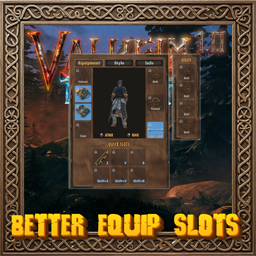
About BetterEquipSlots
From ThunderstoreAdds a character sheet beside your inventory: dedicated armour and utility slots, six hotkey quick slots, a style tab to change how your gear looks, and a full stats page. Frees up backpack space and fully supports controllers.
🛡️ Better Equip Slots
Adds a character sheet next to your inventory, with dedicated armour slots, six quick slots, a style tab for your gear and your stats at a glance. Worn armour stops taking up space in your backpack, and everything works with a controller.
💶 Donations:
If you enjoy using this Valheim mod, please consider making a small donation to help support its development and future updates.
Even £1 or $1 would be greatly appreciated and would help more than you might think!
Thank you for your support, and happy gaming! ⚔️ ...... (A Paypal account is NOT required!)

⚠️ Incompatibilities:
- Do not use alongside EquipmentAndQuickSlots or CDEV.EquipmentSlots. This mod replaces both and switches itself off if either one is installed.
🔥 Features:
- Equipment slots: helmet, chest, legs, cape, belt, trinket and ammo. Drag an item into a slot to wear it, or drag it out to take it off. Right-clicking also equips and unequips.
- Multiple utility items: wear up to 5 belts and similar items at once (no two of the same kind). Each gets its own cell in a window beside the belt slot, and all of their stats and effects apply. This is built in from Equip Multiple Utility Items, so you can remove that mod; your settings from it carry over.
- Six quick slots: hold anything and bind each slot to any key or key combination (
Z,V,Bby default, plus the same keys withLeft Alt). They appear on the HUD next to the Forsaken power. - Style tab: change how your helmet, chest, legs and cape look, using any piece you have ever picked up, or hide a piece entirely. It is purely cosmetic: no armour, weight or effects change. Other players see your style even if they don't have the mod.
- Info tab: health, stamina and eitr with their regeneration, carry weight, your current weapon and its damage, armour, block, resistances, active food and status effects.
- Character preview: drag to rotate your character and pan up and down, and use the mouse wheel to zoom. Left-click to swing your weapon, right-click to block.
- Movable panel: drag the panel by its frame to anywhere on screen and it stays there (Panel → Offset).
- Controller support: on the hotbar, D-pad left / right continues onto the quick slots and D-pad up uses the selected one. In the inventory, RB / LB stop on the panel; use the D-pad to move, A / X / LT / RT work as they do in the inventory, and the right stick switches tabs.
- Padlocks: lock an inventory cell so it is never emptied by "stack similar" or by other mods' store and sort buttons.
- Ammo: shows your next ammo and how much is left above a bow, crossbow or fishing rod on the hotbar, and automatically equips more arrows (bolts, bait) when the current stack runs out.
- Death: your worn gear is placed in the top row of your grave, and Take All puts everything back where it was and re-equips it.
- Easy switching: items from EquipmentAndQuickSlots are converted the first time you start the game, and CDEV.EquipmentSlots' slots, styles, locks and settings carry over unchanged.
🤝 Works with:
- Better Archery (quiver goes in the ammo slot), QuickStackStore, Local Craft From Storage Prime, MouseTweaks, Adventure Backpacks, Valheim Plus, BetterUI (quality stars), Epic Loot (rarity colours), BodyReplacer (shows your Einherjar body on the character preview), and Backpacks and Advanced Backpacks (backpack goes in the Backpack slot).
⚙️ Configuration:
- Change settings in game (with Configuration Manager or the mod settings menu, F7) or by editing
MagicMike.BetterEquipSlots.cfg. Defaults are shown in brackets. - General Settings: Enable Plugin (on; local, needs a restart).
- Quick Slots: Key 1 to Key 6, Alt Modifier (Left Alt: the HUD shows slots 4-6 while held), Keys Win Over Vanilla (off), Show Key Conflicts (on), Gamepad Hotbar (on).
- HUD: Show Quick Slots (on), Offset, Spacing (8).
- Ammo: Show On Hotbar (on), Auto Equip (on).
- Inventory: Cell Locks (on; enables the padlocks).
- Panel: Offset, Show Character (on), Keep Worn In Inventory (off), Show On Key (off), Key (U).
- Utility: Multiple Utility Items (on; allows wearing several and shows their window), Max Utility Items (5, minimum 2). Both are set by the server.
- Jewelry: Rings, Earrings, Amulets: the item prefab names that go in those slots. Set by the server.
🌐 Multiplayer:
- Install on clients. If a server also has it installed, every player joining needs it too; servers without it let anyone in.
- Before uninstalling, empty all the slots. Without the mod, the game drops anything left in them at your feet.
📦 Requirements:
💻 Installation:
Automatic Install
- Designed to be installed with r2modman or Gale.
If you downloaded from Nexus, install manually.
Manual Install
- Unzip and drag the
pluginsfolder into yourBepInExfolder.
🙏 Credits:
- Multiple utility items feature built in from Equip Multiple Utility Items by aedenthorn (public domain).
Highlights
From source dataLoaders
Runs on BepInEx.
Footprint
Rated a light load on a server.
Last update
Its author last shipped an update 1d ago.
BetterEquipSlots on Nxeon
From our catalogue- One-click install
- Supported on Nxeon Valheim servers, for BepInEx servers. We download it from Thunderstore, place it, and restart the server.
- Server type needed
- BepInEx
- Server load
- light
- Smallest plan we suggest
- Valheim — 4 GB (4 GB RAM). This follows our own load rating above, not a benchmark.
- Latest build
- 1.0.3, released 2026-11-03
Game versions by loader
| Loader | Game versions | Newest |
|---|---|---|
| BepInEx |
From 3 recorded builds of BetterEquipSlots.
Recent builds
| Build | Released | Game versions | Loaders |
|---|---|---|---|
| 1.0.3 | 2026-11-03 | n/a | BepInEx |
| 1.0.1 | 2026-11-02 | n/a | BepInEx |
| 1.0.0 | 2026-11-02 | n/a | BepInEx |
Dependencies
- Required: Jotunn
- Required: BepInExPack Valheim
Declared by the newest build that lists any. Required ones are installed with it on one-click installs.
Run BetterEquipSlots on a Valheim server
Pick a server or deploy a new one above; it is installed in one click.
What kind of mod it is
From the catalogQuality of life & UI
Small conveniences, tweaks and interface improvements players notice straight away.
Compatibility
- Game
- Valheim
- Loaders
- BepInEx
- Requires
- One-click install needs a BepInEx server.
Verified at the source
- ✓ThunderstoreOfficial listing, checked 2026-11-03Open ↗
- ✓AuthorMagicMike, as published on Thunderstore
- ✓LicenseNot published by the sourceFree












