






About PlanBuild
From ThunderstorePlanBuild enables you to plan, copy and share your building creations in Valheim with ease. Includes terrain tools and immersion items.
PlanBuild
> ### New in version 0.20.0 > > __Mirror blueprints__ while placing them with __H__, or create a mirrored copy with __Ctrl + H__. Angled pieces and roof corners are turned to match their mirror image. > __Rectangle marker__ for the terrain and paint tools: change its width and depth separately with __Ctrl + Shift + Scroll__ and __Alt + Shift + Scroll__. > * __Slopes__ with the terrain tool: tilt its marker with __Ctrl + Alt + Scroll__, the marker shows the finished slope before you build it. > > More new features and bug fixes are listed in the changelog. > > ### Since version 0.19.0 the HookGenPatcher is no longer needed > > All hooks now use Harmony, so __HookGenPatcher (MMHOOK) is no longer a dependency__ and can be removed if no other mod requires it.
PlanBuild enables you to plan, copy and share your building creations in Valheim with ease. The mod adds two new tools to the game. The __Plan Hammer__ is used to plan your creations before actually gathering all the materials. When you are happy with your build, you can add the required building materials one by one or use a custom totem to automatically build the pieces for you. The __Blueprint Rune__ lets you copy, save or delete your creations as a single building piece which can also be shared with other players using the mod and also includes terrain modification tools for quick and more precise terraforming without using the Hoe or Cultivator.
Planning
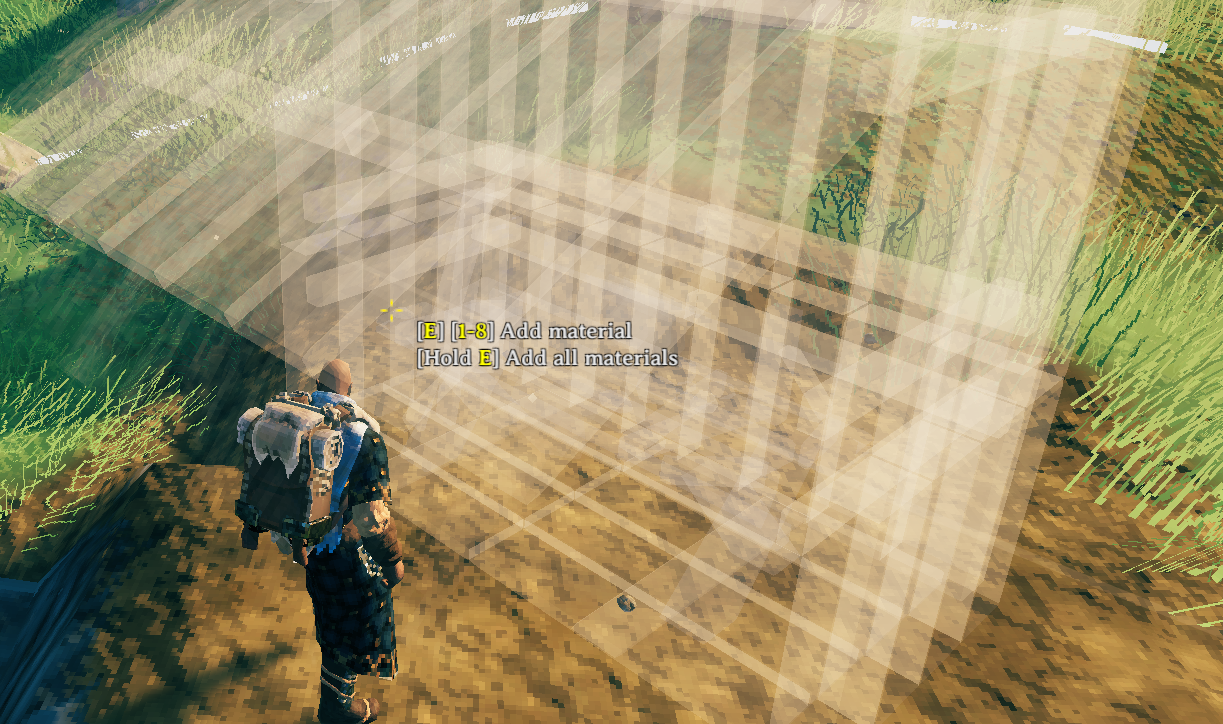
Introducing a new item, the __Plan Hammer__, which can be crafted from a single log of __wood__ and the blessing of Odin shining upon you.

Plan the construction of pieces without the need to gather the resources first. Anyone can add the required resources to the planned structure later and finish the construction after it was placed.
The __Plan Hammer__ is compatible with custom piece tables from other mods. All custom pieces will be incorporated into the runes table for the planned pieces. You still need a __Hammer__ and the required crafting station to finish the construction.
Planned pieces that are __unsupported__ can not be finished. These pieces are also slightly more transparent so you can see what is and isn't supported. The planned pieces themselves do not require support, so you can build forever (if you can reach far enough).
Real pieces also snap to the planned pieces, so you could even use them as __spacers__ or __rulers__.
Plan Totem
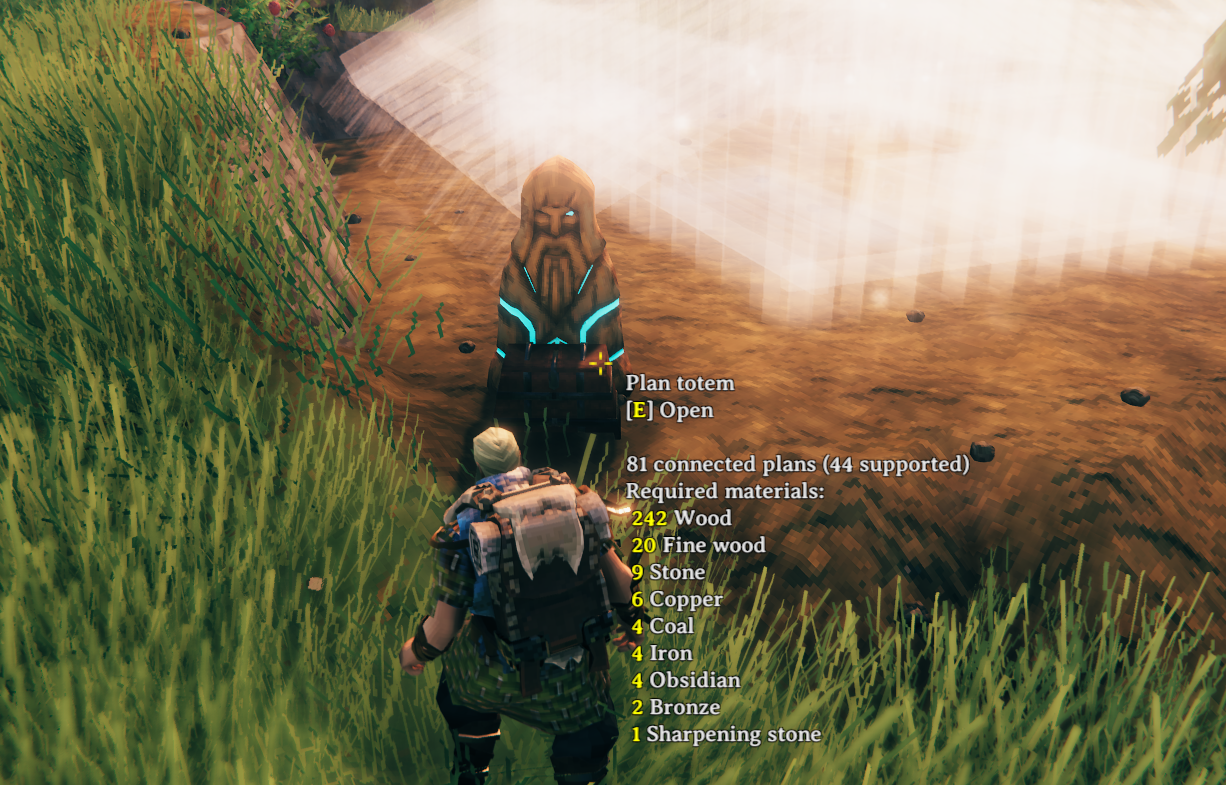
Build a __Plan Totem__ near your planned structures to be able to add resources in a centralized location for all individual pieces on the plan.
It will also protect existing structures. Any piece that is destroyed _(not removed by the Hammer)_ will be replaced with a plan for that same piece in the same place!
This needs to be built with the vanilla Hammer tool and costs you __1 Wood__ and __1 Grey Dwarf Eye__.
Skuld Crystal

Includes the __Skuld Crystal__, a wearable item that removes the shader effect from the blueprints, so you can see what the construction will look like when completed.
Create it from a single __Grey Dwarf Eye__.
__Watch your step!__ The pieces are still not really there, and will not support you!
Blueprinting
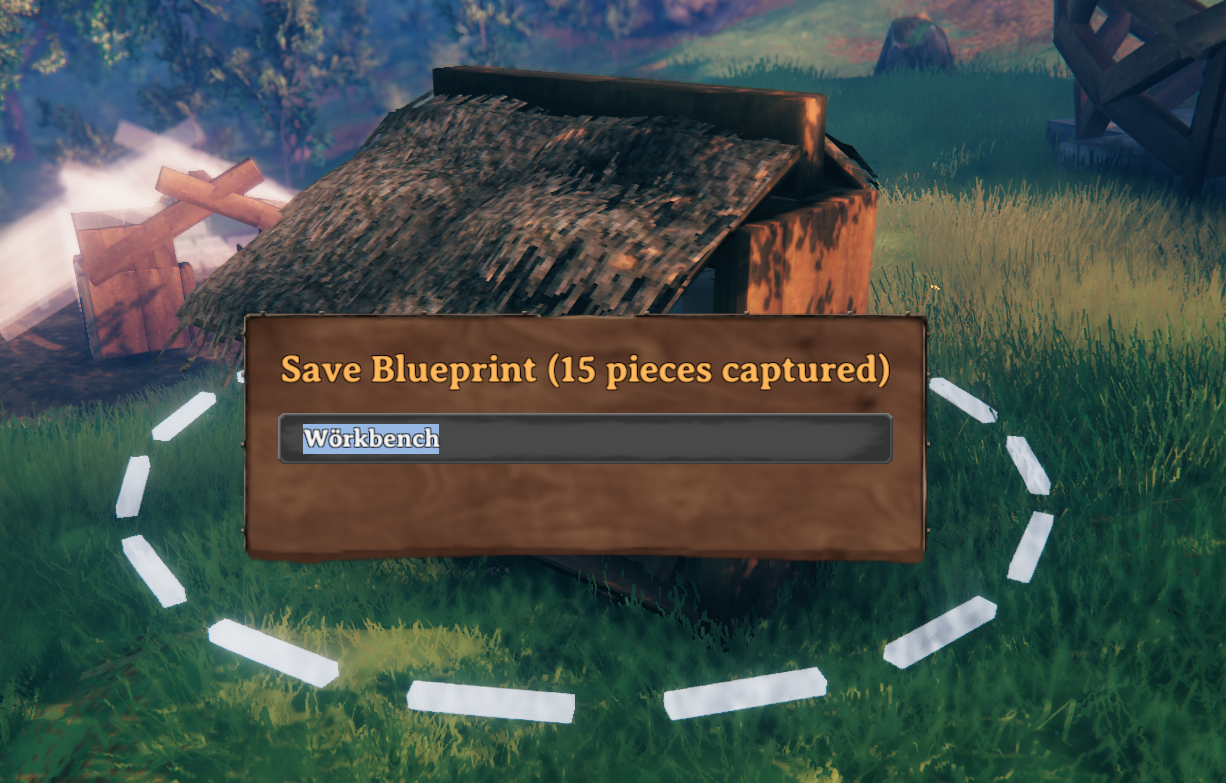
Introducing a new item, the __Blueprint Rune__, which can be crafted from a single __stone__ and festering willpower given to you by the gods.

Copy existing structures into __Blueprints__ and rebuild them as planned or regular pieces all at once. The blueprints are saved in and loaded from the filesystem as __.blueprint__ files. Also supports __.vbuild__ files (you can load and build your BuildShare saves with this mod)! After switching to the blueprint mode, the piece table of the Blueprint Rune offers three different categories:
Tools

The Blueprint Rune comes with a handful of tools to handle blueprint creation and terraforming.
- __Create new Blueprint__: Directly create a blueprint from a selection indicated by the circle marker.
- Hold __Ctrl__ to highlight all pieces which will be saved into the blueprint
- Hold __Alt__ and click to include vanilla snap points in your blueprint (without it only snap point markers are converted to snap points)
- Use the __Scroll Wheel__ to change the selection radius
- Use __Shift + Scroll__ to adjust the camera distance.
- __Add to selection__: Add pieces to the current selection. Currently selected pieces will be highlighted in green. Per default only the hovered piece will be added to the selection. You can use various modifiers to change that behaviour.
- Press __Q__ to quickly switch to the "Remove from selection" tool
- Hold __Alt__ and click to add all connected pieces. This uses a flood fill to find connected pieces.
- Hold __Ctrl__ and click to add pieces in a radius
- Use the __Scroll Wheel__ while holding __Ctrl__ to change the selection radius
Highlights
From source dataLoaders
Runs on BepInEx.
Footprint
Rated a light load on a server.
Dependencies
Needs 2 other projects installed alongside it.
PlanBuild on Nxeon
From our catalogue- One-click install
- Supported on Nxeon Valheim servers, for BepInEx servers. We download it from Thunderstore, place it, and restart the server.
- Server side
- Optional on the server
- Server type needed
- BepInEx
- Server load
- light
- Smallest plan we suggest
- Valheim — 4 GB (4 GB RAM). This follows our own load rating above, not a benchmark.
- Latest build
- 0.20.0, released 2026-10-01
Game versions by loader
| Loader | Game versions | Newest |
|---|---|---|
| BepInEx |
From 26 recorded builds of PlanBuild.
Recent builds
| Build | Released | Game versions | Loaders |
|---|---|---|---|
| 0.20.0 | 2026-10-01 | n/a | BepInEx |
| 0.19.1 | 2026-09-19 | n/a | BepInEx |
| 0.19.0 | 2026-09-17 | n/a | BepInEx |
| 0.18.6 | 2026-09-14 | n/a | BepInEx |
| 0.18.5 | 2026-09-11 | n/a | BepInEx |
| 0.18.4 | 2026-03-13 | n/a | BepInEx |
Dependencies
- Required: BepInExPack Valheim
- Required: Jotunn
Declared by the newest build that lists any. Required ones are installed with it on one-click installs.
Run PlanBuild on a Valheim server
Pick a server or deploy a new one above; it is installed in one click.
What kind of mod it is
From the catalogBuilding & decoration
Blocks, furniture, decorations and building tools.
Works on a server
From source side supportThunderstore lists server-side support for PlanBuild as optional: it can run on a server, but isn’t required there.
Compatibility
- Game
- Valheim
- Loaders
- BepInEx
- Runs on
- Serveroptional on the server
- Requires
- One-click install needs a BepInEx server. 2 other projects installed alongside it.
Verified at the source
- ✓ThunderstoreOfficial listing, checked 2026-10-02Open ↗
- ✓AuthorMathiasDecrock, as published on Thunderstore
- ✓LicenseNot published by the sourceFree











