About Deathlink
From ThunderstoreConfigurable death choices for all your players.
Deathlink - Configureable Death & Difficulty
Deathlink provides the ability to completely configure role specific difficulty, bonuses, penalties and death experience. In addition to extensive configuration, death penalties and bonuses can be scaled by progression.
Bringing together players from many different experience levels often means that some players struggle while others are bored. Deathlink provides a way to challenge and reward players based on their appetite for risk.
Example Deathlink Choices
| Vanilla | Minimal | Hardcore | |:-:|:-:|:-:| | 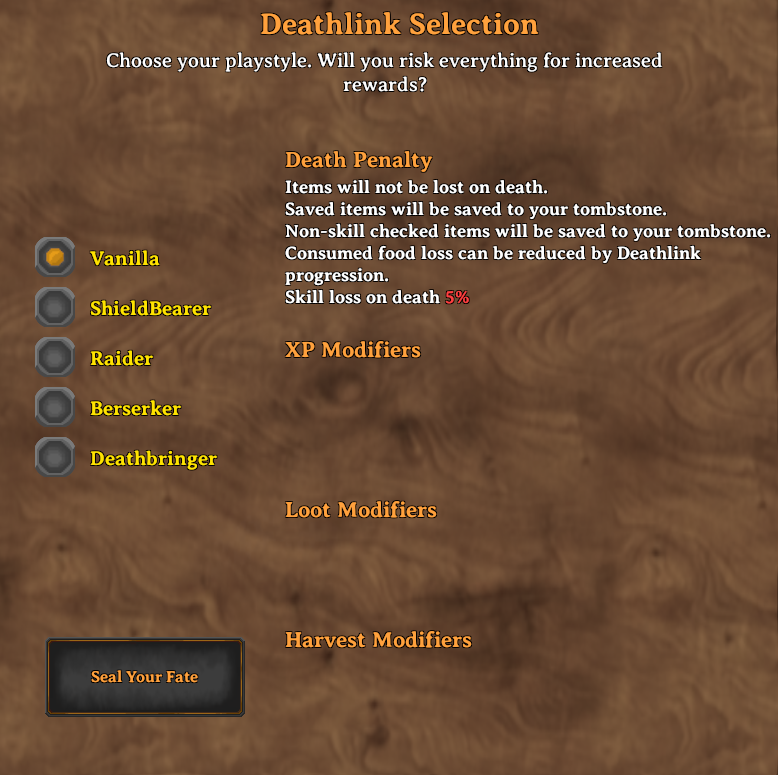 |
| 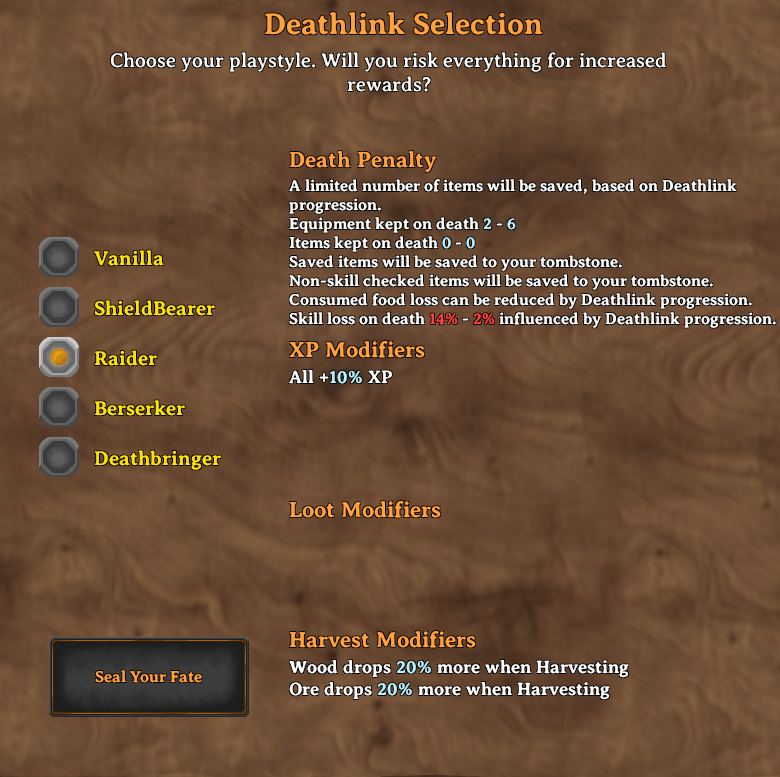 |
| 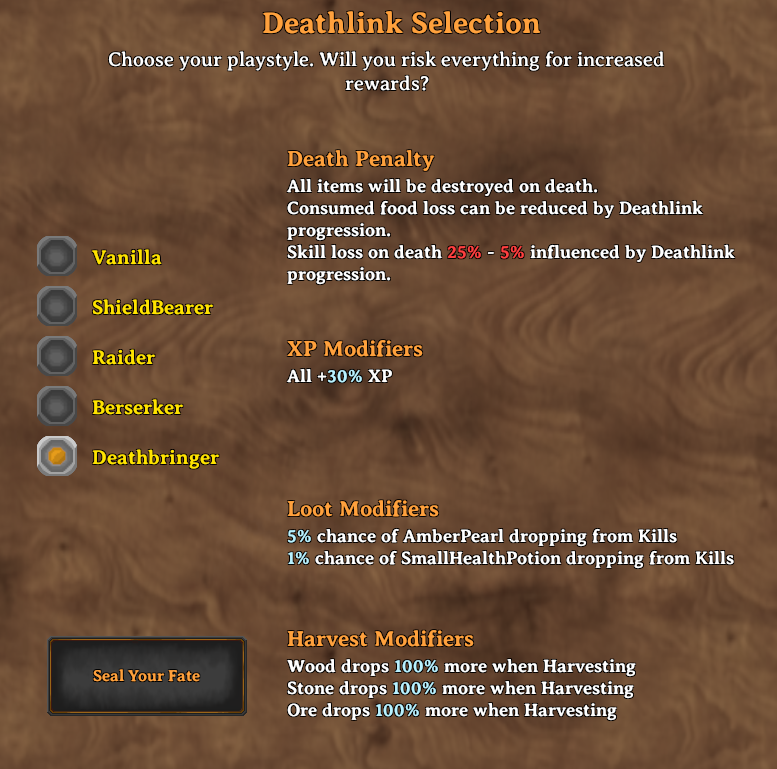 |
|
Configuration
Deathlink has extensive yaml based configuration options. However it can be used with the default configuration.
A visual configuration UI is also available (to admins), allowing complete editing of death choices.

Each of these configuration sections below can be applied to any number of profiles which users can select. Deathlink selection is one per character and is stored on the server the character is on,a character can have different selections in singleplayer or multiplayer.
DeathChoices.yaml is written with a full explanation of every setting at the top of the file, so you can configure it without coming back here. Edits are picked up while the game is running and are pushed to connected clients automatically.
Settings are matched without regard to case, so files written by older versions keep working untouched. A mistake costs you one setting rather than the whole file: an unknown setting or a misspelled value is reported in the log with its line number and skipped, and if the file cannot be parsed at all, the levels that last loaded cleanly stay in use and your file is left exactly as you wrote it.
Example Configuration
Click for full example
Rougelike3:
  DisplayName: Berserker
  DeathStyle:
    FoodLossOnDeath: true
    FoodLossUsesDeathlink: true
    MaxEquipmentKept: 3
    SkillLossOnDeath: true
    MaxSkillLossPercentage: 0.2
    MinSkillLossPercentage: 0.05
    ItemLossStyle: DeathlinkBased
    NonSkillCheckedItemAction: Tombstone
  DeathSkillRate: 1
  ResourceModifiers:
    Wood:
      Prefabs:
      - Wood
      - FineWood
      - RoundLog
      - YggdrasilWood
      - Blackwood
      BonusModifier: 1.5
      BonusActions:
      - Harvesting
    Ore:
      Prefabs:
      - CopperOre
      - TinOre
      - IronScrap
      - SilverOre
      - BlackMetalScrap
      - CopperScrap
      - FlametalOreNew
      BonusModifier: 1.5
      BonusActions:
      - Harvesting
  SkillModifiers:
    All:
      Skill: All
      BonusModifier: 1.2
  DeathLootModifiers:
    AmberPearl:
      Prefab: AmberPearl
      Chance: 0.05
      Amount: 1
      BonusActions:
      - Kills
Deathstyle Configuration
Deathstyle configuration governs what happens when you die.
  DeathStyle:
    FoodLossOnDeath: true                  # Player will loose food on death or not
    FoodLossUsesDeathlink: true            # Food loss is based on skill level from loosing all foods, to none
    MaxEquipmentKept: 3                    # The maximum number of equiped items to keep on death
    SkillLossOnDeath: true                 # Whether or not skill loss occurs on death
    MaxSkillLossPercentage: 0.2            # The maximum percentage of skill lost on death (you start here, example is 20%)
    MinSkillLossPercentage: 0.05           # The minimum skill loss, at max skill level (example is 5%)
    ItemLossStyle: DeathlinkBased          # Item loss style, can be None, DestroyNonWeaponArmor, DeathlinkBased, DestroyAll, ChooseEquipment
    NonSkillCheckedItemAction: Tombstone   # If items are set to avoid skillcheck, what happens to them, can be Destroy, Tombstone, Save
    ItemSavedStyle: Tombstone              # Items that are saved can be: OnCharacter, Tombstone
    EquipmentSavedStyle: OnCharacter       # Where saved equipment goes: SameAsItems (default, follows ItemSavedStyle), OnCharacter, Tombstone
  DeathSkillRate: 1                        # Rate at which Deathlink skill increases, higher is faster
  Fallback: true                           # Marks the level players are moved to when the one they had
                                           # selected is renamed or removed. Set it on exactly one level.
Choosing gear from the tombstone
ItemLossStyle: ChooseEquipment destroys nothing. Everything goes to your tombstone, and after respawning you open your inventory and choose some of your equipment to take back out of it. How many pieces you get scales with your Deathlink skill, between MinEquipmentKept and MaxEquipmentKept. If you carry no more equipment than that, it simply stays on you. ItemSavedStyle, EquipmentSavedStyle and EnableItemSavingChoices are ignored on this style.
Quartermaster:
  DisplayName: Quartermaster
  DeathStyle:
    ItemLossStyle: ChooseEquipment
    MinEquipmentKept: 1                    # Pieces of gear taken back at 0% Deathlink skill
    MaxEquipmentKept: 5                    # Pieces of gear taken back at 100% Deathlink skill
    NonSkillCheckedItemAction: Tombstone
    MinSkillLossPercentage: 0.03
    MaxSkillLossPercentage: 0.10
Resource Configuration
Resource configuration provides a way to get additional resources from kills or harvesting
ResourceModifiers:
    Wood:                     # Name of the entry, can be anything
SkillInfluence: false # Off by default: the bonus applies in full from the start. Set true toHighlights
From source dataLoaders
Runs on BepInEx.
Footprint
Rated a light load on a server.
Last update
Its author last shipped an update 18d ago.
Deathlink on Nxeon
From our catalogue- One-click install
- Supported on Nxeon Valheim servers, for BepInEx servers. We download it from Thunderstore, place it, and restart the server.
- Server side
- Optional on the server
- Server type needed
- BepInEx
- Server load
- light
- Smallest plan we suggest
- Valheim — 4 GB (4 GB RAM). This follows our own load rating above, not a benchmark.
- Latest build
- 0.13.0, released 2026-09-27
Game versions by loader
| Loader | Game versions | Newest |
|---|---|---|
| BepInEx |
From 25 recorded builds of Deathlink.
Recent builds
| Build | Released | Game versions | Loaders |
|---|---|---|---|
| 0.13.0 | 2026-09-27 | n/a | BepInEx |
| 0.12.1 | 2026-09-26 | n/a | BepInEx |
| 0.12.0 | 2026-09-21 | n/a | BepInEx |
| 0.11.3 | 2026-09-19 | n/a | BepInEx |
| 0.11.2 | 2026-09-18 | n/a | BepInEx |
| 0.11.1 | 2026-09-09 | n/a | BepInEx |
Dependencies
- Required: BepInExPack Valheim
- Required: Jotunn
- Required: YamlDotNet
Declared by the newest build that lists any. Required ones are installed with it on one-click installs.
Run Deathlink on a Valheim server
Pick a server or deploy a new one above; it is installed in one click.
What kind of mod it is
From the catalogQuality of life & UI
Small conveniences, tweaks and interface improvements players notice straight away.
Works on a server
From source side supportThunderstore lists server-side support for Deathlink as optional: it can run on a server, but isn’t required there.
Compatibility
- Game
- Valheim
- Loaders
- BepInEx
- Runs on
- Serveroptional on the server
- Requires
- One-click install needs a BepInEx server.
Verified at the source
- ✓ThunderstoreOfficial listing, checked 2026-10-01Open ↗
- ✓AuthorMidnightMods, as published on Thunderstore
- ✓LicenseNot published by the sourceFree