






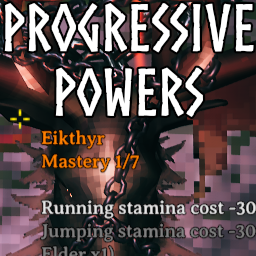
About ProgressivePowers
From ThunderstoreThe Forsaken powers become permanent passives that deepen as you kill bosses.
Progressive Powers
The Forsaken powers stop being a button you forget to press. They become permanent passives that deepen as you kill bosses.
- Nothing is activatable. (configurable) No keybind, no 20-minute cooldown, no five-minute burst.
- You are attuned to one power at a time (configurable up to several) Choose the
vanilla way, by interacting with a boss trophy hook at the Sacrificial Stones.
- Every power has 7 features, unlocked one mastery level at a time, so the powers you pick up
early keep pace with the late game.
- Levels are earned with boss kills, tracked per character.
How mastery works
Each power's seven levels have their own kill requirements. By default level 1 of the Eikthyr power needs one Eikthyr kill, level 2 needs an Elder kill, and so on down the boss order — so the power you have been carrying since the meadows keeps growing as you clear the game.
Powers whose boss comes late have fewer bosses left to draw on, so their later levels ask for repeat kills instead. All seven powers can reach 7/7; some just take a second visit.
Requirements can mix bosses freely:
Eikthyr:
  1: { Eikthyr: 1 }
  2: { Eikthyr: 2 }
  3: { Eikthyr: 3, TheElder: 2 }
Levels are cumulative — reaching level 3 also requires levels 1 and 2 — which is why each level only lists what it adds.
The boss stone and the buff tooltip both show your current mastery, every feature, and exactly what you still have to kill for the ones that are locked.
Attuning to several powers
By default you hold one power at a time, as in vanilla. Raise Max Attuned Powers and a character can hold several at once, up to all seven, each at its own mastery level. Their passives stack like any other buffs: most bonuses add together, and for each resistance the strongest one applies.
- Using the stone of a power you do not hold attunes to it. With every slot taken, it replaces
the power you attuned to longest ago; the stone names that power before you commit.
- Using the stone of a power you already hold releases it.
- The HUD shows every attunement's icon and mastery level, newest first: by default your most
recent with the usual power display, and the rest above it as one line each with just the icon and level. Power Display Mode offers other layouts, listed under Client settings below.
Attunements are saved on your character. Lowering the limit sets the oldest aside rather than forgetting them, so a visit to a stricter server costs you nothing; they are only dropped when you attune or release a power under the lower limit.
Configuration
| File | What it is | |---|---| | BepInEx/config/MidnightsFX.ProgressivePowers.cfg | The general settings below, plus every feature's magnitude. Editable in-game with Configuration Manager. | | BepInEx/config/ProgressivePowers/Levels.yaml | The kill requirements for each power's levels. | | BepInEx/config/ProgressivePowers/Powers.yaml | Every power's levels as free-form effect lists, as many levels per power as you like. Only used while Enable Advanced Power Config is on. |
All three are watched while the game runs: saving one applies it without a restart, and on a server the change is pushed to everyone who is already connected.
All gameplay settings are admin-only and synchronised from the server, including the YAML. On a dedicated server, edit the files on the server: a client's own copies are replaced by the server's, and editing a client's YAML file logs a warning that says so.
General settings
| Setting | Default | What it does | |---|---|---| | Max Attuned Powers | 1 | How many powers a character can be attuned to at once, from 1 to 8. | | Kill Credit Range | 200 | How close you must be to a boss when it dies, in meters, for the kill to count. 0 is unlimited. | | Block Power Activation | true | Stops the powers from being activated. Turn it off to allow vanilla activation on top of the passives. Activating then fires every attuned power at once, and they recharge together; the HUD dims them meanwhile and shows the time left. | | Show Locked Features | true | Lists the features you have not unlocked yet, greyed out, with the kills still needed. | | Show Passive In Status Bar | true | Shows each attuned power's passive as an icon in the status effect bar. | | Enable Advanced Power Config | false | Hands the power definitions over to Powers.yaml; see Advanced configuration below. | | Config Apply Delay | 1 | Seconds to wait before applying a changed setting, so a burst of edits is applied once. 0 applies instantly. |
Every feature's strength is a single config entry in its power's Power N section. Defaults are tuned to roughly half the vanilla burst values, on the grounds that these are always on. Set a number to 0, a resistance to Normal, or a toggle to false to switch a feature off entirely.
Client settings
The Client config section is each player's own and is not synced.
| Setting | Default | What it does | |---|---|---| | Power Display Mode | Compact | How the HUD shows several attunements. Stacked: every one with the full power display (icon, name and mastery level). Mixed: the first Full Power Displays in full, the rest as one line each with icon, name and level. Compact: the newest in full, the rest as one line each with just the icon and level. Icons: all of them as small icons with their level, in the power display's place. NewestOnly: only the newest. | | Full Power Displays | 2 | How many attunements get the full display in Mixed mode. | | Power Display Spacing | 4 | Pixels between stacked full displays, and before the first one-line entry. | | Debug Level Override | -1 | Forces every power to one mastery level for testing. Only takes effect with devcommands enabled, on a world you host. |
Advanced configuration
Highlights
From source dataLoaders
Runs on BepInEx.
Footprint
Rated a light load on a server.
Dependencies
Needs 3 other projects installed alongside it.
ProgressivePowers on Nxeon
From our catalogue- One-click install
- Supported on Nxeon Valheim servers, for BepInEx servers. We download it from Thunderstore, place it, and restart the server.
- Server side
- Optional on the server
- Server type needed
- BepInEx
- Server load
- light
- Smallest plan we suggest
- Valheim — 4 GB (4 GB RAM). This follows our own load rating above, not a benchmark.
- Latest build
- 0.3.7, released 2026-10-13
Game versions by loader
| Loader | Game versions | Newest |
|---|---|---|
| BepInEx |
From 9 recorded builds of ProgressivePowers.
Recent builds
| Build | Released | Game versions | Loaders |
|---|---|---|---|
| 0.3.7 | 2026-10-13 | n/a | BepInEx |
| 0.3.6 | 2026-10-06 | n/a | BepInEx |
| 0.3.5 | 2026-10-04 | n/a | BepInEx |
| 0.3.4 | 2026-10-01 | n/a | BepInEx |
| 0.3.3 | 2026-09-14 | n/a | BepInEx |
| 0.3.2 | 2026-09-14 | n/a | BepInEx |
Dependencies
- Required: YamlDotNet
- Required: BepInExPack Valheim
- Required: Jotunn
Declared by the newest build that lists any. Required ones are installed with it on one-click installs.
Run ProgressivePowers on a Valheim server
Pick a server or deploy a new one above; it is installed in one click.
What kind of mod it is
From the catalogQuality of life & UI
Small conveniences, tweaks and interface improvements players notice straight away.
Works on a server
From source side supportThunderstore lists server-side support for ProgressivePowers as optional: it can run on a server, but isn’t required there.
Compatibility
- Game
- Valheim
- Loaders
- BepInEx
- Runs on
- Serveroptional on the server
- Requires
- One-click install needs a BepInEx server. 3 other projects installed alongside it.
Verified at the source
- ✓ThunderstoreOfficial listing, checked 2026-10-13Open ↗
- ✓AuthorMidnightMods, as published on Thunderstore
- ✓LicenseNot published by the sourceFree












