






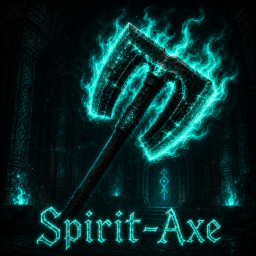
About SalskeriSoulAxe
From ThunderstoreAdds Salskeri, a configurable spirit axe with green flame visuals and blink movement abilities.
SalskeriSoulAxe
SalskeriSoulAxe is a BepInEx + Jotunn Valheim weapon mod that adds Sálskeri, a configurable spirit axe with green flame visuals, spirit damage, custom secondary attack tuning, and blink movement abilities.
Requirements
- Valheim
- BepInEx for Valheim
- Jotunn
All players should install the mod when playing on a server that uses it. Servers do not automatically send custom mod DLLs to joining players.
Features
- Adds the custom weapon prefab
SalskeriSoulAxe. - In-game display name is configurable and defaults to
Sálskeri. - Copies a configurable source weapon prefab, defaulting to
AxeJotunBane. - Configurable recipe, crafting station, damage, durability, block, parry, movement, and attack values.
- Deals spirit damage by default.
- Adds a configurable green flame effect and volume control.
- Uses a bundled custom inventory icon from
SalskeriSprite.png. - Adds a Shift + right click + Space directional blink dodge.
- Adds a Shift + middle mouse aim blink.
- Supports configurable secondary attack hitbox copying from another weapon prefab.
Controls
Sálskeri uses the normal Valheim weapon controls for basic combat:
- Primary attack: left click.
- Secondary attack: middle mouse button.
- Block/aim modifier: hold right click.
Blink controls while Sálskeri is equipped:
- Directional blink dodge: hold Shift + hold right click + press Space.
- Aim blink: hold Shift + click middle mouse button.
The directional blink dodge moves you 8 meters by default in your current movement direction. W/A/S/D chooses the direction, and the movement is camera-relative, so W means forward from the camera's point of view, A/D mean camera-left/camera-right, and S means backward from the camera's point of view.
The aim blink uses the camera aim point and has a longer configurable range. Both blink distances, effects, and sounds can be changed in the mod config.
Installation
Install BepInEx and Jotunn first, then place the DLL in your Valheim BepInEx plugins folder:
BepInEx\plugins\SalskeriSoulAxe.dll
BepInEx\plugins\SalskeriSprite.png
For this local setup, that folder is usually:
C:\Users\Samuel\OneDrive\Documents\Games\Valheim - Sams Mods\BepInEx\plugins\Configuration
After launching the game once, BepInEx creates a config file for the mod. You can edit it manually or through a compatible BepInEx config manager.
Notable config sections:
Weapon: source prefab, display name, description, crafting station.Recipe: crafting requirements.Stats: damage, durability, blocking, movement.Attacks: primary and secondary attack values.Blink: blink distances, visual effects, and sound effects.Green Flame: flame prefab, position, rotation, scale, color, brightness, and sound volume.
Default crafting recipe at the Galdr Table, prefab ID piece_magetable:
- 10 Ashwood, prefab ID
Blackwood - 10 Flametal Bars, prefab ID
FlametalNew - 30 Ectoplasm, prefab ID
Ectoplasm
Building From Source
Open the project file:
src\SalskeriSoulAxe.csprojBuild with Visual Studio or MSBuild. Debug output goes to:
dist\Debug\SalskeriSoulAxe.dllRelease output goes to:
dist\Release\SalskeriSoulAxe.dllThunderstore Package
The prepared upload folder is:
ThunderstorePackage\SalskeriSoulAxeThe package includes manifest.json, README.md, icon.png, plugins\SalskeriSoulAxe.dll, and plugins\SalskeriSprite.png.
Highlights
From source dataLoaders
Runs on BepInEx.
Footprint
Rated a light load on a server.
Last update
Its author last shipped an update 4 mo ago.
SalskeriSoulAxe on Nxeon
From our catalogue- One-click install
- Supported on Nxeon Valheim servers, for BepInEx servers. We download it from Thunderstore, place it, and restart the server.
- Server type needed
- BepInEx
- Server load
- light
- Smallest plan we suggest
- Valheim — 4 GB (4 GB RAM). This follows our own load rating above, not a benchmark.
- Latest build
- 1.0.0, released 2026-07-02
Game versions by loader
| Loader | Game versions | Newest |
|---|---|---|
| BepInEx |
From 1 recorded build of SalskeriSoulAxe.
Dependencies
- Required: BepInExPack Valheim
- Required: Jotunn
Declared by the newest build that lists any. Required ones are installed with it on one-click installs.
Run SalskeriSoulAxe on a Valheim server
Pick a server or deploy a new one above; it is installed in one click.
What kind of mod it is
From the catalogGameplay & overhauls
New mechanics, content and overhauls that change how the game plays.
Compatibility
- Game
- Valheim
- Loaders
- BepInEx
- Requires
- One-click install needs a BepInEx server.
Verified at the source
- ✓ThunderstoreOfficial listing, checked 2026-10-02Open ↗
- ✓AuthorModan, as published on Thunderstore
- ✓LicenseNot published by the sourceFree















