






About ItemStacks
From ThunderstoreIncreases item stack size and reduces item weight. Configurable
ItemStacks Plugin for Valheim
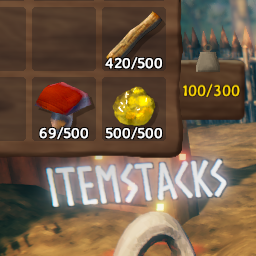
Increases item stack size (10x by default) and item weight (x0.1 by default).
Loading up a world without the mod installed or reducing item stack size will cause any items in a stack above the new stack size to be lost.
Configuration entries are generated based on the items in the ObjectDB instance. You must join a world for it to create the individual item config entries.
You may choose to enable/disable the stack size or weight modification by setting the respective enabled flag.
Item weights and stack sizes can be individually set, setting these values above 0 will have it ignore the multiplier and use the given value instead.
Installation
- Download and install BepInEx Valheim
- Download this mod and move the
ItemStacks.dllinto<GameLocation>\BepInEx\plugins - Launching the game and joining a world will generate a config file at
<GameLocation>\BepInEx\config
Configuration
<GameLoacation>/BepInEx/config/net.mtnewton.itemstacks.cfg
[ItemStacks.ItemMultipliers]

## Multiply the original item stack size by this value
## Minimum resulting stack size is 1
## Overwritten by individual item _stack_size values.
# Setting type: Single
# Default value: 10
stack_size_multiplier = 10

## Multiply the original item weight by this value
## Overwritten by individual item _weight values.
# Setting type: Single
# Default value: 0.1
weight_multiplier = 0.1

[ItemStacks.ItemStackSize]

## Should item stack size be modified?
# Setting type: Boolean
# Default value: true
enabled = true

## Set above 0 to use this value instead of the stack size multiplier
## Game default: 20
# Setting type: Int32
# Default value: 0
amber_stack_size = 0

## Set above 0 to use this value instead of the stack size multiplier
## Game default: 50
# Setting type: Int32
# Default value: 0
amberpearl_stack_size = 0

...

[ItemStacks.ItemWeight]

## Should item weight be modified?
# Setting type: Boolean
# Default value: true
enabled = true

## Set above 0 to use this value instead of the weight multiplier
## Game default: 0.1
# Setting type: Single
# Default value: 0
amber_weight = 0

## Set above 0 to use this value instead of the weight multiplier
## Game default: 0.1
# Setting type: Single
# Default value: 0
amberpearl_weight = 0

...
Changelog
- v1.2.0
- added config option for stack and weight multiplier
- specific item configs now default to 0
- setting these above 0 will cause the weight or stack size to be set to this value instead of being multiplied.
- previous versions set item specific values, these will need to be deleted or set to 0 for a custom multiplier different than the previously default 10x/0.1x to take effect
- v1.1.3
- item weight toggle was using wrong config value
- v1.1.2
- update readme, config path
- v1.1.1
- fix readme typos
- v1.1.0
- readme changes - installation steps and changelog
- refactor code for simplification
- v1.0.0
- initial mod creation
- configurable item stack size and item weight (defaults to 10x base item stack size and 0.1x item weight)
Source Code
https://github.com/mtnewton/valheim-mods/tree/master/ItemStacks
Highlights
From source dataLoaders
Runs on BepInEx.
Footprint
Rated a light load on a server.
Dependencies
Needs 1 other project installed alongside it.
ItemStacks on Nxeon
From our catalogue- One-click install
- Supported on Nxeon Valheim servers, for BepInEx servers. We download it from Thunderstore, place it, and restart the server.
- Server type needed
- BepInEx
- Server load
- light
- Smallest plan we suggest
- Valheim — 4 GB (4 GB RAM). This follows our own load rating above, not a benchmark.
- Latest build
- 1.2.0, released 2021-03-08
Game versions by loader
| Loader | Game versions | Newest |
|---|---|---|
| BepInEx |
From 6 recorded builds of ItemStacks.
Recent builds
| Build | Released | Game versions | Loaders |
|---|---|---|---|
| 1.2.0 | 2021-03-08 | n/a | BepInEx |
| 1.1.3 | 2021-02-21 | n/a | BepInEx |
| 1.1.2 | 2021-02-21 | n/a | BepInEx |
| 1.1.1 | 2021-02-21 | n/a | BepInEx |
| 1.1.0 | 2021-02-21 | n/a | BepInEx |
| 1.0.0 | 2021-02-18 | n/a | BepInEx |
Dependencies
- Required: BepInExPack Valheim
Declared by the newest build that lists any. Required ones are installed with it on one-click installs.
Run ItemStacks on a Valheim server
Pick a server or deploy a new one above; it is installed in one click.
What kind of mod it is
From the catalogWeapons, items & crafting
New weapons, gear, items and the recipes to make them.
Compatibility
- Game
- Valheim
- Loaders
- BepInEx
- Requires
- One-click install needs a BepInEx server. 1 other project installed alongside it.
Verified at the source
- ✓ThunderstoreOfficial listing, checked 2026-10-02Open ↗
- ✓Authormtnewton, as published on Thunderstore
- ✓LicenseNot published by the sourceFree















