About SeidrChest
From ThunderstoreOpen your Personal chest anywhere, anytime! With optional Ender chest mode.
SeidrChest
Open your Personal chest anytime, anywhere!
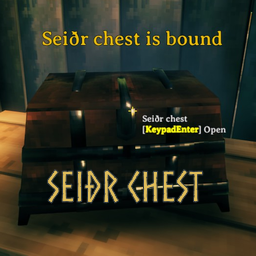
Bind your Personal chest with Seiðr ('magic' in Old Norse) and access it anywhere, any time, with a keystroke.
Or if that's not your style, use Ender Chest mode, and access your common inventory by opening Personal chests throughout your world.
Keep a spare set of armor, emergency potions or food available in an instant without taking up inventory space.
Store stacks of resources temporarily without impacting your inventory weight limit ...but use your space wisely; you only have six slots.
Of course, all magic comes at a price. Binding and using a Seiðr chest costs Eitr and/or Stamina.
New
- Updated for Valheim 1.0
Use
Hover your cursor over a Personal chest and press the _BindSeidrChest_ key. You can bind a different chest at any time, but only one at a time.
In SeidrChest mode, your Seiðr chest is accessible remotely, from any location at any time you could normally open a chest, by pressing the _OpenSeidrChest_ key.
In EnderChest mode, your Seidr chest content is only accessible from one of your Personal chests (anywhere). Opening the chest will reveal your Seiðr chest contents. If you want to access the actual Personal chest, hold down the _OpenSeidrChest_ key while opening the chest. You can also "invert" this by setting _InvertEnderOpenKey_ to True so the default open is the Personal chest, and the 'keyed' open accesses the Seiðr chest.
Configuration
General
- BindSeidrChest: Press this key to bind a Personal chest. (also to unbind, see _Notes_) Default is LeftAlt-J
- OpenSeidrChest: Press this key to open your Seiðr chest. In Ender Chest mode, hold down to access a Personal chest's actual content. Default is H.
- BindCost: The cost of Eitr and/or Stamina for binding a Seiðr chest. What energy is used depends on the _CostType_ setting.
- OpenCost: The cost of Eitr and/or Stamina for opening a Seiðr chest. What energy is used depends on the _CostType_ setting.
- CostType: Determines what energy is used to bind and open Seiðr chests. Can be one of: Eitr Only, Stamina Only, or Eitr Then Stamina.
- StrictCost: Prevents binding and opening chests if the _BindCost_ or _OpenCost_ exceeds available Eitr and/or Stamina, depending on the _CostType_.
- ChestMode: Selects either Seidr Chest or Ender Chest mode. Sets the method by which you access your Seiðr chest inventory, either directly (Seiðr Chest) or through Personal chests (Ender Chest)
- RestrictNonTeleportable: Set to true to prevent storing non-teleportable items in the Seidr chest. Default is false;
- InvertEnderOpenKey: Set to true to open (in Ender mode) a Personal chest by default and press the _OpenSeidrChest_ key to open the Seiðr chest.
Utility
- LogLevel: Sets the level of information that appears in the log file. Default is Info
Notes
- All config settings are server authoritative except those in bold italics
- SeidrChest saves your chest ID between sessions in custom Player data. As long as your Personal chest does not get destroyed, you can open your Seidr chest every session without rebinding.
- Since SeidrChest uses an actual 'vanilla' chest to store your items, if you uninstall or disable the mod, your items will still remain in your Personal chest.
- You can only bind a Personal chest you created, and only one at a time. All Personal chest access rules apply to the Seidr chest.
- If _RestrictNonTeleportable_ is set to true, you cannot bind chests that already have non-teleportable items inside. Move them out of the chest to bind it.
- If you need to unbind a chest, hover over the bound chest and press the BindSeidrChest key. This will unbind the chest after which you can deconstruct it. Note You can always change Seiðr chests by binding another chest without unbinding the first.
- If a player is not physically located in the same zone as the Seidr Chest when loading, there will be an exception in the log file for WearNTear.Start that is currently unresolvable. It does not affect gameplay.
Compatibility issues & defects
- If you find a compatibility issue please post it on mod-help on Discord. Be sure to include the mod name and version you think may be incompatible.
- If you have a bug please report it in mod-help on Discord. If you do post a bug report, please make sure to include the following:
- Your version of this mod
- What you were doing, or attempting to do when it happened
- If it's repeatable - i.e., can you duplicate it?
- The exact behavior you observed (or didn't observe)
- If possible, post a capture of the log file with errors (errors always begin with this mod's name) on Discord
You can find all Neobotics released mods on:
- Thunderstore: NeoboticsOnThunderstore
- Nexus Mods: NeoboticsOnNexus
- Hexium: [NeoboticsOnHexium]https://valheim.hexium.gg/?q=Neobotics
Your comments and feedback are always welcome. Post on NexusMods or Discord: NeoboticsOnDiscord
Special shout out to Goldenrevolver for help testing, code review, and a bunch of great ideas.
Highlights
From source dataLoaders
Runs on BepInEx.
Footprint
Rated a light load on a server.
Last update
Its author last shipped an update 35d ago.
SeidrChest on Nxeon
From our catalogue- One-click install
- Supported on Nxeon Valheim servers, for BepInEx servers. We download it from Thunderstore, place it, and restart the server.
- Server type needed
- BepInEx
- Server load
- light
- Smallest plan we suggest
- Valheim — 4 GB (4 GB RAM). This follows our own load rating above, not a benchmark.
- Latest build
- 1.0.0, released 2026-09-11
Game versions by loader
| Loader | Game versions | Newest |
|---|---|---|
| BepInEx |
From 22 recorded builds of SeidrChest.
Recent builds
| Build | Released | Game versions | Loaders |
|---|---|---|---|
| 1.0.0 | 2026-09-11 | n/a | BepInEx |
| 0.1.20 | 2026-08-16 | n/a | BepInEx |
| 0.1.19 | 2026-07-10 | n/a | BepInEx |
| 0.1.18 | 2025-09-09 | n/a | BepInEx |
| 0.1.17 | 2024-10-29 | n/a | BepInEx |
| 0.1.16 | 2024-07-10 | n/a | BepInEx |
Dependencies
- Required: BepInExPack Valheim
Declared by the newest build that lists any. Required ones are installed with it on one-click installs.
Run SeidrChest on a Valheim server
Pick a server or deploy a new one above; it is installed in one click.
What kind of mod it is
From the catalogQuality of life & UI
Small conveniences, tweaks and interface improvements players notice straight away.
Compatibility
- Game
- Valheim
- Loaders
- BepInEx
- Requires
- One-click install needs a BepInEx server.
Verified at the source
- ✓ThunderstoreOfficial listing, checked 2026-10-02Open ↗
- ✓AuthorNeobotics, as published on Thunderstore
- ✓LicenseNot published by the sourceFree