







About Portaler
From ThunderstoreEvery portal connects to every portal. Pick a destination from a list or the map with a live preview. Favorites, categories, search, back history, other players' last trips and biome auto-names, all synced by the server.
Portaler
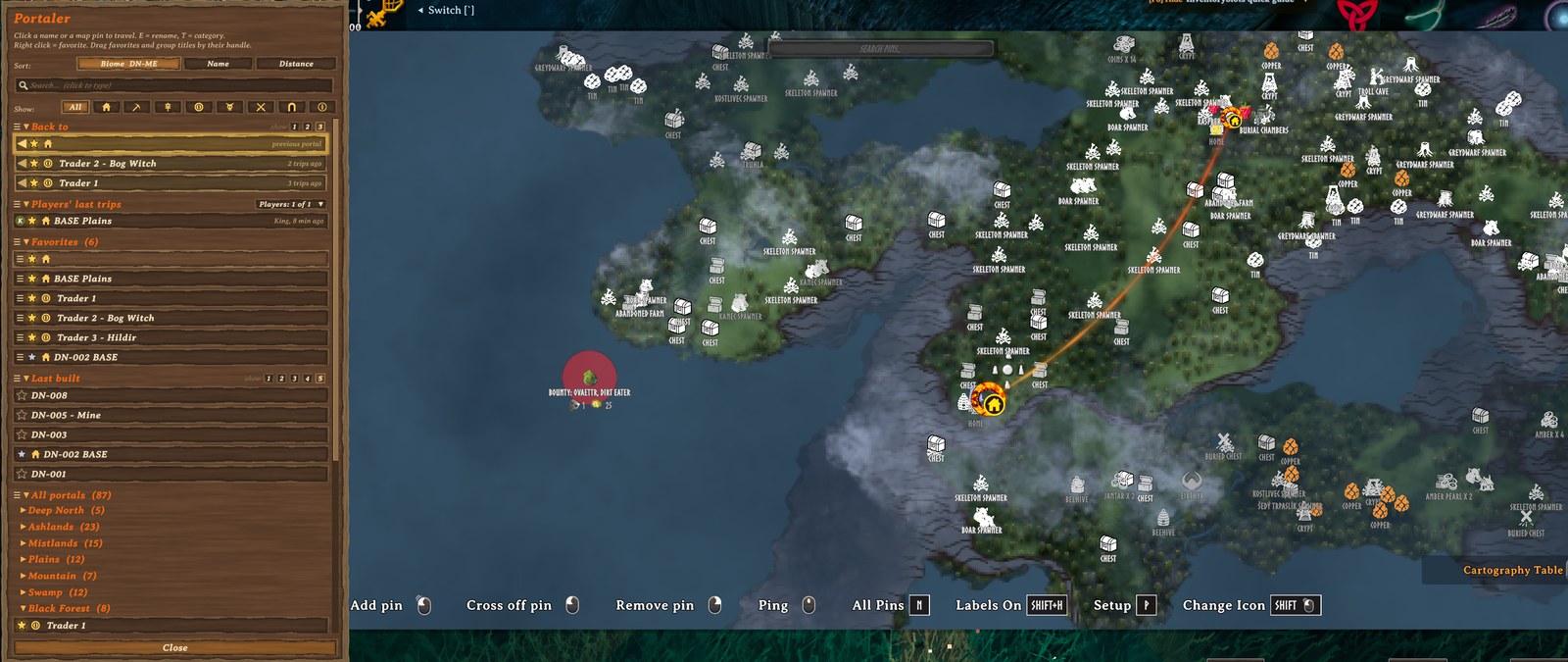
Every portal connects to every portal. Step into any portal and the map opens with a list of all portals on the server. Pick a name or click a pin and you're there. There's no pairing and no tag matching, and by default no item restrictions.
Rest the mouse on a name and the map shows where it goes, with a fiery line from your portal to the target.
Built for servers that play together:
- Favorites, personal (silver) or shared with everyone (gold), in your own order.
- Categories with icons on the list and the map pins (base, mine, farm, trader, boss, danger, dungeon, explore), plus a one-click filter.
- Players' last trips: see where your friends went and follow them with one click.
- Back to: your last 1-3 departure portals, one click away.
- Last built: the newest portals on the server.
- Search, sorting (biome, name, distance), foldable groups and blocks you can drag into your own order.
- Quick arrival: you arrive as soon as the target area is loaded, often in half the game's usual time.
- Automatic names by biome (
BF-007,MO-012) and renaming any portal right from the list.
Everybody has the same rights: anyone can rename, set categories or change shared favorites. Everything shared is synced through the server and kept with the world save, so it survives restarts and mod updates.
Screenshots
Source code, issues and ideas: github.com/nfp007/portaler
Features
Every feature says what is 🌐 shared (the same for everybody on the server) and what is 👤 personal (only for you).
1. Travel from any portal to any portal
- Walk into a portal: the big map opens with the portal list on the left.
- Click a name in the list, or a portal pin on the map, to travel.
- Vanilla name pairing is switched off, so every portal is always active.
- The portal you stand in stays in the list, greyed out with "you are here", and cannot be selected.
- 🌐 Shared: the list of portals (everybody sees every portal).
2. Map preview
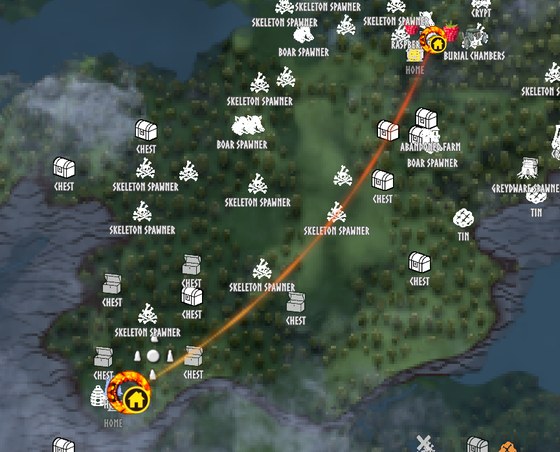
- Rest the mouse on a name: a soft fiery line flows from your portal to it and its pin gets bigger, so you see where the trip goes.
- Close portals (up to 2 km apart): the map calmly frames both portals, with extra room around the target.
- Far portals: the map shows the target right away, without flying across the world.
- The map stays there 10 seconds after the mouse leaves the list, then glides back. Move or zoom the map yourself and it stays where you put it.
- 👤 Personal: only your own map moves. Timing, zoom and the line can be changed in your config.
3. Favorites
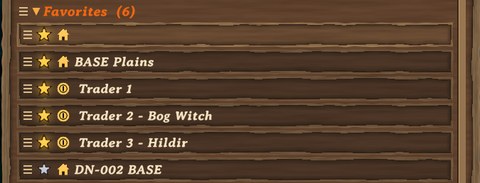
- Right click a name: mine (silver star), then shared (bigger glowing gold star), then off.
- Drag favorites by their handle into any order. New favorites go to the end.
- 🌐 Shared: gold stars. Everybody sees them, and anyone can add or remove them.
- 👤 Personal: silver stars and the order of your favorites (per character, saved on the server).
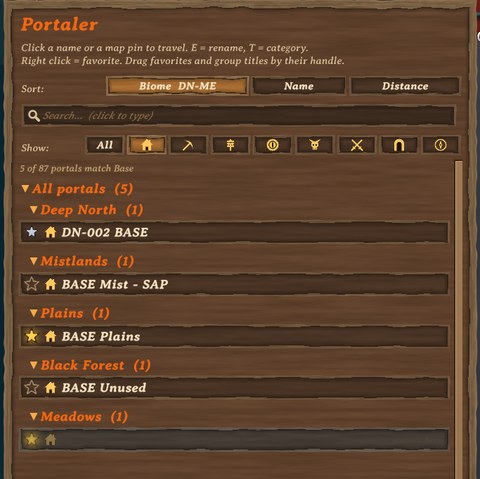
4. Categories & filter
- Hover a name and press T to choose a category: Base, Mine, Farm, Trader, Boss, Danger, Dungeon or Explore.
- The icon shows in the list and inside the portal's ring on the map.
- One click on an icon in the Show: row lists only that category. Click it again (or All) to see everything.
- 🌐 Shared: the category of each portal (anyone can change it).
- 👤 Personal: which category you are filtering by.
5. Search
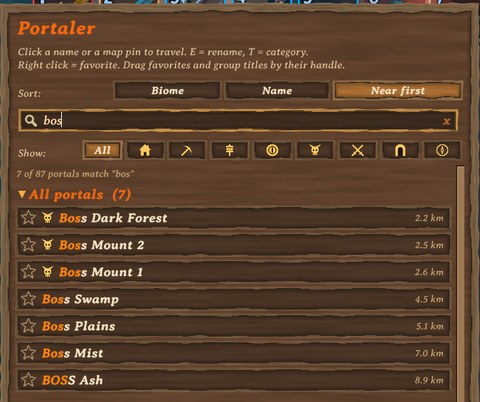
- Click the search box and type: only portals whose name contains the text are shown (any case), matching letters in gold.
- While typing, the game ignores your keys (no walking, the map stays open). Esc or x clears the search.
- 👤 Personal: your search (cleared each time you enter a portal).
6. Sorting & foldable groups
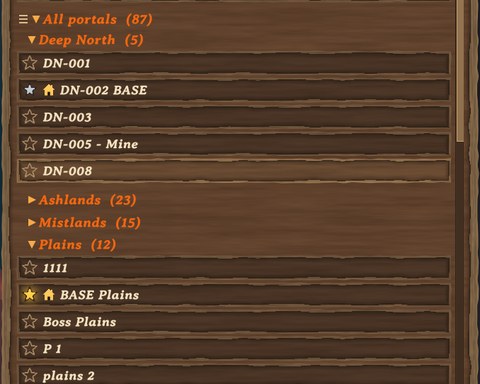
- Biome (default): grouped by biome, Deep North first. Click again for Meadows first.
- Name: one list A to Z, or Z to A.
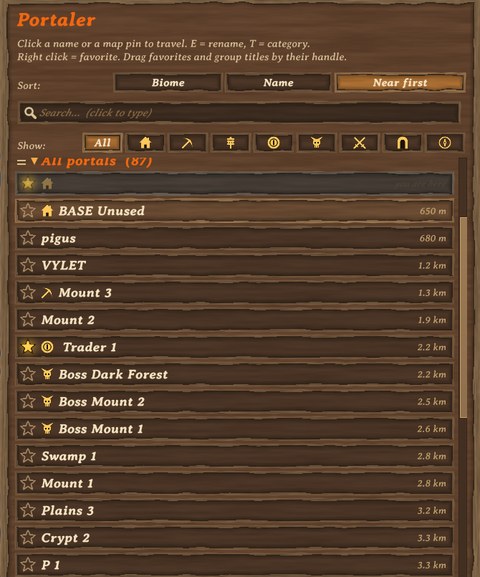
- Distance: nearest first (or farthest first), with the distance shown next to each name.
- Click a group title to fold or unfold it.
- Blocks, from the top by default: Back to, Players' last trips, Favorites, Last built, All portals (the biome groups, or the sorted list). Each has a handle left of its title: drag them into any order, for example put Last built below all portals.
- 👤 Personal: sort choice (per PC), folded groups and group order (per character).
7. "Back to"
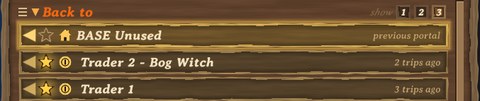
- The portals you last travelled from, at the top of the list. One click takes you back.
- The newest one is golden and glows; older ones say "2 trips ago", "3 trips ago".
- show 1 2 3 in the title: how many to list.
- 👤 Personal: the history per character, the number per PC.
Highlights
From source dataLoaders
Runs on BepInEx.
Footprint
Rated a light load on a server.
Last update
Its author last shipped an update 1d ago.
Portaler on Nxeon
From our catalogue- One-click install
- Supported on Nxeon Valheim servers, for BepInEx servers. We download it from Thunderstore, place it, and restart the server.
- Server side
- Optional on the server
- Server type needed
- BepInEx
- Server load
- light
- Smallest plan we suggest
- Valheim — 4 GB (4 GB RAM). This follows our own load rating above, not a benchmark.
- Latest build
- 1.0.13, released 2026-11-03
Game versions by loader
| Loader | Game versions | Newest |
|---|---|---|
| BepInEx |
From 10 recorded builds of Portaler.
Recent builds
| Build | Released | Game versions | Loaders |
|---|---|---|---|
| 1.0.13 | 2026-11-03 | n/a | BepInEx |
| 1.0.11 | 2026-11-03 | n/a | BepInEx |
| 1.0.10 | 2026-11-02 | n/a | BepInEx |
| 1.0.9 | 2026-11-02 | n/a | BepInEx |
| 1.0.6 | 2026-10-31 | n/a | BepInEx |
| 1.0.5 | 2026-10-30 | n/a | BepInEx |
Dependencies
- Required: BepInExPack Valheim
Declared by the newest build that lists any. Required ones are installed with it on one-click installs.
Run Portaler on a Valheim server
Pick a server or deploy a new one above; it is installed in one click.
What kind of mod it is
From the catalogQuality of life & UI
Small conveniences, tweaks and interface improvements players notice straight away.
Works on a server
From source side supportThunderstore lists server-side support for Portaler as optional: it can run on a server, but isn’t required there.
Compatibility
- Game
- Valheim
- Loaders
- BepInEx
- Runs on
- Serveroptional on the server
- Requires
- One-click install needs a BepInEx server.
Verified at the source
- ✓ThunderstoreOfficial listing, checked 2026-11-04Open ↗
- ✓Authornfp007, as published on Thunderstore
- ✓LicenseNot published by the sourceFree












