






About EquipmentAndQuickSlotsPlus
From ThunderstoreAdds equipment slots, quick slots, configurable player inventory rows, and up to 3 extra chest rows for Valheim 1.0.
EquipmentAndQuickSlotsPlus
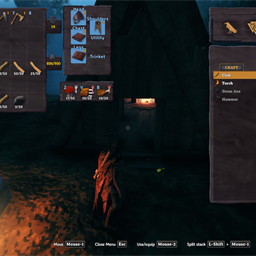
EquipmentAndQuickSlotsPlus adds dedicated equipment slots, configurable quick slots, and inventory expansion options for Valheim 1.0.
Features
- Equipment slots shown beside the player inventory:
- Head
- Chest
- Shoulders
- Legs
- Utility
- Trinket
- Quick slots labeled with configurable hotkeys. Defaults are
Z,V, andB. - Configurable player inventory expansion through
Inventory / Extra Inventory Rows. - Configurable chest and container expansion through
Inventory / Extra Chest Rows, from0to3extra rows. - Chest windows resize to fit the added rows.
- Equipment slots highlight when a dragged item fits that slot.
- Right click equipment slot items to unequip them back into the player inventory.
- Optional keep-on-death and gravestone pickup behavior.
- Automatic backup and migration behavior for equipment and quick slot items.
Configuration
After the first launch, BepInEx creates the config file for the mod. The main options are:
Inventory / Extra Inventory Rows: adds visible rows to the player inventory.Inventory / Extra Chest Rows: adds rows to chests and other normal containers. Maximum is3.Quick Slots / Quick Slot Count: controls how many quick slots are active.Hotkeys / Quick slot hotkey 1-6: controls each quick slot key.Equipment Slots / Utility Slot Count: controls how many utility items can be equipped.
Config values are saved by BepInEx. For chest rows, changes refresh the currently open container when possible.
Installation
Install with a Thunderstore-compatible mod manager, or manually install with BepInEx:
- Install
denikson-BepInExPack_Valheim. - Place
EquipmentAndQuickSlotsPlus.dllinBepInEx/plugins. - Start Valheim once to generate the config.
If you previously used the original Equipment and Quick Slots mod, remove the old DLL before installing this Plus build.
Console Commands
eaqs_validate: revalidates slots and relocates overlapping or out-of-grid items.eaqs_api: prints API version, endpoints, and slot states.invcheck: prints the inventory grid contents.eaqs_restorebackup: restores the automatic slot backup into free slots.breakequipmentanddropall: testing helpers.
Compatibility Notes
The mod declares incompatibility with several other inventory slot mods:
- AzuExtendedPlayerInventory
- ExtendedPlayerInventory
- ExtraSlots
- ComfyQuickSlots
BetterUI and Better Archery compatibility code is included from the Equipment and Quick Slots base mod.
Credits
Based on Equipment and Quick Slots by RandyKnapp and the later rewrite work by MidnightsFX, with Plus changes for Valheim 1.0, configurable player inventory rows, equipment and quick slot layout changes, and configurable chest rows.
Highlights
From source dataLoaders
Runs on BepInEx.
Footprint
Rated a light load on a server.
Dependencies
Needs 1 other project installed alongside it.
EquipmentAndQuickSlotsPlus on Nxeon
From our catalogue- One-click install
- Supported on Nxeon Valheim servers, for BepInEx servers. We download it from Thunderstore, place it, and restart the server.
- Server type needed
- BepInEx
- Server load
- light
- Smallest plan we suggest
- Valheim — 4 GB (4 GB RAM). This follows our own load rating above, not a benchmark.
- Latest build
- 3.1.1, released 2026-09-11
Game versions by loader
| Loader | Game versions | Newest |
|---|---|---|
| BepInEx |
From 1 recorded build of EquipmentAndQuickSlotsPlus.
Dependencies
- Required: BepInExPack Valheim
Declared by the newest build that lists any. Required ones are installed with it on one-click installs.
Run EquipmentAndQuickSlotsPlus on a Valheim server
Pick a server or deploy a new one above; it is installed in one click.
What kind of mod it is
From the catalogQuality of life & UI
Small conveniences, tweaks and interface improvements players notice straight away.
Compatibility
- Game
- Valheim
- Loaders
- BepInEx
- Requires
- One-click install needs a BepInEx server. 1 other project installed alongside it.
Verified at the source
- ✓ThunderstoreOfficial listing, checked 2026-10-02Open ↗
- ✓AuthorNooblyCrew, as published on Thunderstore
- ✓LicenseNot published by the sourceFree















