







About Simple Item Upgrade Preview
From ThunderstoreSee current and upgraded item stats side by side in the existing Upgrade panel before spending materials. Client-side, with no extra windows or configuration.
Simple Item Upgrade Preview

Know what you’re getting before you upgrade.
See your item’s current stats alongside its next upgrade values, right inside Valheim’s existing Upgrade panel. Compare improvements before spending your materials, with no extra windows, hotkeys, or configuration.
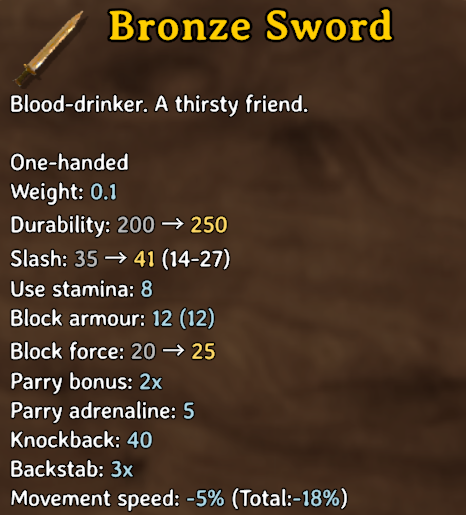
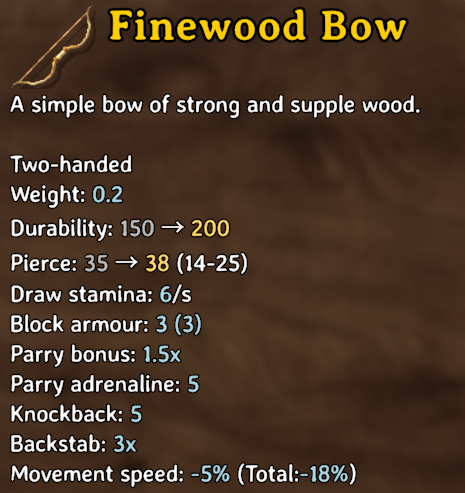
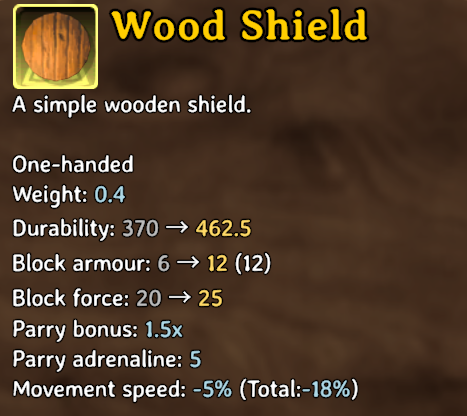
Current values appear in grey and upgraded values in gold. Only changed supported stats receive a comparison.
Features
- Preview changes to damage, armour, maximum durability, and supported blocking stats.
- Uses the existing Upgrade panel and the selected item’s tooltips.
- Client-side BepInEx mod; no server installation required.
- Does not change crafting costs, item stats, upgrade results, or save data.
Usage
Open a crafting station, select Upgrade, and choose an item. Supported changed stats show current → upgraded values.
Durability compares maximum durability, not current wear. Damage ranges in parentheses describe the upgraded item’s skill-dependent damage range.
Screenshots
Captured in a modded playthrough; item balance values may differ in your game.
| Armour | Bow | Shield | | --- | --- | --- | | 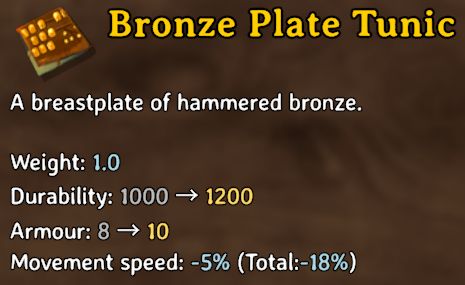 |
 |
 |
Installation
Install using Thunderstore Mod Manager or r2modman. BepInEx is installed as a dependency. For manual installation, copy the included BepInEx folder into your game or active mod profile, then restart the game.
If replacing the earlier locally named SimpleUpgradePreview.dll, remove that previous DLL first. Both use the same plugin identifier: local.che.simpleupgradepreview.
To uninstall, remove this mod’s DLL. Do not manually register it in your mod manager’s mods.yml; use the packaged ZIP for mod-manager imports.
Build and test
On Windows, use the .NET Framework C# compiler and references from your own Valheim and BepInEx installations. No game or third-party DLLs are included.
.\build.ps1 -GameManagedDirectory 'D:\Games\Valheim\valheim_Data\Managed' -BepInExCoreDirectory 'D:\ModProfile\BepInEx\core'
.\test.ps1
Both scripts accept an optional -Compiler path. Build output goes into dist/.
Compatibility and validation
Built against the installed Valheim and BepInEx libraries on October 18, 2026. Four in-game screenshots demonstrate weapon, armour, bow, and shield comparisons. Fourteen automated text-comparison checks cover formatting and edge cases.
Other mods can influence tooltip values. UI replacements that replace the normal Upgrade panel may not work. Epic Loot patches were inspected during development, but comprehensive enchanted-item and Forge of Potential behavior has not been verified. This mod does not change refinement odds or outcomes.
On an unexpected preview error, the mod logs a warning and disables its comparison feature for that session.
Reporting issues
Include your Valheim and BepInEx versions, relevant UI or item mods, the selected item and quality, a screenshot, and relevant log excerpts. Remove personal information before sharing logs.
Highlights
From source dataLoaders
Runs on BepInEx.
Footprint
Rated a light load on a server.
Last update
Its author last shipped an update 17d ago.
Simple Item Upgrade Preview on Nxeon
From our catalogue- One-click install
- Supported on Nxeon Valheim servers, for BepInEx servers. We download it from Thunderstore, place it, and restart the server.
- Server type needed
- BepInEx
- Server load
- light
- Smallest plan we suggest
- Valheim — 4 GB (4 GB RAM). This follows our own load rating above, not a benchmark.
- Latest build
- 1.0.0, released 2026-10-18
Game versions by loader
| Loader | Game versions | Newest |
|---|---|---|
| BepInEx |
From 1 recorded build of Simple Item Upgrade Preview.
Dependencies
- Required: BepInExPack Valheim
Declared by the newest build that lists any. Required ones are installed with it on one-click installs.
Run Simple Item Upgrade Preview on a Valheim server
Pick a server or deploy a new one above; it is installed in one click.
What kind of mod it is
From the catalogWeapons, items & crafting
New weapons, gear, items and the recipes to make them.
Compatibility
- Game
- Valheim
- Loaders
- BepInEx
- Requires
- One-click install needs a BepInEx server.
Verified at the source
- ✓ThunderstoreOfficial listing, checked 2026-10-19Open ↗
- ✓AuthorOctoberJemini, as published on Thunderstore
- ✓LicenseNot published by the sourceFree















