






About DungeonMaps
From ThunderstoreDraws the dungeon you are standing in on your minimap and full map - burial chambers, sunken crypts, frost caves and infested mines, revealed room by room as you explore.
Dungeon Maps
Your map does nothing underground. Walk into a Sunken Crypt and the minimap keeps showing the swamp around the entrance, frozen, while you take your fourth identical corridor and quietly lose track of which way is out.
This mod draws the dungeon instead.

What you get
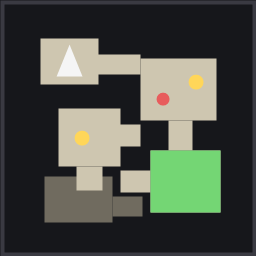
Step into a burial chamber, sunken crypt, troll cave, frost cave, infested mine or dvergr ruin and both your minimap and your full map switch to that dungeon's own floorplan.
Not an approximation of it, either. The plan is traced from the dungeon's real geometry — as you reveal a room it is probed against the actual colliders — so what you see is the floor you can genuinely walk: the corridors, the alcoves, the odd little side chamber, the true shape of the place.
It is drawn in the dungeon's own wall texture, lifted off the geometry around you at runtime. A burial chamber is drawn in burial chamber stone, a frost cave in ice, an infested mine in dvergr metal. Around it, the unexcavated rock is flat and dark, so the map reads as chambers cut out of solid stone.
Each dungeon type also carries a colour tint — bone for crypts, moss green for sunken crypts, pale blue for caves, copper for dvergr ruins, ember for the Ashlands. TextureStrength sets how much stone shows through that tint; drop it to 0 for flat colour.
Markers
| Marker | Meaning | |---|---| | Green cave icon | The entrance. This is the way out. | | White arrow | You, and which way you are facing. | | Gold chest | A chest | | Red skull | A creature spawner |
These are the game's own map pin icons wherever Valheim has one that means the right thing — the cave pin, the death skull, your own map marker — so the dungeon map speaks the same visual language as the world map. Valheim has no chest pin, so that one is drawn to match.
Markers obey the same fog as the plan: nothing shows in a room you have not walked.
Fog of war
The map only shows rooms you have actually walked into. It is a record of where you have been, not a solution to the dungeon — you still have to find the place, you just stop walking the same loop twice.
The same burial chamber a few minutes apart:
| Just inside | A little later | |---|---| |  |
 |
Explored rooms are saved per world, so a crypt you cleared last week still has its map when you come back.
RevealRadius will also uncover ground beyond the room you are standing in, but it applies in every horizontal direction at once, so even a few metres uncovers the neighbours. It defaults to 0. Set RevealAll if you would rather have the whole floorplan the moment you step inside.
Zooming
Use the game's own map zoom keys — , and . by default — on both the minimap and the full map. The mod follows Valheim's own zoom rather than binding its own keys, so if you rebind them in Settings the dungeon map follows, and the gamepad bindings and the mouse wheel work too.
Zoomed out, the full map fits the whole dungeon in the panel. Zoom past that and it follows you instead, since at that point you are what needs to stay on screen.
Squared up
Valheim spawns every dungeon at a random angle, so a north-up map of one is a field of diamonds. The map is turned to the dungeon's own grid instead, which is what makes it read as a floorplan rather than a pile of tilted boxes. Your arrow turns with it, so it still points where you are actually looking. Set AlignToDungeon = false if you would rather have true north.
Multiple floors
Sunken crypts and infested mines stack levels on top of each other, which is exactly why they are so easy to get lost in. Each storey is traced separately: the one you are standing on draws bright, the floor above fades to a ghost, and the floor below darkens but keeps its shape — so a stacked crypt reads as floors instead of spaghetti.
Pins
While the dungeon plan is covering the full map, map pins are switched off — adding, crossing off, removing and pinging alike. A click on the map becomes a world position, and on a dungeon plan that would land somewhere out on the surface with no relation to what you clicked. The world pins are hidden behind the plan too, so acting on one would be done blind.
Everything comes back the moment you leave, or press the toggle key to look at the world map underneath.
Multiplayer
Only you need it. This mod reads dungeon data your game client already has and draws an overlay on your own screen, so it works on vanilla servers, modded servers and dedicated servers alike, whether or not anybody else has it installed. Nothing is sent to anyone.
Configuration
Everything is in BepInEx/config/zl.dungeonmaps.cfg — which maps it draws on, minimap zoom level, plan detail, opacity, stone strength, height dimming, and every marker individually.
Chest and spawner markers are on by default. If you would rather not know what is in the next room, turn MarkChests and MarkSpawners off.
ToggleKey (default Left Alt + M) hides the dungeon map so you can read the world map underneath without leaving the dungeon.
The plan fills your minimap panel whatever shape it is; set RoundMinimap if you want it clipped to a circle.
Installation
Use a mod manager, or install BepInEx and drop DungeonMaps.dll into BepInEx/plugins.
Uninstalling
Delete the DLL. Nothing is added to your world, so there is nothing left behind to break. Your explored-room record stays in BepInEx/config/DungeonMaps/ in case you put the mod back.
Contact
Got an idea? I'd love to hear it — new markers, feature requests, or just to say it's working for you. Find me on Instagram: @lg_9d
Highlights
From source dataLoaders
Runs on BepInEx.
Footprint
Rated a light load on a server.
Dependencies
Needs 1 other project installed alongside it.
DungeonMaps on Nxeon
From our catalogue- One-click install
- Supported on Nxeon Valheim servers, for BepInEx servers. We download it from Thunderstore, place it, and restart the server.
- Server type needed
- BepInEx
- Server load
- light
- Smallest plan we suggest
- Valheim — 4 GB (4 GB RAM). This follows our own load rating above, not a benchmark.
- Latest build
- 1.1.2, released 2026-09-12
Game versions by loader
| Loader | Game versions | Newest |
|---|---|---|
| BepInEx |
From 4 recorded builds of DungeonMaps.
Recent builds
| Build | Released | Game versions | Loaders |
|---|---|---|---|
| 1.1.2 | 2026-09-12 | n/a | BepInEx |
| 1.1.1 | 2026-08-28 | n/a | BepInEx |
| 1.1.0 | 2026-08-25 | n/a | BepInEx |
| 1.0.0 | 2026-08-25 | n/a | BepInEx |
Dependencies
- Required: BepInExPack Valheim
Declared by the newest build that lists any. Required ones are installed with it on one-click installs.
Run DungeonMaps on a Valheim server
Pick a server or deploy a new one above; it is installed in one click.
What kind of mod it is
From the catalogQuality of life & UI
Small conveniences, tweaks and interface improvements players notice straight away.
Compatibility
- Game
- Valheim
- Loaders
- BepInEx
- Requires
- One-click install needs a BepInEx server. 1 other project installed alongside it.
Verified at the source
- ✓ThunderstoreOfficial listing, checked 2026-10-01Open ↗
- ✓AuthorOverDrive, as published on Thunderstore
- ✓LicenseNot published by the sourceFree












