







About ValheimFarmerNPC
From ThunderstoreAutonomous goblin farmers for Valheim. Place a homestead, mark your field, assign chests - farmers plant, harvest, and store crops. Multiplayer-safe; server and clients need the mod.
Valheim Farmer NPC
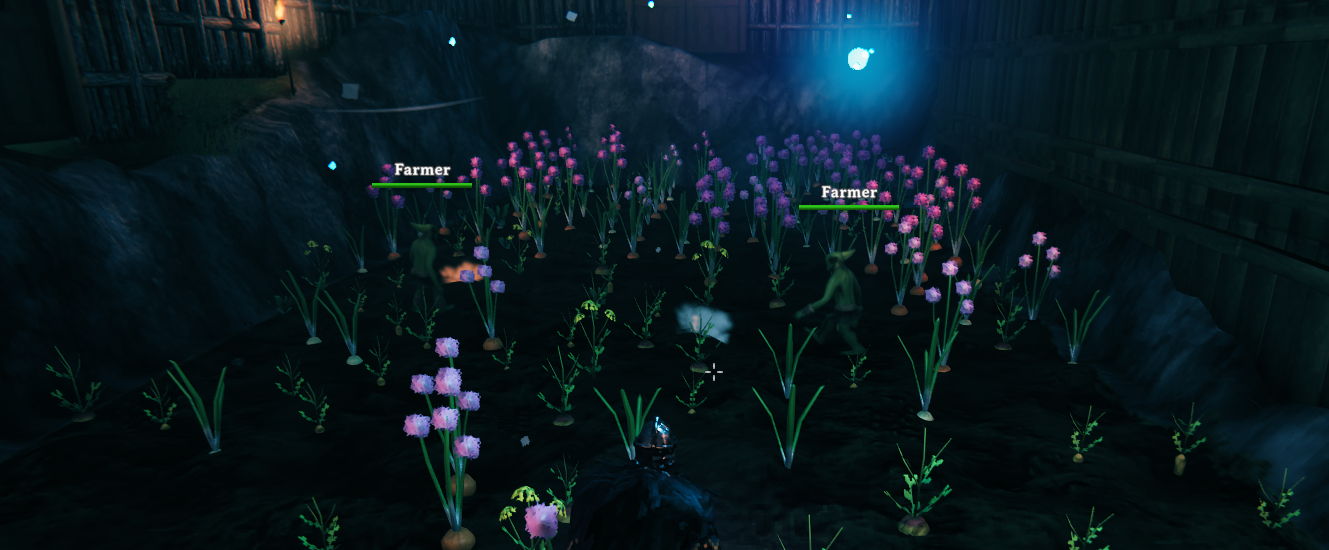
Put your farm on autopilot. Place a homestead, mark your field, assign a few chests — then let goblin farmers plant, harvest, and store your crops while you get on with raiding, building, and exploring.
Highlights
- Hands-off farming — farmers harvest mature crops and replant empty plots automatically.
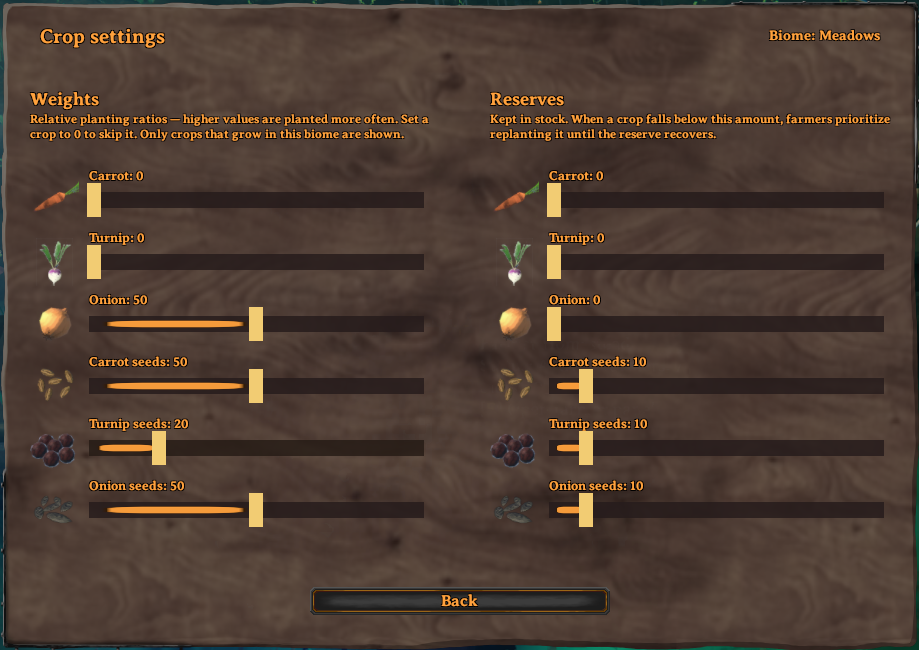
- You decide the mix — set planting ratios and seed reserves per crop, filtered to what actually grows in your biome.
- Storage handled — farmers pull seeds from your chests and deposit the harvest back.
- Multiplayer-safe — works on local worlds, player-hosted games, and dedicated servers.
- Simple in-game menu — everything is driven from one panel on the Homestead piece.
| | | |---|---| | Version | 1.1.1 | | Author | Pjanky | | License | MIT | | Requires | BepInExPack Valheim + Jötunn | | Install on | Dedicated server and all clients (same version) |
Install
With r2modman / Thunderstore Mod Manager (recommended)
- Install BepInExPack Valheim and Jötunn.
- Install Valheim Farmer NPC.
- Use the same mods on the dedicated server and every client.
Manual
- Install BepInEx for Valheim and Jötunn.
- Copy
ValheimFarmerNPC.dllintoBepInEx/plugins/ValheimFarmerNPC/on the server and every client. - Launch once so the config file is created under
BepInEx/config/.
The mod adds two hammer build pieces: Farmer Homestead and Farm Boundary Post.
> By default only server admins can place farm pieces and open the panel. To let any player manage farms, set AdminOnlyPlacement and AdminOnlyAccess to false (see Configuration).
Quick start
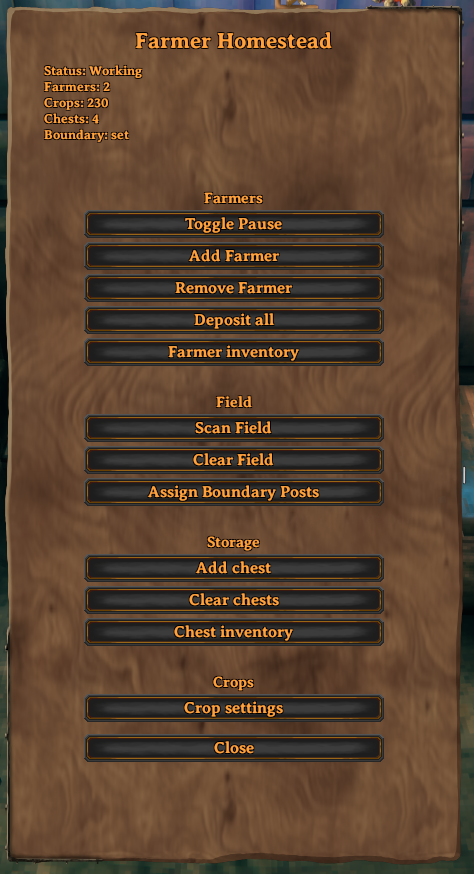
Everything runs from the Farmer Homestead panel — interact with the placed homestead to open it.
- Prepare a field. Till the soil and plant the plots you want farmed (saplings or grown crops both work).
- Place the Homestead near the field. It spawns your first farmer automatically.
- Set the boundary. Place two Farm Boundary Posts at opposite corners of the field, then click Assign Boundary Posts.
- Scan the field. Click Scan Field — the homestead remembers every crop inside the boundary as a work slot.
- Add storage. Place chests nearby and click Add chest for each.
That's it — as long as a player keeps the area loaded, farmers will harvest, replant, restock seeds, and deposit the surplus. Tune what they grow under Crop settings whenever you like.
> Farmers vanishing when you leave is normal. They are temporary workers, not permanent creatures. Your homestead, field, and chest contents are saved. When you return, open the panel and click Add Farmer if none are present.
How it works
- The Homestead piece stores all persistent farm data (crop slots, chests, pause state, crop settings) in the world save.
- Farmers only work while a player keeps the farm's area loaded — they are summoned workers, not wandering monsters.
- On multiplayer, the game keeps the farm in sync across everyone; the dedicated server keeps field progress consistent even when several players share one farm.
- Talking to a farmer toggles pause/resume for that homestead.
Full setup walkthrough
1. Plant the initial field (required)
Till the soil and plant every plot you want farmers to work. Scan Field discovers slots from existing crops inside the boundary — it does not create slots from bare tilled ground. After the first scan, farmers harvest and replant those remembered slots on their own.
2. Place the Farmer Homestead
Open the hammer, pick Farmer Homestead, and place it near your farm (exact facing doesn't matter). Interact with it to open the panel. The status line at the top shows pause state, farmer count, crop-slot count, chest count, and whether a boundary is set.
3. Place & assign Boundary Posts
- Place two Farm Boundary Posts at opposite corners of the rectangle covering your farm — just outside the outermost plots so every tile is inside the box.
- Keep each half-width within
MaxFarmRadius(default 64 m), or scanning will fail. - On the panel, click Assign Boundary Posts. Status should then read
Boundary: set. If it fails, move closer, confirm both posts exist, and retry.
4. Scan the field
Click Scan Field. The homestead inventories every crop inside the boundary and remembers those positions as farm slots; the Crops count should rise above zero.
Use Clear Field only to wipe the remembered slot list (for a clean rescan after a big layout change). It does not destroy plants in the world — rescan afterward if you still want that field worked.
5. Assign chests (storage)
- Place normal Valheim chests (or compatible containers) near the homestead.
- Click Add chest to assign the nearest free chest within
ChestAssignRange(default 20 m). Repeat for more storage. - Clear chests unassigns all chests (their contents are never deleted).
- Chest inventory shows the combined contents of all assigned chests.
6. Configure crop settings
Highlights
From source dataLoaders
Runs on BepInEx.
Footprint
Rated a light load on a server.
Last update
Its author last shipped an update 3 mo ago.
ValheimFarmerNPC on Nxeon
From our catalogue- One-click install
- Supported on Nxeon Valheim servers, for BepInEx servers. We download it from Thunderstore, place it, and restart the server.
- Server side
- Optional on the server
- Server type needed
- BepInEx
- Server load
- light
- Smallest plan we suggest
- Valheim — 4 GB (4 GB RAM). This follows our own load rating above, not a benchmark.
- Latest build
- 1.1.1, released 2026-07-29
Game versions by loader
| Loader | Game versions | Newest |
|---|---|---|
| BepInEx |
From 6 recorded builds of ValheimFarmerNPC.
Recent builds
| Build | Released | Game versions | Loaders |
|---|---|---|---|
| 1.1.1 | 2026-07-29 | n/a | BepInEx |
| 1.1.0 | 2026-07-26 | n/a | BepInEx |
| 1.0.18 | 2026-07-25 | n/a | BepInEx |
| 1.0.17 | 2026-07-25 | n/a | BepInEx |
| 1.0.13 | 2026-07-22 | n/a | BepInEx |
| 1.0.6 | 2026-07-22 | n/a | BepInEx |
Dependencies
- Required: BepInExPack Valheim
- Required: Jotunn
Declared by the newest build that lists any. Required ones are installed with it on one-click installs.
Run ValheimFarmerNPC on a Valheim server
Pick a server or deploy a new one above; it is installed in one click.
What kind of mod it is
From the catalogGameplay & overhauls
New mechanics, content and overhauls that change how the game plays.
Works on a server
From source side supportThunderstore lists server-side support for ValheimFarmerNPC as optional: it can run on a server, but isn’t required there.
Compatibility
- Game
- Valheim
- Loaders
- BepInEx
- Runs on
- Serveroptional on the server
- Requires
- One-click install needs a BepInEx server.
Verified at the source
- ✓ThunderstoreOfficial listing, checked 2026-10-02Open ↗
- ✓AuthorPjanky, as published on Thunderstore
- ✓LicenseNot published by the sourceFree















