







About ValheimLumberNPC
From ThunderstoreFriendly lumber trolls for Valheim. Place a homestead, set a work radius, assign chests - they chop, smash logs, collect wood, and store it. Optional replanting. Multiplayer-safe.
Valheim Lumber NPC
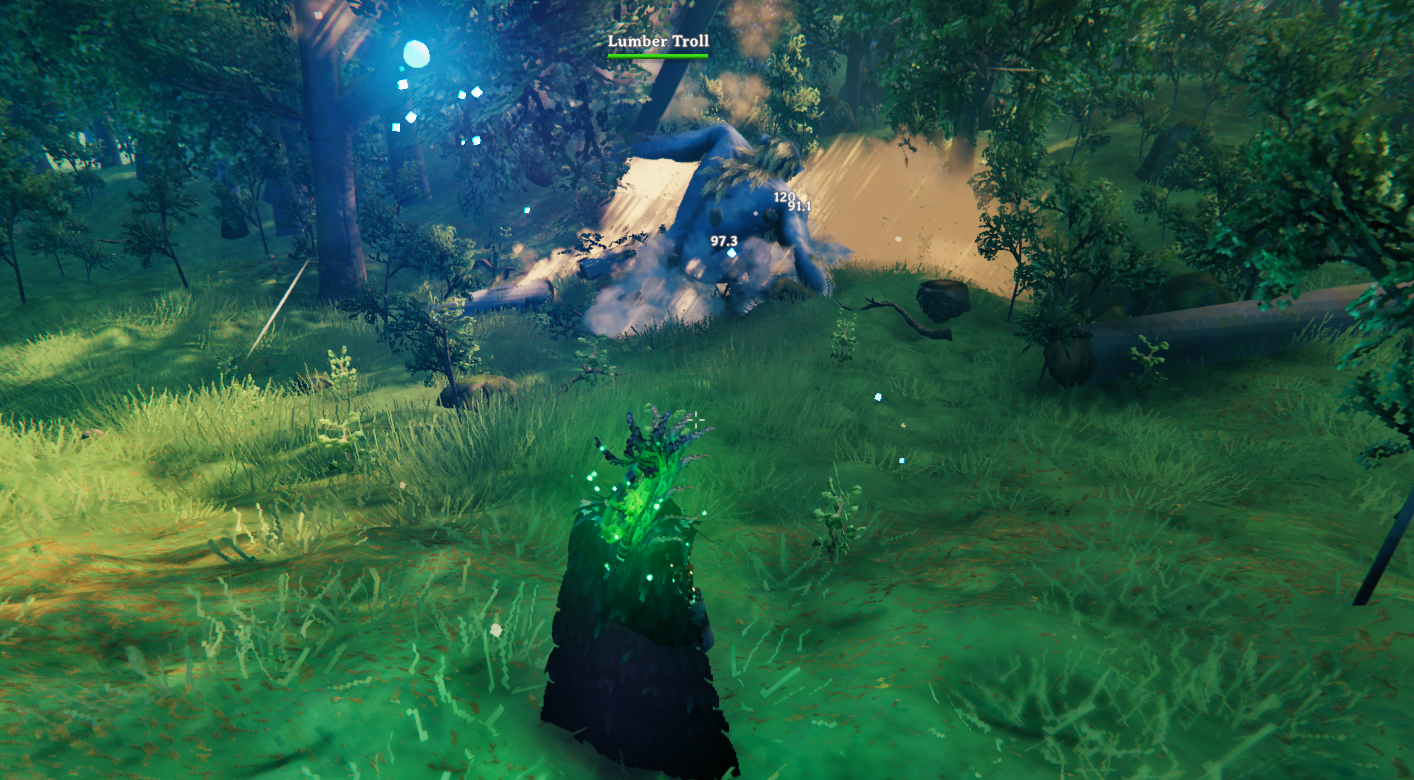
Put your logging on autopilot. Place a homestead, set a work radius, assign a few chests — then let a friendly Lumber Troll chop trees, smash logs and stumps, pick up wood, and store it while you get on with raiding, building, and exploring.
Highlights
- Hands-off logging — chops trees, smashes fallen logs and stumps, collects drops, and deposits wood.
- You decide the mix — set chop priorities and replant priorities per tree type, filtered to the homestead biome.
- Optional replanting — after clearing a stump, can plant a sapling from seeds carried in the bag.
- Storage handled — assigns normal Valheim chests; deposits surplus and pauses when chests are full.
- Multiplayer-safe — works on local worlds, player-hosted games, and dedicated servers.
- Simple in-game menu — everything is driven from one panel on the Homestead piece.
| | | |---|---| | Version | 1.0.1 | | Author | Pjanky | | License | MIT | | Requires | BepInExPack Valheim + Jötunn | | Install on | Dedicated server and all clients (same version) |
Install
With r2modman / Thunderstore Mod Manager (recommended)
- Install BepInExPack Valheim and Jötunn.
- Install Valheim Lumber NPC (
Pjanky-ValheimLumberNPC). - Use the same mods on the dedicated server and every client.
Manual
- Install BepInEx for Valheim and Jötunn.
- Copy
ValheimLumberNPC.dllintoBepInEx/plugins/ValheimLumberNPC/on the server and every client. - Launch once so the config file is created under
BepInEx/config/.
The mod adds one hammer build piece: Lumber Homestead.
> By default only server admins can place the homestead and open the panel. To let any player manage lumber yards, set AdminOnlyPlacement and AdminOnlyAccess to false (see Configuration).
Quick start
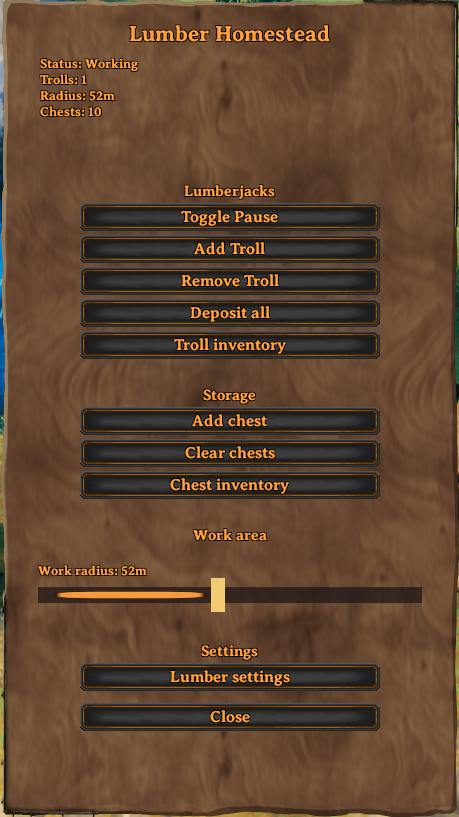
Everything runs from the Lumber Homestead panel — interact with the placed homestead to open it.
- Place the Homestead where you want logging done. It spawns your first Lumber Troll automatically.
- Set the work radius on the main page (default 40 m, adjustable 10–100 m).
- Add storage. Place chests nearby and click Add chest for each.
- Tune tree priorities under Lumber settings if you want (biome-filtered).
That's it — as long as a player keeps the area loaded, the troll will chop, smash logs/stumps, collect wood, and deposit into your chests. When chests fill up, work pauses until you free space or add another chest, then unpause.
> Trolls vanishing when you leave is normal. They are temporary workers, not permanent creatures. Your homestead settings, radius, and chest assignments are saved. When you return, open the panel and click Add Troll if none are present.
How it works
- The Homestead piece stores persistent data (chests, pause state, work radius, tree priorities) in the world save.
- Lumber Trolls only work while a player keeps the area loaded — they are summoned workers, not wandering monsters.
- Work loop: find tree → chop → smash logs → smash stump → (optional replant) → collect wood → deposit.
- On multiplayer, AI runs on the peer that owns the NPC’s network view, which keeps dedicated servers safe without forcing the headless server to simulate every troll.
- Talking to a troll toggles pause/resume for that homestead.
Full setup walkthrough
1. Place the Lumber Homestead
Open the hammer, pick Lumber Homestead, and place it near the trees you want cleared (exact facing doesn’t matter). Interact with it to open the panel. The status line shows pause state, troll count, work radius, and chest count.
2. Set the work radius
On the main page under Work area, drag the Work radius slider (10–100 m). Trees outside this circle are ignored.
> Tip: MaxWorkRadius in the BepInEx config is a server ceiling, not the homestead’s current radius. Change the radius in the UI. If the config ceiling is stuck at 40, the slider cannot go higher until that config is raised (newer builds auto-correct a ceiling of 40 up to 100).
3. Assign chests (storage)
- Place normal Valheim chests (or compatible containers) near the homestead.
- Click Add chest to assign the nearest free chest within
ChestAssignRange(default 20 m). Repeat for more storage. - Clear chests unassigns all chests (their contents are never deleted).
- Chest inventory shows the combined contents of all assigned chests.
4. Configure lumber settings
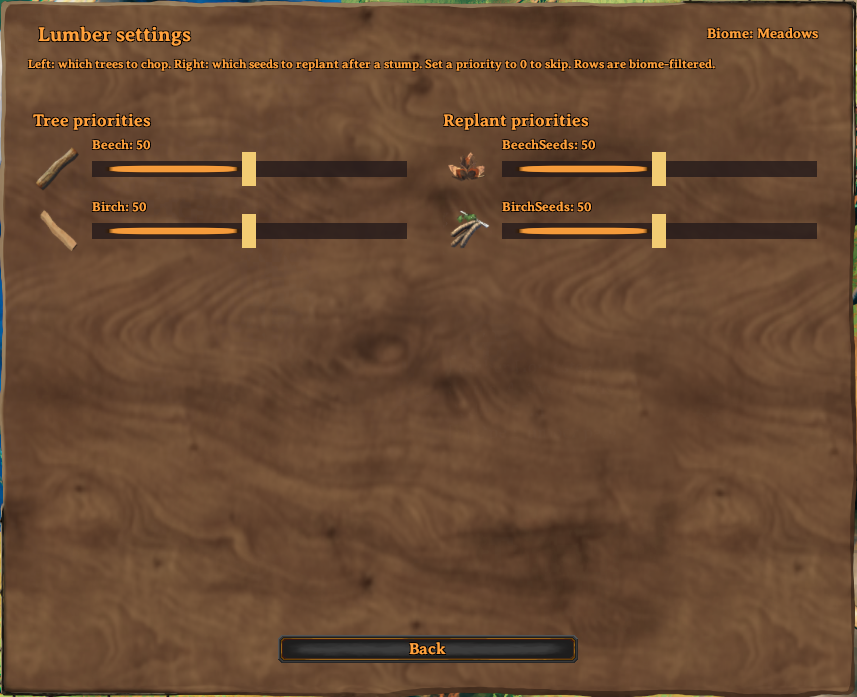
Open Lumber settings. Only tree types for the homestead’s biome (shown top-right) appear.
- Tree priorities (left) — relative chance to pick that tree type when chopping. Higher = preferred. Set to 0 to skip chopping that type.
- Replant priorities (right) — after a stump is cleared, which seed family to prefer when planting a sapling from the bag. Set to 0 to never replant that type. Replanting only uses seeds already in the troll’s bag (it does not fetch seeds from chests).
Click Back when done.
Which trees appear where
| Biome | Tree types shown | |-------|------------------| | Meadows, Ocean | Beech, Birch | | Black Forest | Beech, Birch, Fir, Pine, Oak |
Highlights
From source dataLoaders
Runs on BepInEx.
Footprint
Rated a light load on a server.
Last update
Its author last shipped an update 3 mo ago.
ValheimLumberNPC on Nxeon
From our catalogue- One-click install
- Supported on Nxeon Valheim servers, for BepInEx servers. We download it from Thunderstore, place it, and restart the server.
- Server side
- Optional on the server
- Server type needed
- BepInEx
- Server load
- light
- Smallest plan we suggest
- Valheim — 4 GB (4 GB RAM). This follows our own load rating above, not a benchmark.
- Latest build
- 1.0.1, released 2026-07-29
Game versions by loader
| Loader | Game versions | Newest |
|---|---|---|
| BepInEx |
From 2 recorded builds of ValheimLumberNPC.
Recent builds
| Build | Released | Game versions | Loaders |
|---|---|---|---|
| 1.0.1 | 2026-07-29 | n/a | BepInEx |
| 1.0.0 | 2026-07-27 | n/a | BepInEx |
Dependencies
- Required: BepInExPack Valheim
- Required: Jotunn
Declared by the newest build that lists any. Required ones are installed with it on one-click installs.
Run ValheimLumberNPC on a Valheim server
Pick a server or deploy a new one above; it is installed in one click.
What kind of mod it is
From the catalogGameplay & overhauls
New mechanics, content and overhauls that change how the game plays.
Works on a server
From source side supportThunderstore lists server-side support for ValheimLumberNPC as optional: it can run on a server, but isn’t required there.
Compatibility
- Game
- Valheim
- Loaders
- BepInEx
- Runs on
- Serveroptional on the server
- Requires
- One-click install needs a BepInEx server.
Verified at the source
- ✓ThunderstoreOfficial listing, checked 2026-10-02Open ↗
- ✓AuthorPjanky, as published on Thunderstore
- ✓LicenseNot published by the sourceFree















