






About Valheim Admin Tool
From ThunderstoreA management mod to play Valheim the way you want.
Valheim Admin Tool
Made by icecub · Version 0.5.8 · Valheim 1.0 · Requires BepInEx 5
Update 0.5.8 — Valheim 1.0.20
Valheim 1.0.20 changed an internal crafting check used by VAT's virtual workbenches. Older VAT releases could fail during startup, which could leave the menu unavailable. This release updates that check for the new game version.
Close Valheim before updating, then replace your existing ValheimAdminTool.dll with version 0.5.8. Remove duplicate or older copies of that DLL from other plugin folders. Keep your existing configuration and saved-cheat files. If your server runs VAT, update its copy as well. The menu shortcut remains F7 unless you changed it.
VAT now initializes gameplay patch groups separately. If another mod causes one group to fail, VAT reports that group and continues loading unaffected features.
Manage your character, spawn items and creatures, restore your world's resources, and handle common admin tasks from one in-game menu.
Valheim Admin Tool works in singleplayer and multiplayer. Install it on your own client to use its character tools and cheats, or add it to your server to enable admin-only world and player management. Server installation is optional, and Jötunn is not required.
Open the menu with F7. Close it with F7 or Escape. In the hotkey editor, Escape first cancels recording or returns to the binding list.
What can it do?
Cheats and character tools
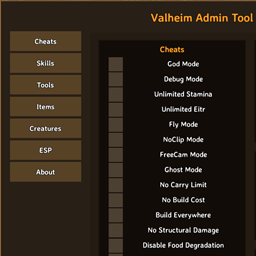
Choose the tools you need with individual toggles:
- God Mode, Debug Mode and Ghost Mode.
- Unlimited Stamina and Unlimited Eitr.
- Disable Food Degradation: pause eaten food's remaining duration and bonuses while normal healing continues.
- Disable Durability Loss: preserve the current durability of your weapons, armor, shields, tools and equipped items.
- Fly Mode, NoClip Mode and FreeCam Mode.
- Infinite Jumps: press your jump button again to keep jumping in midair.
- No Carry Limit, No Build Cost, Build Everywhere and No Structural Damage.
- Death protection: individually disable item, food, status-effect and skill loss.
- Ship cheats: wind in your back and increased sailing speed.
- Quick actions: heal yourself, receive one hour of Rested, reveal or reset your map, and activate boss powers.
- Show World Seed: show the current world's original seed in an on-screen message and the VAT log; an optional hotkey is available under Quick actions.
- Reveal POI: mark boss locations and possible or confirmed Haldor, Hildir and Bog Witch locations on your map.
- Map Teleport: hold Shift and click your destination on the map.
- Unrestricted Portals: take normally forbidden items, including metals, through portals.
- Forge: Always Succeed: guarantee success for your own Forge of Potential upgrades. Normal materials and other requirements still apply. Starts off, supports a hotkey and is included in Save cheats.
- Instant Crafting: finish inventory, cauldron and crafting-station recipes immediately, including multi-crafting and upgrades.
Build Everywhere also allows normal hammer dismantling in no-build zones while enabled. Normal ward access, workbench requirements and restrictions on occupied or non-removable objects still apply. Resource returns and multiplayer removal use the game's normal handling.
To use Map Teleport, enable Cheats → Map Teleport, close the admin menu and open the large map. Hold either Shift key and left-click your destination. The large map closes when the teleport is accepted. Normal clicks still work for managing map pins.
Reveal POI is beside the map buttons in Cheats. Boss markers are red, trader candidates are gold, and confirmed traders are green, with icons and text labels to distinguish them. It covers the main boss locations, including the Deep North, and all three traders: Haldor, Hildir and the Bog Witch. The game attempts to place up to 10 candidate locations per trader. Once the game selects a trader's location, VAT removes that trader's unused candidates from the overlay automatically.
In singleplayer and worlds you host, Reveal POI reads the world's actual locations. A server running VAT 0.4.2 or newer can provide those same locations. Without that support, VAT calculates locations from the seed and labels them seed estimate: these can differ in worlds generated by older game versions or changed by mods. Calculation may take a moment. Opening the overlay does not select a trader location, spawn anything or uncover the map's fog.
After revealing POI, the button changes to Hide POI. Press it again to remove the overlay while keeping your own map pins. Hiding also cancels an unfinished lookup. You can assign a Reveal / Hide POI hotkey with the same behavior. POI markers last for the current session; Reset Map also clears the overlay. They are not added to shared cartography or your saved cheat selection. Server installation remains optional, and Anti Valheim Admin Tool restrictions still apply.
Unrestricted Portals removes inventory restrictions for your own character. Enable it under Cheats and walk through a connected portal as usual. Item properties stay unchanged, and disabling the cheat restores normal item restrictions immediately. It starts off, supports a configurable hotkey and is included in Save cheats. Server installation is optional; Anti Valheim Admin Tool restrictions still apply. Portals still need a destination and must be permitted by the world's portal and boss-event settings.
Highlights
From source dataLoaders
Runs on BepInEx.
Footprint
Rated a light load on a server.
Dependencies
Needs 1 other project installed alongside it.
Valheim Admin Tool on Nxeon
From our catalogue- One-click install
- Supported on Nxeon Valheim servers, for BepInEx servers. We download it from Thunderstore, place it, and restart the server.
- Server type needed
- BepInEx
- Server load
- light
- Smallest plan we suggest
- Valheim — 4 GB (4 GB RAM). This follows our own load rating above, not a benchmark.
- Latest build
- 0.5.8, released 2026-10-16
Game versions by loader
| Loader | Game versions | Newest |
|---|---|---|
| BepInEx |
From 6 recorded builds of Valheim Admin Tool.
Recent builds
| Build | Released | Game versions | Loaders |
|---|---|---|---|
| 0.5.8 | 2026-10-16 | n/a | BepInEx |
| 0.5.0 | 2026-10-03 | n/a | BepInEx |
| 0.4.0 | 2026-09-14 | n/a | BepInEx |
| 0.3.9 | 2026-09-12 | n/a | BepInEx |
| 0.3.3 | 2026-09-11 | n/a | BepInEx |
| 0.1.0 | 2024-11-28 | n/a | BepInEx |
Dependencies
- Required: BepInExPack Valheim
Declared by the newest build that lists any. Required ones are installed with it on one-click installs.
Run Valheim Admin Tool on a Valheim server
Pick a server or deploy a new one above; it is installed in one click.
What kind of mod it is
From the catalogAdmin & protection
Permissions, moderation, anti-cheat and land protection for the people running the server.
Compatibility
- Game
- Valheim
- Loaders
- BepInEx
- Requires
- One-click install needs a BepInEx server. 1 other project installed alongside it.
Verified at the source
- ✓ThunderstoreOfficial listing, checked 2026-10-17Open ↗
- ✓AuthorQoLTeam, as published on Thunderstore
- ✓LicenseNot published by the sourceFree











