






About Quads Build Orders
From ThunderstoreShared ghost build orders and blueprints: plan pieces (or import a blueprint) for everyone in your party, then build them by walking up and pressing E.
<!-- This page is made by tools/modpages/make_pages.py from the mod's DESCRIPTION.txt, CHANGELOG.txt, settings and the repo's README. Change those (or the HAND-WRITTEN part below), not the rest of this page. -->
👻 BuildOrders
Version 1.12.1 · all the mods · install it from Thunderstore (r2modman, Thunderstore Mod Manager) or the in-game mod manager (F7)
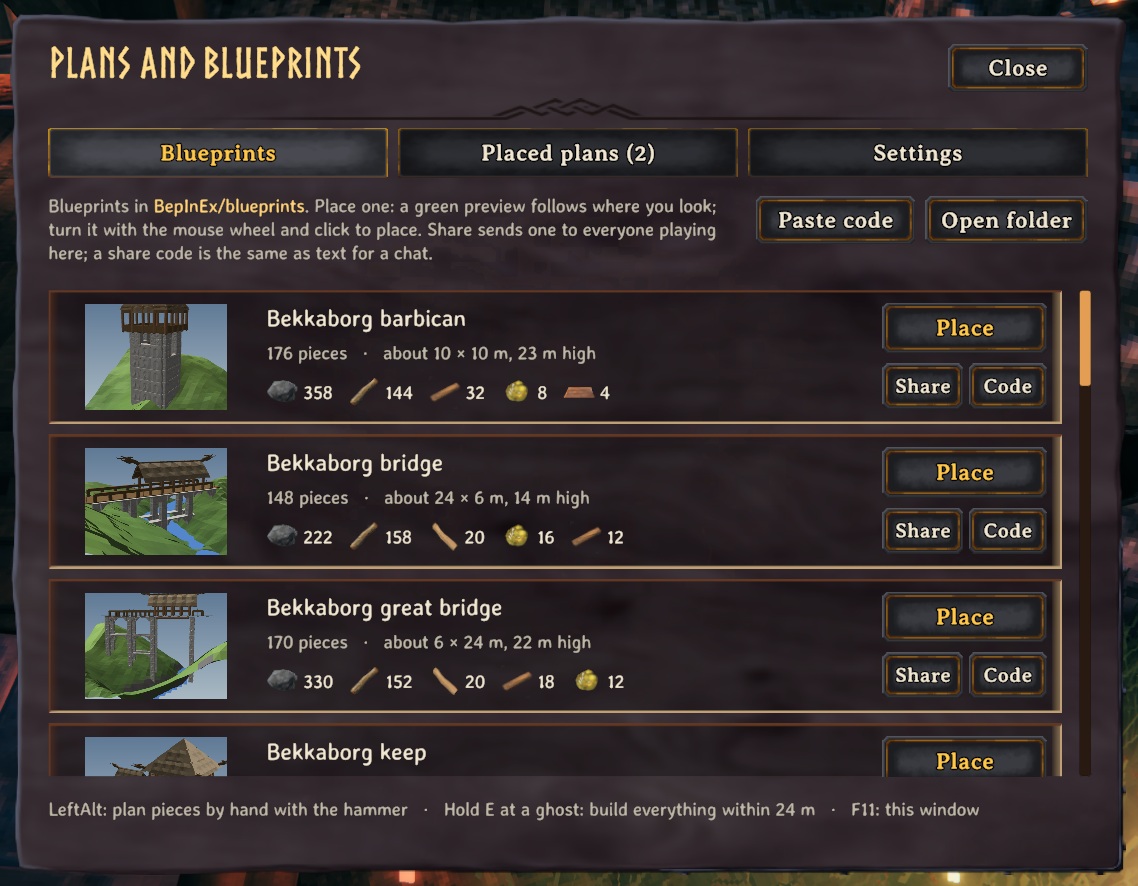
Plan pieces as shared ghost build orders. Your party sees them, you can build one by just walking up and pressing E, and a panel totals the materials you still need. Pick a blueprint in the Plans window (F11), turn its preview into place, and a whole structure appears as ghosts (share blueprints with your friends from the same window): ask an AI assistant to design a fort for you.
<!-- HAND-WRITTEN: kept when this page is made again -->
📸 Screenshots
The Plans window (F11): blueprints to place, with their size and cost
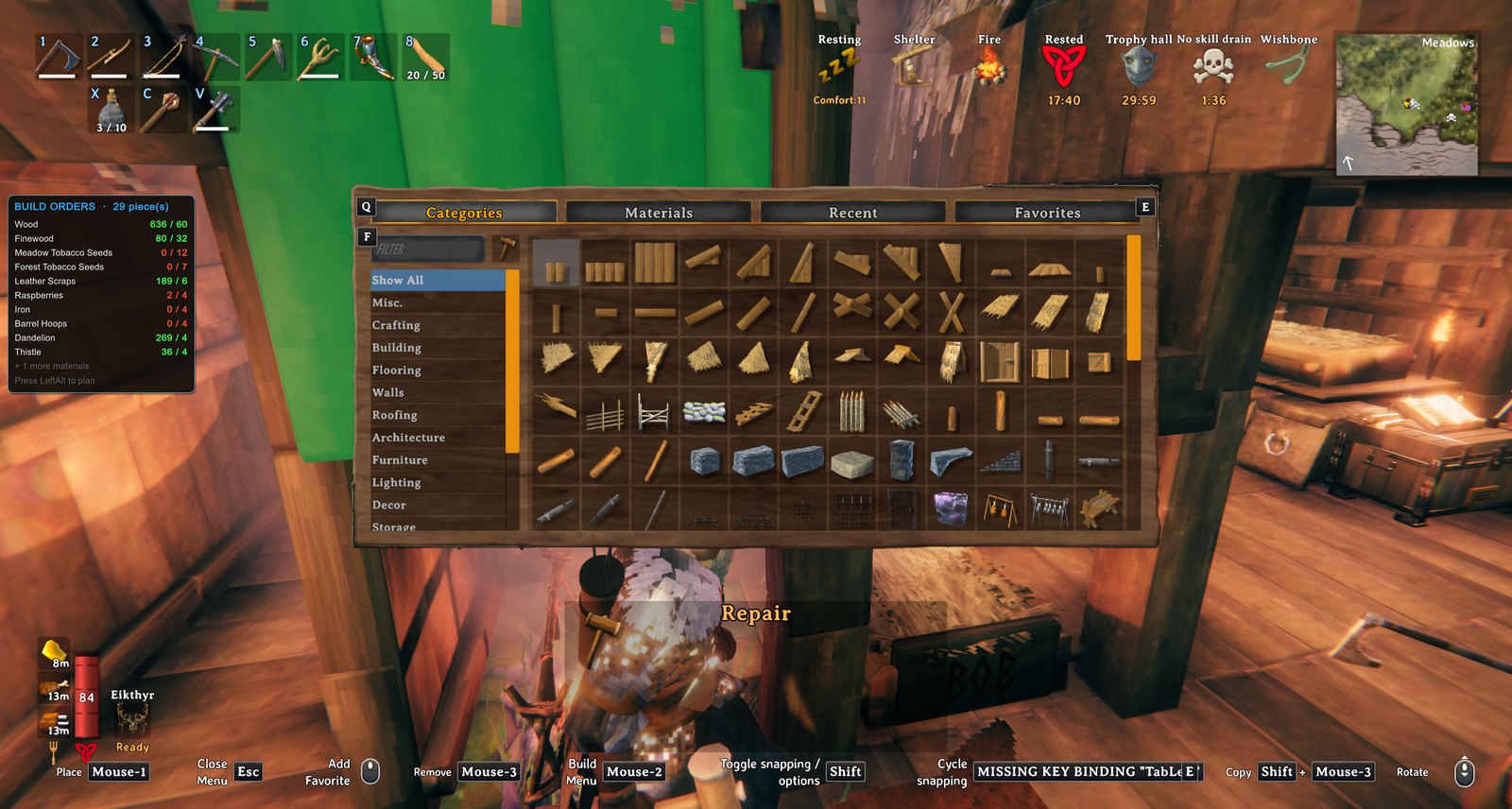
Building a plan: what it still needs, in the corner
 <!-- END HAND-WRITTEN -->
🔍 How it works
Plan pieces as shared ghost build orders for everyone in your party, and build them by just walking up and pressing E.
How it works
- With the hammer out, press Left Alt to turn plan mode on (press it again, or put the hammer away, to turn it off). In plan mode, placing a piece plans it instead of building it. It shows as a see-through ghost that other players see too. (A setting lets you hold the key instead.)
- Walk up to a ghost and tap E to build it: no hammer needed, on land or in the water. It builds even if nothing supports it yet (so you can build the structure around it afterwards). It costs the normal materials, from your inventory and then nearby chests (with BuildFromChests), and needs the piece to be unlocked and the spot not to be protected.
- Hold E at a ghost to build every ghost within 24 m (changeable in the F11 window) that you can afford, lowest first. Short of materials? It builds the part you can pay for, and only pieces that will stand on what is built (so nothing falls and nothing is wasted); come back with more and hold E again to carry on.
- Aiming at a ghost shows what that piece costs, what the whole plan still needs against what you have, and how many pieces holding E would build right now.
- Stability: while planning, ghosts are coloured by how well they would be supported (blue solid, green to red weaker, red would fall), worked out from the same rules the game uses. F10 shows or hides the colours any time, and the prompt says how well the ghost you are looking at would hold. It is an estimate; the game does the real check once a piece is built.
- In plan mode, ghosts act like real pieces: you can aim at them and your next piece snaps onto their snap points, so you can lay out a whole structure with the normal snapping and build it later, piece by piece.
- When you build for real, your placement snaps onto a ghost of the same piece, and the ghost disappears once the real piece is built.
- U selects the piece you are looking at to build more like it, and Delete removes a ghost. F9 shows or hides all ghosts.
- A panel totals the materials your orders still need.
Settings: ghost opacity, view distance, snap distance, how close you must be to build with E, and the keys.
Swimming: your hammer stays out in the water (setting BuildWhileSwimming), so you can plan and build from it. Equip the hammer before you jump in, because the game does not let you equip things while swimming.
Fetching materials: with the hammer out and a piece selected, a hint appears when your inventory is short of materials that the chests nearby have. Press Y (FetchKey) to take one stack of each of those materials out of the chests and into your inventory. It uses BuildFromChests for the chest access, so that mod has to be installed.
Bridge builder
- Pick Bridge in the hammer's build menu (Misc tab). Click where the bridge starts and walk or swim across (a ghost of it stretches after you, with its length and cost), then click where it ends.
- A Bridge panel opens beside the ghost: width (2, 4 or 6 m), material (wood; core wood, stronger and reaching deeper water; darkwood; stone, with a pillar under every slab and a stonecutter needed), sides (handrails, half walls or none), open or covered (a pitched roof on tall posts), supports down to the riverbed (auto, every 2 m, every 4 m), straight or gently arched, ends (a deck sloping from bank to bank, or a level deck with steps down at the lower end, stopping at the waterline), and torches every 8 m. The ghost changes as you choose and the panel shows what it takes against what you have. Confirm places it; Change end lets you aim the end again; Cancel or Esc drops it. Your choices are kept for next time.
- The deck slopes evenly from end to end (kept above the water, so a pier works too). Build it with E or hold E like any plan; Remove and take-down work as usual. The ground is not levelled, and a bridge is not moved (its posts are cut to the riverbed where it stands). It warns when it is very steep, the water is too deep for the posts, or there is no workbench within reach of an end.
Plans window (F11)
Highlights
From source dataLoaders
Runs on BepInEx.
Footprint
Rated a light load on a server.
Last update
Its author last shipped an update 25d ago.
Quads Build Orders on Nxeon
From our catalogue- One-click install
- Supported on Nxeon Valheim servers, for BepInEx servers. We download it from Thunderstore, place it, and restart the server.
- Server type needed
- BepInEx
- Server load
- light
- Smallest plan we suggest
- Valheim — 4 GB (4 GB RAM). This follows our own load rating above, not a benchmark.
- Latest build
- 1.12.1, released 2026-10-10
Game versions by loader
| Loader | Game versions | Newest |
|---|---|---|
| BepInEx |
From 1 recorded build of Quads Build Orders.
Dependencies
- Required: BepInExPack Valheim
Declared by the newest build that lists any. Required ones are installed with it on one-click installs.
Run Quads Build Orders on a Valheim server
Pick a server or deploy a new one above; it is installed in one click.
What kind of mod it is
From the catalogBuilding & decoration
Blocks, furniture, decorations and building tools.
Compatibility
- Game
- Valheim
- Loaders
- BepInEx
- Requires
- One-click install needs a BepInEx server.
Verified at the source
- ✓ThunderstoreOfficial listing, checked 2026-10-10Open ↗
- ✓AuthorQuads_Lab, as published on Thunderstore
- ✓LicenseNot published by the sourceFree











