






About Quads Ledger Chest
From ThunderstoreA chest you build that shows everything in every chest around it, with a search: search all your chests and storage, and take anything from wherever it is.
<!-- This page is made by tools/modpages/make_pages.py from the mod's thunderstore.toml, DESCRIPTION.txt, CHANGELOG.txt, settings and the repo's README. Change those, or the HAND-WRITTEN parts, not the rest of this page. -->
📒 Quad's Ledger Chest
A chest you build that shows everything in every chest around it, with a search: search all your chests and storage, and take anything from wherever it is.



Source code · Report a bug · Discord


✨ Features
- Build the Ledger Chest with the hammer at a workbench (10 Wood, 4 Fine Wood, 4 Leather Scraps, 2 Resin). It keeps nothing itself: it is the counter of your storehouse.
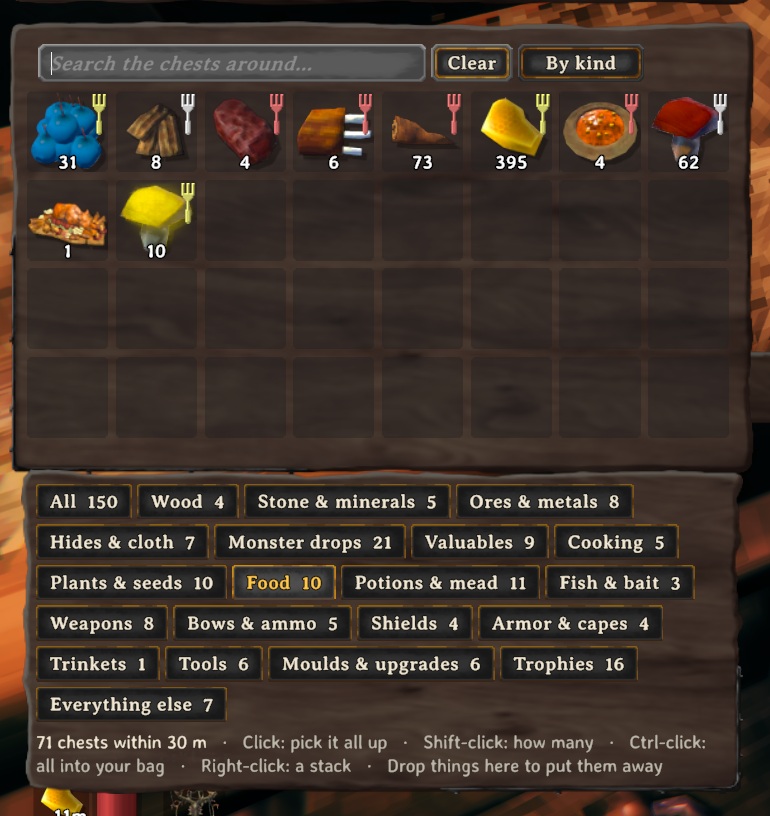
- Open it (E): in place of a chest's slots, the ledger shows every kind of item in the chests within 30 m, one slot each with how many there are in all. It is the game's own chest window, with its tooltips.
- A search in its title bar narrows it down (several words: all must match); list by kind, A to Z or most first.
- Category buttons under it (Wood, Stone & minerals, Ores & metals, Hides & cloth, Cooking, Food, Weapons, Armor, Trophies and more), each with how many things it holds: press one to see only those. Under them: which chests hold what is under your mouse.
- Click an item to pick all of it up, and put it down on a slot of your inventory: as much as fits comes out of the nearest chests that have it, into that slot first and then wherever there's room. Shift-click to choose how many (the game's own split slider). Ctrl-click: all that fits, straight into your inventory. Right-click: a stack, straight in. Put it back on the ledger (or outside the windows, or right-click) and nothing moves.
- Drop things onto it (or Ctrl-click them in your inventory) to put them away: each goes straight on to a chest around it. A chest assigned that item first (QualityOfLife's K), then one assigned its category, then a chest with nothing assigned (one already holding it first). When no chest has room it comes back to you.
- Hover a line to see which chests hold it and how far away they are.
- Items come out exactly as they went in (upgrades, wear). Chests someone else has open are left alone, and so are carts, ships, tombstones and companions' own chests.
- It has its own hand-made look: an iron-bound strongbox with the ledger open on a reading stand, a quill in its inkpot, scrolls and a candle.
📸 Screenshots
<!-- HAND-WRITTEN: screenshots --> The Ledger Chest
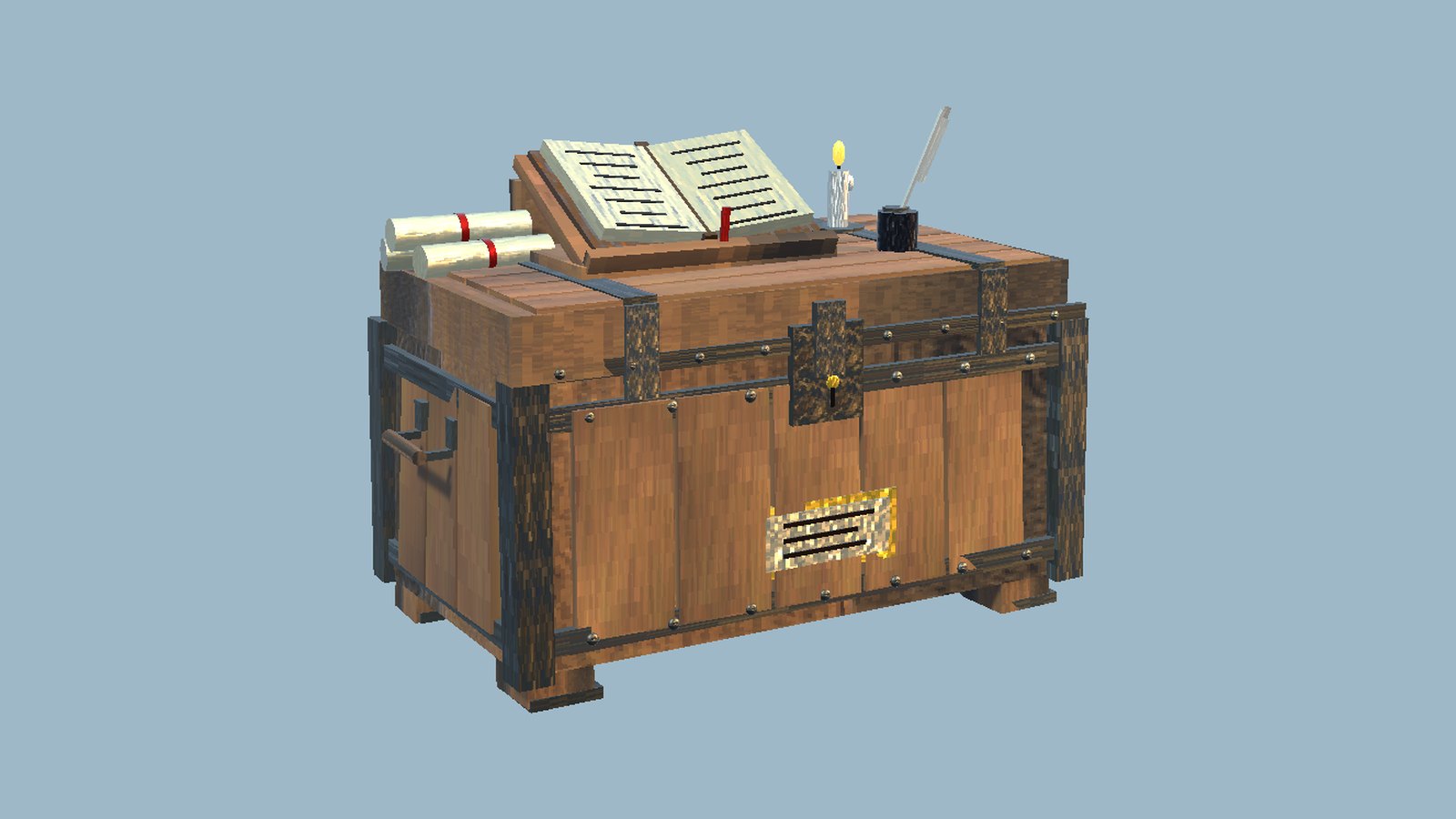
Everything in the chests around it, in one searchable list
 <!-- END HAND-WRITTEN: screenshots -->
🎮 How to use
| Key | What it does | |---|---| | E at a Ledger Chest | See and search everything in the chests around it; click to take, Shift-click to choose how many |
<!-- HAND-WRITTEN: how-to-use -->
<!-- END HAND-WRITTEN: how-to-use -->
🧩 Other mods
Goes well with
| <img src="https://raw.githubusercontent.com/HardHeadHackerHead/valheim-mods/main/mods/CraftFromChests/thunderstore/icon.png" alt="Quad's Craft From Chests" width="256"> | <img src="https://raw.githubusercontent.com/HardHeadHackerHead/valheim-mods/main/mods/BuildFromChests/thunderstore/icon.png" alt="Quad's Build From Chests" width="256"> | <img src="https://raw.githubusercontent.com/HardHeadHackerHead/valheim-mods/main/mods/FeedFromChests/thunderstore/icon.png" alt="Quad's Feed From Chests" width="256"> | <img src="https://raw.githubusercontent.com/HardHeadHackerHead/valheim-mods/main/mods/QualityOfLife/thunderstore/icon.png" alt="Quad's Quality of Life" width="256"> | |:-:|:-:|:-:|:-:| | Craft From Chests | Build From Chests | Feed From Chests | Quality of Life |
<!-- HAND-WRITTEN: other-mods --> Known clashes: none known.
It moves items with the game's own moves, and never lists graves, carts, ships or companions' chests.
Better together
Highlights
From source dataLoaders
Runs on BepInEx.
Footprint
Rated a light load on a server.
Last update
Its author last shipped an update 23d ago.
Quads Ledger Chest on Nxeon
From our catalogue- One-click install
- Supported on Nxeon Valheim servers, for BepInEx servers. We download it from Thunderstore, place it, and restart the server.
- Server side
- Optional on the server
- Server type needed
- BepInEx
- Server load
- light
- Smallest plan we suggest
- Valheim — 4 GB (4 GB RAM). This follows our own load rating above, not a benchmark.
- Latest build
- 1.2.3, released 2026-10-12
Game versions by loader
| Loader | Game versions | Newest |
|---|---|---|
| BepInEx |
From 5 recorded builds of Quads Ledger Chest.
Recent builds
| Build | Released | Game versions | Loaders |
|---|---|---|---|
| 1.2.3 | 2026-10-12 | n/a | BepInEx |
| 1.2.1 | 2026-10-11 | n/a | BepInEx |
| 1.2.0 | 2026-10-11 | n/a | BepInEx |
| 1.0.4 | 2026-10-10 | n/a | BepInEx |
| 1.0.3 | 2026-10-10 | n/a | BepInEx |
Dependencies
- Required: BepInExPack Valheim
Declared by the newest build that lists any. Required ones are installed with it on one-click installs.
Run Quads Ledger Chest on a Valheim server
Pick a server or deploy a new one above; it is installed in one click.
What kind of mod it is
From the catalogBuilding & decoration
Blocks, furniture, decorations and building tools.
Works on a server
From source side supportThunderstore lists server-side support for Quads Ledger Chest as optional: it can run on a server, but isn’t required there.
Compatibility
- Game
- Valheim
- Loaders
- BepInEx
- Runs on
- Serveroptional on the server
- Requires
- One-click install needs a BepInEx server.
Verified at the source
- ✓ThunderstoreOfficial listing, checked 2026-10-12Open ↗
- ✓AuthorQuads_Lab, as published on Thunderstore
- ✓LicenseNot published by the sourceFree











