






About Quads Portal Hub
From ThunderstoreA portal network: press E on a portal and pick where it goes from a list, a teleport menu with search, favourites and map lines. No more matching portal names; portals you already built keep working.
<!-- This page is made by tools/modpages/make_pages.py from the mod's thunderstore.toml, DESCRIPTION.txt, CHANGELOG.txt, settings and the repo's README. Change those, or the HAND-WRITTEN parts, not the rest of this page. -->
🌀 Quad's Portal Hub
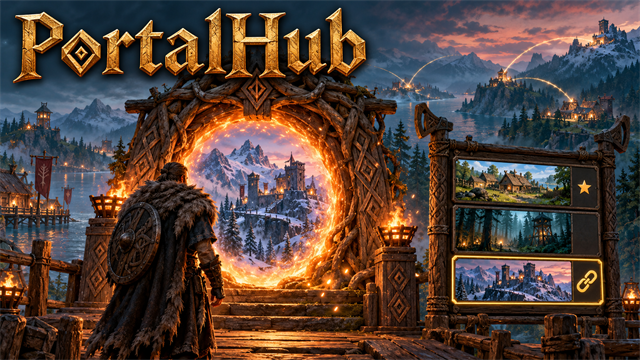
A portal network: press E on a portal and pick where it goes from a list, a teleport menu with search, favourites and map lines. No more matching portal names; portals you already built keep working.



Source code · Report a bug · Discord


✨ Features
A portal network: press E on a portal and pick where it goes from a list. No more matching portal names to teleport where you want.
What is in it
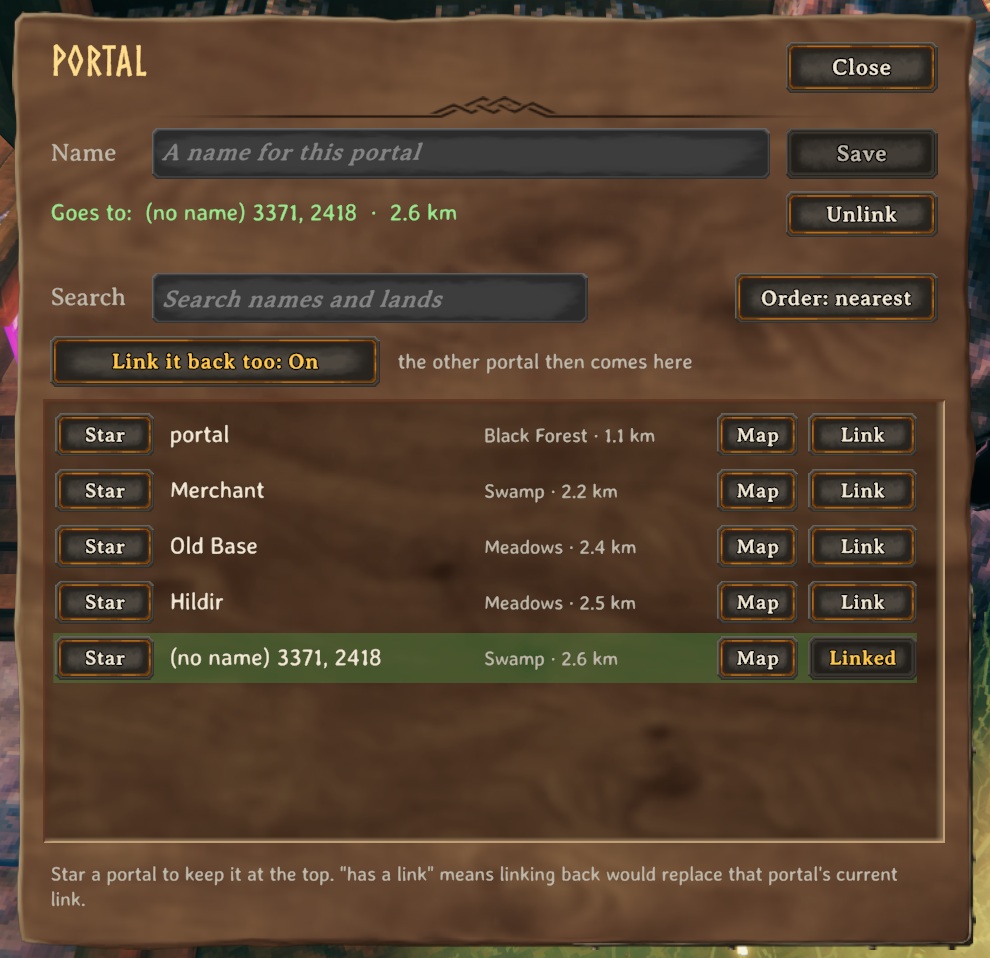
- The list shows every portal in the world, nearest first, with its biome and distance. Search it, sort it by name, or star the ones you use most to keep them at the top.
- One click links this portal to the one you pick, and (by default) links that one back, so there is no more matching names on both ends.
- Every portal shows on the map with its name, and the big map draws a line from each portal to where it goes (an arrow when it only goes one way). A Map button next to each portal in the menu opens the map at that spot.
- Look at a portal and it tells you where it goes.
- Rename a portal right in the menu. Portals you never choose a destination for work the old way, by matching names, so nothing you built breaks.
- Teleport rules are unchanged: you still cannot carry ores or other blocked items through a portal.
- Needs to be installed on the host's game (and on yours to use the menu). Players without it can still walk through linked portals.
📸 Screenshots
<!-- HAND-WRITTEN: screenshots --> Pick where a portal goes from the list: names, lands, distances
 <!-- END HAND-WRITTEN: screenshots -->
🎮 How to use
| Key | What it does | |---|---| | E at a portal | Open the portal menu and choose where it goes |
<!-- HAND-WRITTEN: how-to-use -->
- E on any portal opens the PortalHub menu instead of the game's name box (press Shift+E for the game's own name box).
- Protected areas: a portal inside someone else's switched-on ward can't be relinked or renamed by you, and you can't link a portal
into it either (a link would let anyone walk into their base). The host checks this, whatever a player's game says. With HideWardedPortals on (the host's choice), those portals also stay out of your list and map. <!-- END HAND-WRITTEN: how-to-use -->
🧩 Other mods
Goes well with
| <img src="https://raw.githubusercontent.com/HardHeadHackerHead/valheim-mods/main/mods/MapShare/thunderstore/icon.png" alt="Quad's Map Share" width="256"> | <img src="https://raw.githubusercontent.com/HardHeadHackerHead/valheim-mods/main/mods/PartyHud/thunderstore/icon.png" alt="Quad's Party HUD" width="256"> | <img src="https://raw.githubusercontent.com/HardHeadHackerHead/valheim-mods/main/mods/Ziplines/thunderstore/icon.png" alt="Quad's Ziplines" width="256"> | <img src="https://raw.githubusercontent.com/HardHeadHackerHead/valheim-mods/main/mods/JetSkis/thunderstore/icon.png" alt="Quad's Jet Skis" width="256"> | |:-:|:-:|:-:|:-:| | Map Share | Party HUD | Ziplines | Jet Skis |
<!-- HAND-WRITTEN: other-mods --> Known clashes
- XPortal: PortalHub stands down while it's installed (the log says so).
<!-- END HAND-WRITTEN: other-mods -->
Found a clash with another mod? Tell us which one and what happened.
👥 Multiplayer
Who needs it: The host (it keeps the portal links), and everyone who wants the portal menu.
<!-- HAND-WRITTEN: multiplayer --> The host keeps the portal list and the links, and checks wards before relinking or renaming. Players without the mod still travel through linked portals; they just don't get the menu.
The host decides: whether the menu is on and whether warded portals are hidden. While you play on their world their values replace yours (your file isn't changed); a host without the mod leaves everyone their own. <!-- END HAND-WRITTEN: multiplayer -->
🌍 Languages
Highlights
From source dataLoaders
Runs on BepInEx.
Footprint
Rated a light load on a server.
Last update
Its author last shipped an update 23d ago.
Quads Portal Hub on Nxeon
From our catalogue- One-click install
- Supported on Nxeon Valheim servers, for BepInEx servers. We download it from Thunderstore, place it, and restart the server.
- Server side
- Optional on the server
- Server type needed
- BepInEx
- Server load
- light
- Smallest plan we suggest
- Valheim — 4 GB (4 GB RAM). This follows our own load rating above, not a benchmark.
- Latest build
- 1.4.3, released 2026-10-12
Game versions by loader
| Loader | Game versions | Newest |
|---|---|---|
| BepInEx |
From 5 recorded builds of Quads Portal Hub.
Recent builds
| Build | Released | Game versions | Loaders |
|---|---|---|---|
| 1.4.3 | 2026-10-12 | n/a | BepInEx |
| 1.4.1 | 2026-10-11 | n/a | BepInEx |
| 1.4.0 | 2026-10-11 | n/a | BepInEx |
| 1.2.2 | 2026-10-10 | n/a | BepInEx |
| 1.2.1 | 2026-10-10 | n/a | BepInEx |
Dependencies
- Required: BepInExPack Valheim
Declared by the newest build that lists any. Required ones are installed with it on one-click installs.
Run Quads Portal Hub on a Valheim server
Pick a server or deploy a new one above; it is installed in one click.
What kind of mod it is
From the catalogQuality of life & UI
Small conveniences, tweaks and interface improvements players notice straight away.
Works on a server
From source side supportThunderstore lists server-side support for Quads Portal Hub as optional: it can run on a server, but isn’t required there.
Compatibility
- Game
- Valheim
- Loaders
- BepInEx
- Runs on
- Serveroptional on the server
- Requires
- One-click install needs a BepInEx server.
Verified at the source
- ✓ThunderstoreOfficial listing, checked 2026-10-12Open ↗
- ✓AuthorQuads_Lab, as published on Thunderstore
- ✓LicenseNot published by the sourceFree












