






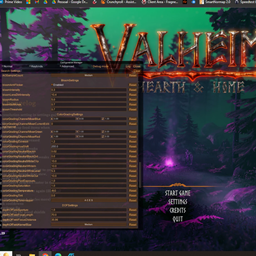
About PostProcessing
From ThunderstoreGives you advanced control over the game's post processing effects, including Anti-Aliasing, Ambient Occlusion, Bloom, Color Grading, Depth of Field, Eye Adaptation, Motion Blur, Vignette, Chromatic Aberration, and Screen Space Reflection.
Installation (manual)
If you are installing this manually, do the following
- Extract the archive into a folder. Do not extract into the game folder.
- Move the contents of
BepInExPack_Valheimfolder into<Steam Location>\steamapps\common\Valheim. - Check that you have installed it correctly.
If done correctly, your folder will look as follows
Highlights
From source dataLoaders
Runs on BepInEx.
Footprint
Rated a light load on a server.
Last update
Its author last shipped an update 2 yr ago.
PostProcessing on Nxeon
From our catalogue- One-click install
- Supported on Nxeon Valheim servers, for BepInEx servers. We download it from Thunderstore, place it, and restart the server.
- Server type needed
- BepInEx
- Server load
- light
- Smallest plan we suggest
- Valheim — 4 GB (4 GB RAM). This follows our own load rating above, not a benchmark.
- Latest build
- 0.1.2, released 2024-07-20
Game versions by loader
| Loader | Game versions | Newest |
|---|---|---|
| BepInEx |
From 1 recorded build of PostProcessing.
Run PostProcessing on a Valheim server
Pick a server or deploy a new one above; it is installed in one click.
What kind of mod it is
From the catalogListed on Thunderstore as “Admin”
Admin & protection
Permissions, moderation, anti-cheat and land protection for the people running the server.
Compatibility
- Game
- Valheim
- Loaders
- BepInEx
- Requires
- One-click install needs a BepInEx server.
Verified at the source
- ✓ThunderstoreOfficial listing, checked 2026-10-02Open ↗
- ✓AuthorRenaGames, as published on Thunderstore
- ✓LicenseNot published by the sourceFree











