






About RunicStorageNetwork
From ThunderstoreConnects your base's chests into a network. Craft and upgrade items, build using stored resources, and extend coverage with Runic Relays. Adds four build pieces and two codex items. Created with AI assistance.
Runic Storage Network
> New in 1.0: Distant storage and the mod API are enabled by default for new configurations. You can turn them off in settings. Existing settings are kept when updating. > > Новое в 1.0: Удалённые хранилища и API включены по умолчанию в новых конфигурациях. При желании их можно отключить в настройках. При обновлении сохранённые настройки не меняются.
Settings (EN) · Настройки (RU) · API for mod developers
Report a bug / Сообщить об ошибке · Changelog (EN) · История изменений (RU)
English
Keep your resources in storage — craft and build where you need them.
Runic Storage Network connects your base's chests into a supply network. Craft and upgrade items at connected crafting stations, build with your construction tools, and expand your base without hauling materials from one building to another.
Craft and build through the familiar menus while materials are consumed directly from connected chests. A Storage Codex also lets you search the network and retrieve items into your inventory.
Build pieces
The Storage Codex, equippable Builder's Codex and Runic Gateway are available only when their individual [Content] settings are true (all default to true). Gateways also require ExperimentalUnloadedNetworks = true. See content settings.
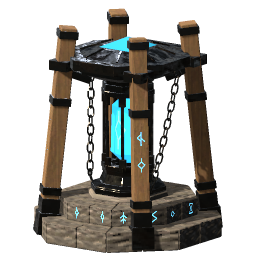
Storage Network Core
The center of your network. Connects nearby chests and makes their resources available for crafting, upgrading items, and building within its coverage area. One core is enough for a small workshop and storage area.
Runic Relay
Extends the network between buildings. Connects to the core directly or through other relays, links nearby chests, and lets you craft and build nearby using resources from the entire network.
Relays can form chains and branches. They need an uninterrupted connection to the core to function. If the connection breaks, the disconnected section loses access to network resources, but items remain in their chests and can still be retrieved manually.
Storage Codex
A book on a stone pedestal that opens network storage. Place it within the supply range of a core or connected relay. It gives access to that network without extending its coverage. Hover over it to see whether it is connected.
Runic Gateway
Bridges distant sections of the same network. Enable experimental distant storage, build the first gateway near your core or connected relay, and give it a link name. Give a second gateway the same name to extend that network to a distant outpost. Relays, chests, crafting stations and the Storage Codex work around each gateway within normal relay ranges.
Exactly two gateways may share a link name. A third disables that pair until the names are corrected. Gateways keep their network binding and cannot join two independent networks; dismantle and rebuild a gateway to bind it to another core.
By default, only items allowed through ordinary portals can cross the distant link, including the world's portal setting. Set Network.GatewayCarriesAllItems = true and restart the game/server to allow ore, metal bars and other portal-restricted items through gateways. Local materials stay usable: iron stored at an outpost can be used there, but iron at the main base cannot cross the gateway under normal portal rules. An ordinary relay path between the two sides also allows those materials. Gateways do not teleport players.
All four structures are built with the regular hammer near a workbench and require no fuel.
Runic Codex
The closed book used to build a Storage Codex. Craft it at a level 1 forge after discovering its ingredients. It can be carried, stored, dropped and picked up like a regular item.
Runic Builder's Codex
A wearable book for building farther from the network. Craft it at a black forge, put it on your hotbar, aim at a Network Core and press the book's hotbar key to bind it. Then equip it in the utility slot, shared with Megingjord.
While equipped, the book draws building materials only from its bound network within 50 m of a core or connected relay, following the configured relay link range. Each copy keeps its own binding; use it on another core to rebind. Network names are optional, and renaming a network does not break the binding. An unbound book supplies no network materials while equipped.
The book does not connect nearby chests or other players, and does not extend crafting-station supply or remove normal workbench requirements for building. Gateway restrictions and storage access rules still apply. Loaded networks work normally; reaching unloaded parts requires experimental distant storage.
Getting started
- Build a core near your storage chests.
- Place crafting stations within its coverage area, or extend the network to other buildings with relays.
- Use crafting stations and your construction tools as usual — the required materials will be drawn from the available supply.
Materials in your inventory are used first, followed by any missing materials from connected chests. Recipe requirements and crafting station level requirements still apply.
Highlights
From source dataLoaders
Runs on BepInEx.
Footprint
Rated a light load on a server.
Last update
Its author last shipped an update 17d ago.
RunicStorageNetwork on Nxeon
From our catalogue- One-click install
- Supported on Nxeon Valheim servers, for BepInEx servers. We download it from Thunderstore, place it, and restart the server.
- Server type needed
- BepInEx
- Server load
- light
- Smallest plan we suggest
- Valheim — 4 GB (4 GB RAM). This follows our own load rating above, not a benchmark.
- Latest build
- 1.0.2, released 2026-10-18
Game versions by loader
| Loader | Game versions | Newest |
|---|---|---|
| BepInEx |
From 19 recorded builds of RunicStorageNetwork.
Recent builds
| Build | Released | Game versions | Loaders |
|---|---|---|---|
| 1.0.2 | 2026-10-18 | n/a | BepInEx |
| 1.0.1 | 2026-10-08 | n/a | BepInEx |
| 1.0.0 | 2026-10-02 | n/a | BepInEx |
| 0.8.8 | 2026-09-30 | n/a | BepInEx |
| 0.8.7 | 2026-09-28 | n/a | BepInEx |
| 0.8.6 | 2026-09-28 | n/a | BepInEx |
Dependencies
- Required: BepInExPack Valheim
- Required: Jotunn
Declared by the newest build that lists any. Required ones are installed with it on one-click installs.
Run RunicStorageNetwork on a Valheim server
Pick a server or deploy a new one above; it is installed in one click.
What kind of mod it is
From the catalogBuilding & decoration
Blocks, furniture, decorations and building tools.
Compatibility
- Game
- Valheim
- Loaders
- BepInEx
- Requires
- One-click install needs a BepInEx server.
Verified at the source
- ✓ThunderstoreOfficial listing, checked 2026-10-19Open ↗
- ✓AuthorRerit, as published on Thunderstore
- ✓LicenseNot published by the sourceFree











