







About RossPortals
From ThunderstorePick a portal's destination from a searchable, foldered list, and mark every portal on the map. No tag pairing.
RossPortals
Pick a portal's destination from a list, and actually find the one you want.
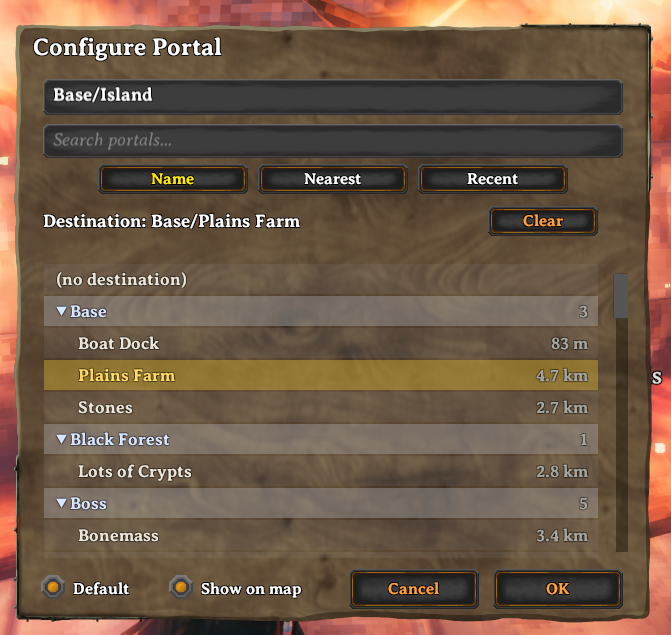
Once you have more than a handful of portals, vanilla tag-pairing — and even a plain destination dropdown — turns finding the right one into a scavenger hunt. RossPortals gives every portal a configuration panel with:
- A search box. Type any part of a name to filter the list instantly.
- Folders. Put a separator in a portal's name and it becomes a folder:
name portals Mines/Copper, Mines/Iron, Base/Home and they group under collapsible Mines and Base headers. The separator is / by default and configurable. No extra menus — you organise purely by how you name things.
- Sorting. Sort by Name (which keeps the folders), or by Nearest or
Recent — those two show a flat list of every portal, so you can jump straight to the closest one, or the one you just came from.
- No tag pairing. Portals don't need matching tags or to point at each
other. Choose a destination and go.
- Default destination. Mark one portal as the default and every new portal
you place points at it automatically — no configuring each one.
- Portals on the map. Every portal is marked on your map with the portal
icon and its name, so you can see your whole network at a glance. Toggle any portal off the map individually.
Switching from XPortal
RossPortals is a drop-in replacement for XPortal and imports your existing portal network the first time it loads a save: every destination you set in XPortal is carried over automatically. Just disable XPortal and enable RossPortals — your portal names and connections come with you.
The two mods can't run at the same time (they both take over the portal interface), so remove or disable XPortal before playing.
Multiplayer
Everyone on a server needs the mod, at the same minor version. The server keeps the authoritative portal list and syncs it to every player.
Usage
Walk up to a portal and press your Use key. Give it a name (use / to file it in a folder), search and pick a destination, and press OK. That's it.
Highlights
From source dataLoaders
Runs on BepInEx.
Footprint
Rated a light load on a server.
Last update
Its author last shipped an update 37d ago.
RossPortals on Nxeon
From our catalogue- One-click install
- Supported on Nxeon Valheim servers, for BepInEx servers. We download it from Thunderstore, place it, and restart the server.
- Server type needed
- BepInEx
- Server load
- light
- Smallest plan we suggest
- Valheim — 4 GB (4 GB RAM). This follows our own load rating above, not a benchmark.
- Latest build
- 0.2.6, released 2026-09-29
Game versions by loader
| Loader | Game versions | Newest |
|---|---|---|
| BepInEx |
From 8 recorded builds of RossPortals.
Recent builds
| Build | Released | Game versions | Loaders |
|---|---|---|---|
| 0.2.6 | 2026-09-29 | n/a | BepInEx |
| 0.2.5 | 2026-09-21 | n/a | BepInEx |
| 0.2.4 | 2026-09-21 | n/a | BepInEx |
| 0.2.3 | 2026-09-21 | n/a | BepInEx |
| 0.2.2 | 2026-09-20 | n/a | BepInEx |
| 0.2.1 | 2026-09-20 | n/a | BepInEx |
Dependencies
- Required: BepInExPack Valheim
- Required: Jotunn
Declared by the newest build that lists any. Required ones are installed with it on one-click installs.
Run RossPortals on a Valheim server
Pick a server or deploy a new one above; it is installed in one click.
What kind of mod it is
From the catalogQuality of life & UI
Small conveniences, tweaks and interface improvements players notice straight away.
Compatibility
- Game
- Valheim
- Loaders
- BepInEx
- Requires
- One-click install needs a BepInEx server.
Verified at the source
- ✓ThunderstoreOfficial listing, checked 2026-10-01Open ↗
- ✓AuthorRoss, as published on Thunderstore
- ✓LicenseNot published by the sourceFree












