About AdvancedTerrainModifiers
From ThunderstoreQuality of life building mod that improves how terrain manipulation with the hoe and cultivator works and adds new terrain manipulation tools.
AdvancedTerrainModifiers
Quality of life building mod that improves how terrain manipulation with the hoe and cultivator works and adds new terrain manipulation tools.
Server-Side Info: This mod does work as a client-side only mod and only needs to be installed on the server if you wish to enforce configuration settings.
Deep North Update: There are some visual glitches at the moment where the change of terrain paint (dirt, cobblestone, grass, etc.) can be slightly misalgned with the precision terrain tools (square shaped tools). This issue is related to a Vanilla issue and will be adressed in a future update.
Compatibility Notice: This mod is fully compatible with EpicLoot as far as I and the authors of EpicLoot are aware, not sure why one of the forks of it thinks otherwise. If you run into any issues please report them to myself and/or the modders who maintain EpicLoot.
Features
Multiplayer Support
- All terrain operations, including resetting terrain modifications, work in multiplayer and are synced to other players.
Quality of Life
- Adds descriptions of how each terrain tool works for all Vanilla terrain tools.
- All new features can be enabled/disabled from the configuration file.
Modifiable Tool Radius
- Lets you change the radius of terrain tools using the scroll wheel.
- Configurable hotkey to enable changing radius.
- Configurable maximum tool radius.
- Camera zoom is blocked while modifying tool radius.
Modifiable Tool Sharpness
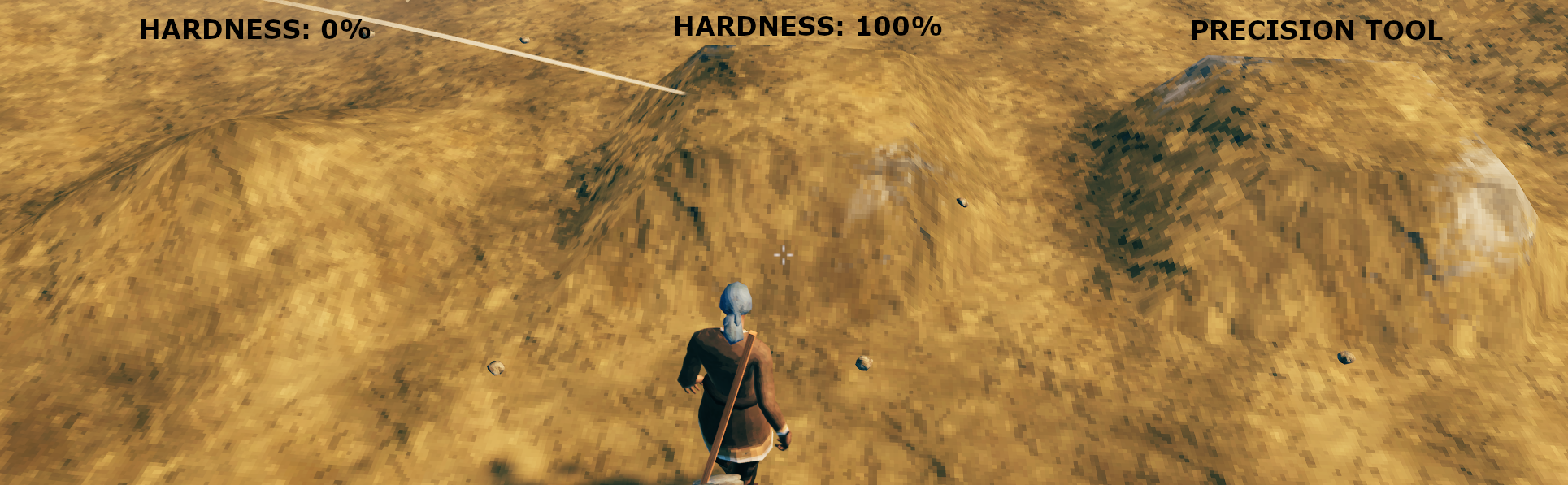
- Lets you change the "sharpness" of terrain tools using the scroll wheel. "Sharpness" refers to how uniformly the effect is applied over the radius of the tool, so increasing the hardness will apply the effect more uniformly (see image for example of changing hardness for the Raise Ground tool).
- Configurable hotkey to enable changing sharpness.
- Camera zoom is blocked while modifying tool sharpness.
- It's refered to as "hardness" in the example image because I originally named it that after digital paintbrush tools but I got tired of my friends making jokes about getting harder and changed it to sharpness.
 </img>
New Terrain Tool
- Adds a craftable shovel that lets you lower terrain.
Shovel Recipe Information
You need to discover iron and have access to a forge to craft the shovel.
New Hoe Tools
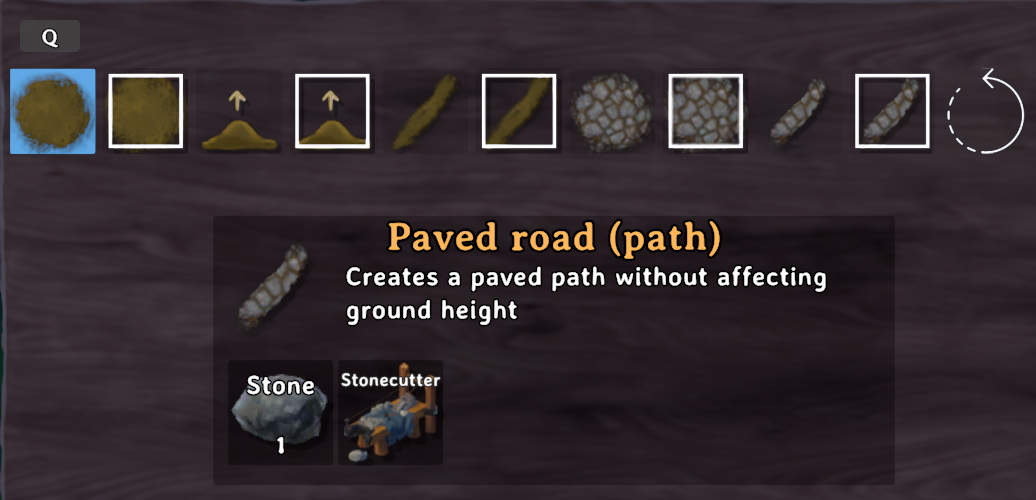
- Adds a version of each terrain tool that doesn't affect the terrain height when used.
- Adds square versions of all terrain tools that modify terrain according to the world grid (so you can enjoy clean edges).
- Adds a precision raise ground tool that lets you set the exact height you want to raise the terrain by using the scroll wheel on your mouse.
- Adds a remove terrain modifications tool that lets you reset terrain.
 </img>
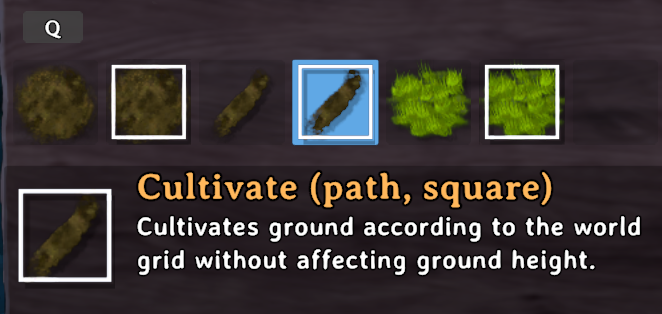
New Cultivator Tools
- Adds a version of the cultivate tool that doesn't affect the terrain height when used.
- Adds square versions of each tools tool in the cultivator that modifies terrain according to the world grid (so you can enjoy clean edges).
 </img>
Instructions
If you are using a mod manager for Thunderstore simply install the mod from there. If you are not using a mod manager then, you need a modded instance of Valheim (BepInEx) and the Jotunn plugin installed.
Configuration
Changes made to the configuration settings will be reflected in-game immediately (no restart required) and they will also sync to clients if the mod is on the server. The mod also has a built in file watcher so you can edit settings via an in-game configuration manager (changes applied upon closing the in-game configuration manager) or by changing values in the file via a text editor or mod manager.
Global Section
These settings control the global settings and how verbose the output to the log is.- Acceptable values: Low, Medium, High
- Default value: Low
- Acceptable values: False, True
- Default value: true
Radius Section
These settings control features related to modifying the radius of terrain tools.- Acceptable values: False, True
- Default value: true
Highlights
From source dataLoaders
Runs on BepInEx.
Footprint
Rated a light load on a server.
Dependencies
Needs 2 other projects installed alongside it.
AdvancedTerrainModifiers on Nxeon
From our catalogue- One-click install
- Supported on Nxeon Valheim servers, for BepInEx servers. We download it from Thunderstore, place it, and restart the server.
- Server side
- Optional on the server
- Server type needed
- BepInEx
- Server load
- light
- Smallest plan we suggest
- Valheim — 4 GB (4 GB RAM). This follows our own load rating above, not a benchmark.
- Latest build
- 1.6.1, released 2026-10-26
Game versions by loader
| Loader | Game versions | Newest |
|---|---|---|
| BepInEx |
From 24 recorded builds of AdvancedTerrainModifiers.
Recent builds
| Build | Released | Game versions | Loaders |
|---|---|---|---|
| 1.6.1 | 2026-10-26 | n/a | BepInEx |
| 1.6.0 | 2026-10-19 | n/a | BepInEx |
| 1.5.7 | 2026-10-16 | n/a | BepInEx |
| 1.5.6 | 2026-10-08 | n/a | BepInEx |
| 1.5.5 | 2026-10-03 | n/a | BepInEx |
| 1.5.4 | 2026-09-21 | n/a | BepInEx |
Dependencies
- Required: Jotunn
- Required: BepInExPack Valheim
Declared by the newest build that lists any. Required ones are installed with it on one-click installs.
Run AdvancedTerrainModifiers on a Valheim server
Pick a server or deploy a new one above; it is installed in one click.
What kind of mod it is
From the catalogQuality of life & UI
Small conveniences, tweaks and interface improvements players notice straight away.
Works on a server
From source side supportThunderstore lists server-side support for AdvancedTerrainModifiers as optional: it can run on a server, but isn’t required there.
Compatibility
- Game
- Valheim
- Loaders
- BepInEx
- Runs on
- Serveroptional on the server
- Requires
- One-click install needs a BepInEx server. 2 other projects installed alongside it.
Verified at the source
- ✓ThunderstoreOfficial listing, checked 2026-10-26Open ↗
- ✓AuthorSearica, as published on Thunderstore
- ✓LicenseNot published by the sourceFree