






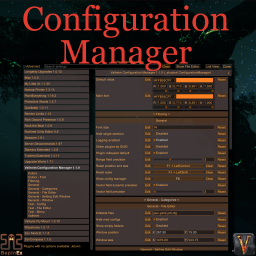
About ConfigurationManager
From ThunderstoreLocalized, recolored, refined. Split view mode. Config files editor. Setting edit window. Changed values are highlighted. Prevent user input or pause the game while window is open. Window scale depends on game scale.
The mod was originally created and hosted by the BepInEx team https://github.com/BepInEx/BepInEx.ConfigurationManager
It is distributed under the GPLv3 and this version maintains that license.
That fork have additions from other similar mods
- Coloring and localization are based on aedenthorn's https://github.com/aedenthorn/BepInEx.ConfigurationManager
- Color drawer is based on Azumatt's https://github.com/AzumattDev/BepInEx.ConfigurationManager (dev branch)
- Everything taken was improved and refined in various places
How to use
Press hotkey button in game (default F1) to open mod window and change configuration of mods.
Features improved
- Localization - every button and label can be localized
- Elements recolored - you can set color of background, widget and enabled toggle
- Fonts colored - set distinct colors for default and changed values
- Color drawer extended further
- Window is draggable, resizable and remembers its size and position
- Open and close window by hitting one hotkey. Close window with Escape.
- Dropdown menu style refined; open dropdowns suppress hover highlights and tooltips on other manager controls
- Reuses UI styles, enum metadata, and tooltip measurements instead of rebuilding them on every IMGUI event
- Lots of minor refinements and improvements
- Readonly entries (locked from server) could be colored, disabled or completely hidden
- Dynamic
ReadOnlyandBrowsableattributes are refreshed while the window remains open and rechecked immediately before a setting write - Synchronization state buttons with hover details for Jotunn, ServerSync and Conditional Config Sync settings;
Smeans server-controlled andCmeans client-controlled. Conditional settings use the normal font color while their mod default is active and blue after server policy changes the ownership. Authorized administrators can toggle CCS Conditional ownership directly. - Optional compact config list layout applies uniform reduced vertical spacing to every setting row, is enabled by default and is switchable from the window header
- default view is Split View where plugins and categories are showed as a tree in left column
- File Editor for configuration files
- Setting Edit Window for more detailed setting configuration
Valheim specific
Valheim 1.0.7 is the target game version. The manager uses ZCursor for cursor visibility and restores the current scene's cursor handling when it closes.
Prevent input supports three modes: Off allows pass-through; Player blocks gameplay and background HUD/menu controls while preserving the console; All also blocks console input. The manager itself remains interactive. These modes cover vanilla ZInput/uGUI paths, not arbitrary other mods reading Unity input directly.
Dropdown placement is derived from the actual button rectangle independently of background hover masking, including in scrolled and scaled windows.
Tooltips are available on setting names and synchronization indicators even when an entry is read-only. Tooltip hit areas respect the owning window and scroll viewport. Both manager scaling and the optional Valheim GUI scale are supported.
The game will be paused (if it can be paused) while the window is open (disabled by default).
Configuration Manager settings and server policy
All settings belonging to Configuration Manager itself are registered with Conditional Config Sync as policy-controlled settings. They remain client-controlled by default, preserving each player's local UI, input, window, text, color, and file-editor preferences.
When Configuration Manager is also installed on the server, administrators can use the CCS synchronization policy to force individual settings or complete sections to server-controlled ownership. Lock Configuration is always server-controlled. Configuration Manager remains optional on remote peers (ModRequired = false), so clients without the mod can still connect.
Hidden settings
Create file shudnal.ConfigurationManager.hiddensettings.json and place next to plugin dll or in \BepInEx\config folder.
The file could contain array of strings with special format. pluginGUID=Section name=Settings name equal sign separated strings containing mod GUID, section name and config name.
If such settings is found in settings list it will be hidden completely.
In given file entries 1 and 2 are here for format example. 3rd string will hide setting "Pause game" in section "Valheim" of that Configuration manager mod.
[
	"pluginGUID=Section name=Settings name",
	"authorname.exampleGUID=Section name=Settings name 2",
	"shudnal.ConfigurationManager=Valheim=Pause game"
]
To get mod GUID ingame you can enable "Debug mode" toggle in mods header. Now mod GUID will be presented in mod tooltip on hover.
Said file could also be placed on server to push that hidden settings to clients. Combined with preconfigured modpack configs you can prevent users from changing values of client-sided mods easily. Yet they can still edit files manually. Server administrators are identified through Conditional Config Sync's effective administrator state, so hidden settings are not applied to an authorized administrator because of delayed or stale vanilla AdminList data.
Compatibility
The mod is incompatible with original configuration manager and will not be loaded in that case.
Conditional Config Sync 1.0.5 or newer is required.
Installation (manual)
Install Conditional Config Sync 1.0.5 or newer, then place ConfigurationManager.dll in your BepInEx\Plugins\ folder.
Dependencies
Install ConditionalConfigSync as a separate dependency; do not copy its DLLs into this mod's package.
Highlights
From source dataLoaders
Runs on BepInEx.
Footprint
Rated a light load on a server.
Dependencies
Needs 4 other projects installed alongside it.
ConfigurationManager on Nxeon
From our catalogue- One-click install
- Supported on Nxeon Valheim servers, for BepInEx servers. We download it from Thunderstore, place it, and restart the server.
- Server side
- Optional on the server
- Server type needed
- BepInEx
- Server load
- light
- Smallest plan we suggest
- Valheim — 4 GB (4 GB RAM). This follows our own load rating above, not a benchmark.
- Latest build
- 1.1.27, released 2026-10-24
Game versions by loader
| Loader | Game versions | Newest |
|---|---|---|
| BepInEx |
From 30 recorded builds of ConfigurationManager.
Recent builds
| Build | Released | Game versions | Loaders |
|---|---|---|---|
| 1.1.27 | 2026-10-24 | n/a | BepInEx |
| 1.1.26 | 2026-10-22 | n/a | BepInEx |
| 1.1.25 | 2026-10-06 | n/a | BepInEx |
| 1.1.24 | 2026-10-05 | n/a | BepInEx |
| 1.1.23 | 2026-10-02 | n/a | BepInEx |
| 1.1.22 | 2026-09-27 | n/a | BepInEx |
Dependencies
- Required: YamlDotNet
- Required: JsonDotNET
- Required: BepInExPack Valheim
- Required: ConditionalConfigSync
Declared by the newest build that lists any. Required ones are installed with it on one-click installs.
Run ConfigurationManager on a Valheim server
Pick a server or deploy a new one above; it is installed in one click.
What kind of mod it is
From the catalogAdmin & protection
Permissions, moderation, anti-cheat and land protection for the people running the server.
Works on a server
From source side supportThunderstore lists server-side support for ConfigurationManager as optional: it can run on a server, but isn’t required there.
Compatibility
- Game
- Valheim
- Loaders
- BepInEx
- Runs on
- Serveroptional on the server
- Requires
- One-click install needs a BepInEx server. 4 other projects installed alongside it.
Verified at the source
- ✓ThunderstoreOfficial listing, checked 2026-10-25Open ↗
- ✓Authorshudnal, as published on Thunderstore
- ✓LicenseNot published by the sourceFree











