About Seasons
From ThunderstoreFour customizable seasons. Different visual flavor for every season, seasonal impact on gameplay. Frozen water and ice floes in Winter. Different weather, raids, lightings and trader items. New special spring grass. Minimal impact on fps.
Seasons
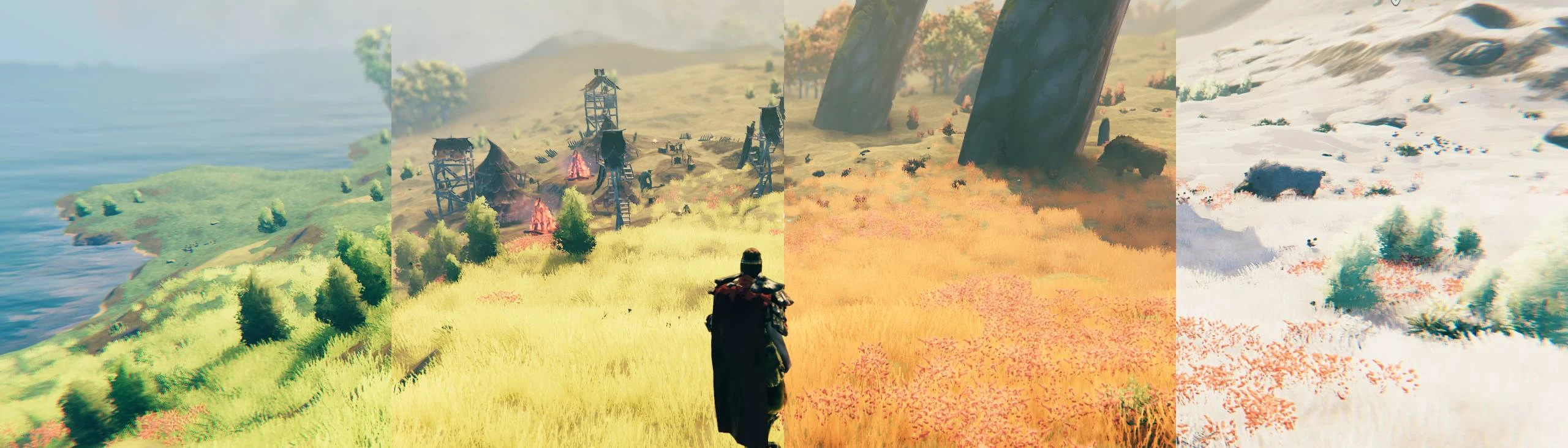
Four customizable seasons.
Seasons changes Valheim through spring, summer, fall and winter. Each season can affect the world, weather, lighting, resources, creatures and character stats, while still keeping the vanilla game recognizable.
Conditional Config Sync
- Config values marked with
[Synced with Server]are synchronized from the server by default. Most of them control whether an entire feature or section is enabled, while its visual presentation and formatting remain configurable by each client - Server administrators can change the synchronization policy for policy-controlled settings in
BepInEx/config/shudnal.ConditionalConfigSync/ConditionalConfigSync.SyncPolicy.cfg - Prefix an exact setting or whole-section identifier with
+to force server control or-to make it client-controlled. Exact-setting rules take precedence over whole-section rules - Use shared modpack configs or distribute your config manually if you also want client-controlled appearance and formatting settings to be identical for all players initially
- Seasons must be installed on the server and every connecting client
- The current season and day, seasonal JSON settings, generated runtime data, and settings that affect shared world state or networked physics are always controlled by the server and cannot be made client-controlled through the synchronization policy
- Settings without
[Synced with Server]are client-controlled by default, but a server administrator can still force them to be server-controlled through the synchronization policy - If you install this mod manually do not forget to install ConditionalConfigSync
If you experience FPS issues
If you notice FPS drops, your GPU might handle more. Try adding these launch options:
-gfx-enable-gfx-jobs -gfx-enable-native-gfx-jobsin Valheim's launch options on Steam.
This unlocks more GPU power for the game, which might help. It is more convenient than editing the boot.config file and is safe to try.
If you use the RenderLimits mod and have the "Distance area" setting higher than 10, it may cause noticeable FPS loss in areas with many trees. This cannot be further optimized with modding tools alone.
What can be customized per season
- Environments: add new weather types, modify weather properties, or remove weather.
- Random events: adjust event frequency, remove events, or change biome restrictions.
- Lighting: control luminance, fog density for different times of day and indoors.
- Stats: modify regeneration rates, stamina usage, skill levels, skill gain speed, damage modifiers, and more.
- Seasonal settings: adjust season length, night length, production rates, and other multipliers.
- Trader items: add seasonal trader inventory to balance resource availability.
Configuring the mod
The mod uses general settings through BepInEx configuration.
Custom settings
Custom seasonal settings are defined using JSON files.
The mod creates a shudnal.Seasons directory inside the BepInEx config folder. This is where default and custom settings are stored.
Default settings
On each world load, the mod generates a Default settings folder containing files with default values.
BepInEx\config\shudnal.Seasons\Default settingsYou need to launch the world at least once after installing the mod to generate these default files.
Important: Do not edit files inside the Default settings folder directly. Any changes will be overwritten the next time you load a world or update the mod.
How to create custom settings
To create custom seasonal settings:
- Open the folder:
BepInEx\config\shudnal.Seasons\Default settings- Copy the file you want to edit (e.g.,
Winter.json). - Paste it into the main
shudnal.Seasonsconfig folder:
BepInEx\config\shudnal.Seasons\- Edit the copied file as needed.
If your changes are applied, you will see this message in the BepInEx console or LogOutput.log:
[Info : Seasons] Settings updated: WinterNote: For the seasonal files such as Winter.json, omitted properties use their built-in values. Seasonal snow.json is different: it replaces the entire snow rule set. Missing piece or material rules are not copied from the default file.
Seasonal snow rules
Seasonal snow.json controls snow behavior for individual building pieces and snow-cover ranges for creature materials and player capes. General snow switches, buildup limits and melting multipliers remain in the BepInEx configuration.
Copy Default settings/Seasonal snow.json to the main shudnal.Seasons folder to customize it. The override file replaces the complete built-in rule set. When connected to a server, the server file replaces both local defaults and the local override. An empty object {} means that no individual rules are configured. Remove the override file to return to the built-in defaults. Changes reload while a world is running.
Pieces
The keys in pieces are prefab names. Each piece can use these fields:
- buildup: Snow processing mode.
Seasonaluses normal seasonal buildup,Reduceduses the reduced buildup limits,Ignoreleaves the piece outside Seasons snow processing, andDisabledforces snow buildup to zero and keeps its snow caps disabled. If omitted,Seasonalis used. - copyFrom: Prefab whose main snow cap is copied when the target piece has no snow cap of its own.
- position: Local snow-cap position override.
x,yandzare optional; omitted axes keep their original values. - scale: Local snow-cap scale override.
x,yandzare optional; omitted axes keep their original values.
"stone_fence": {Highlights
From source dataLoaders
Runs on BepInEx.
Footprint
Rated a light load on a server.
Dependencies
Needs 3 other projects installed alongside it.
Seasons on Nxeon
From our catalogue- One-click install
- Supported on Nxeon Valheim servers, for BepInEx servers. We download it from Thunderstore, place it, and restart the server.
- Server side
- Optional on the server
- Server type needed
- BepInEx
- Server load
- light
- Smallest plan we suggest
- Valheim — 4 GB (4 GB RAM). This follows our own load rating above, not a benchmark.
- Latest build
- 1.10.5, released 2026-10-05
Game versions by loader
| Loader | Game versions | Newest |
|---|---|---|
| BepInEx |
From 27 recorded builds of Seasons.
Recent builds
| Build | Released | Game versions | Loaders |
|---|---|---|---|
| 1.10.5 | 2026-10-05 | n/a | BepInEx |
| 1.10.4 | 2026-10-04 | n/a | BepInEx |
| 1.10.3 | 2026-09-29 | n/a | BepInEx |
| 1.10.2 | 2026-09-28 | n/a | BepInEx |
| 1.10.1 | 2026-09-28 | n/a | BepInEx |
| 1.10.0 | 2026-09-28 | n/a | BepInEx |
Dependencies
- Required: JsonDotNET
- Required: BepInExPack Valheim
- Required: ConditionalConfigSync
Declared by the newest build that lists any. Required ones are installed with it on one-click installs.
Run Seasons on a Valheim server
Pick a server or deploy a new one above; it is installed in one click.
What kind of mod it is
From the catalogQuality of life & UI
Small conveniences, tweaks and interface improvements players notice straight away.
Works on a server
From source side supportThunderstore lists server-side support for Seasons as optional: it can run on a server, but isn’t required there.
Compatibility
- Game
- Valheim
- Loaders
- BepInEx
- Runs on
- Serveroptional on the server
- Requires
- One-click install needs a BepInEx server. 3 other projects installed alongside it.
Verified at the source
- ✓ThunderstoreOfficial listing, checked 2026-10-06Open ↗
- ✓Authorshudnal, as published on Thunderstore
- ✓LicenseNot published by the sourceFree