






About TradersExtended
From ThunderstoreExtended trader UI, synchronized JSON/YAML lists, custom currencies, price tooltips, repairs, balances, and buyback.
Traders Extended
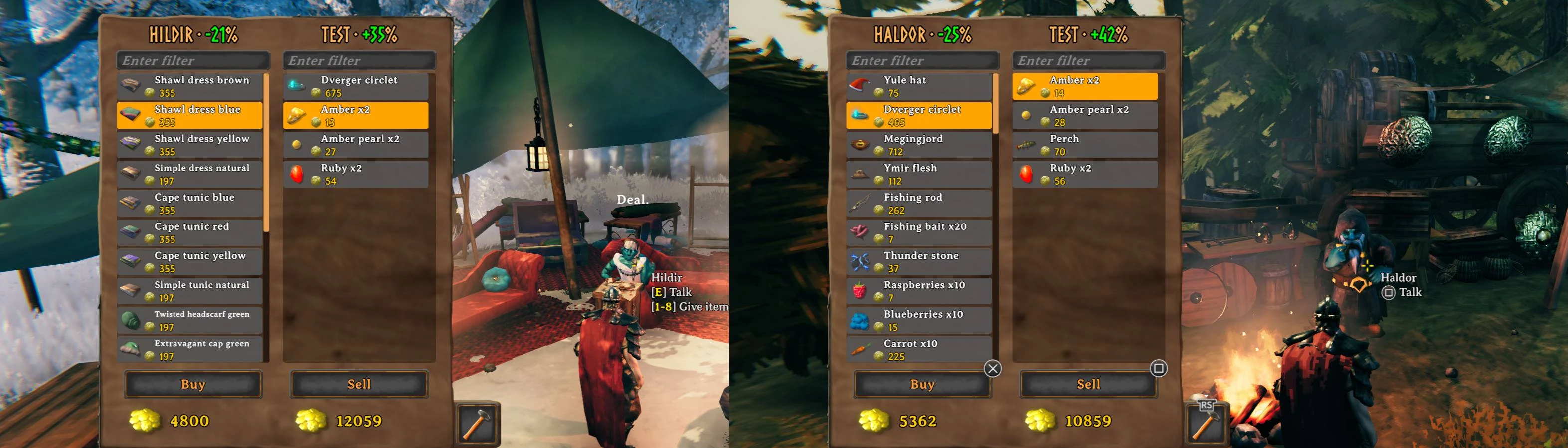
Traders Extended adds trader-specific and common buy/sell lists, a two-column store UI, item filtering, repairs, trader balances, flexible pricing, persistent buyback, configurable currencies, and live synchronized configuration.
Features
- Trader-specific and common buy and sell lists.
- JSON, YAML, YML, and CSV item config files.
- JSON, YAML, and YML personal settings files for individual traders.
- Built-in in-game editor for trader settings and item lists.
- Live config reload and server synchronization through Conditional Config Sync.
- Per-trader default currencies and per-item currency overrides for both buy and sell entries.
- Currency-aware purchases, sales, repairs, buyback, amount dialog, price icons, and balance accounting.
- Sell prices in regular item tooltips, grouped by common and trader-specific values.
- Non-teleportable marker on applicable items in the trader buy list.
- Optional discovery, global-key, and player-key requirements.
- Optional automatic addition of ObjectDB items with a positive vanilla value to the common sell list.
- Optional removal of vanilla or other-mod buy-list entries.
- Configurable trader repairs, finite balances, replenishment, discounts, and markups.
- Buy and sell amount dialog for stackable items.
- Persistent per-trader buyback with configurable expiration in world time.
- Gamepad navigation and independent buy/sell filters.
- Epic Loot Adventure mode compatibility configurable per trader.
- Optional coin weight and stack-size changes.
Requirements
- BepInEx Pack for Valheim
- Conditional Config Sync
- Json.NET
- YamlDotNet
A Thunderstore-compatible mod manager installs these dependencies automatically. For manual installation, install the dependencies before Traders Extended.
Item config files
New item files should be placed in BepInEx/config/shudnal.TradersExtended. Legacy files beginning with shudnal.TradersExtended. are still supported anywhere below BepInEx/config. Item configurations may also be embedded into the assembly under TradersExtended.Configs.
Supported extensions:
.json.yaml.yml.csv
New file names use this format:
<trader-or-common>.<buy-or-sell>[.<identifier>].<extension>Examples:
haldor.buy.json
haldor.sell.yaml
hildir.buy.yml
bogwitch.sell.csv
common.buy.yaml
common.sell.json
hildir.buy.food.basic.json
hildir.buy.food.progression.csv
The legacy shudnal.TradersExtended. prefix remains accepted, for example shudnal.TradersExtended.haldor.buy.json. Existing files keep their original names when saved by the editor.
The optional identifier may contain multiple dot-separated segments. It is ignored when selecting the trader and list type, and exists only to split a trader list across multiple human-readable files.
All matching item files are merged. Embedded files are processed first and files below BepInEx/config last. Within each source, files are processed by file name; entries remain in their original order inside each file. Within sell lists, trader-specific entries override common entries for the same item, quality, and stack.
Names are case-insensitive on Windows. Prefab names inside files remain case-sensitive because they are resolved through ObjectDB. Invalid files or entries are logged and skipped without preventing the remaining files from loading.
Tradeable item model
{
  "prefab": "DragonEgg",
  "stack": 1,
  "price": 500,
  "quality": 0,
  "currency": "Coins",
  "requiredGlobalKey": "defeated_dragon",
  "notRequiredGlobalKey": "",
  "requiredPlayerKey": "",
  "notRequiredPlayerKey": ""
}prefab: item prefab name.stack: number of items covered by the price. The default is1; values less than one disable the entry.price: price for the configured stack. The default is1; values less than one disable the entry.quality: required/generated quality. Zero means default quality for buy lists and any quality for sell lists.currency: optional currency prefab for this entry. It overrides the trader default for this buy or sell item only.requiredGlobalKey: comma-separated global keys; all must be present.notRequiredGlobalKey: comma-separated global keys; none may be present.requiredPlayerKey: comma-separated player unique keys; all must be present.notRequiredPlayerKey: comma-separated player unique keys; none may be present.
JSON buy-list example
[
  {
    "prefab": "DragonEgg",
    "stack": 1,
    "price": 500,
    "requiredGlobalKey": "defeated_dragon"
  },
  {
    "prefab": "RawMeat",
    "stack": 10,
    "price": 2,
    "currency": "Ruby"
  },
  {
    "prefab": "Cultivator",
    "stack": 1,
    "price": 500,
    "quality": 4,
    "requiredGlobalKey": "defeated_gdking"
  }
]
YAML sell-list example
- prefab: FishingRod
  stack: 1
  price: 200

- prefab: Wood
  stack: 50
  price: 25
  requiredGlobalKey: defeated_gdking

- prefab: Fish1
  stack: 5
  price: 500
  quality: 4
  currency: Ruby
CSV item-list example
The first row contains property names. prefab is required. Any other column may be omitted when it is not used by any row; omitted values use the same defaults as JSON and YAML.
prefab,stack,price,currency,requiredGlobalKey
FishingRod,1,200,,
Wood,50,25,,defeated_gdking
Fish1,5,500,Ruby,
Supported headers are:
prefab,stack,price,quality,currency,requiredGlobalKey,notRequiredGlobalKey,requiredPlayerKey,notRequiredPlayerKeyQuote a field according to normal CSV rules when it contains a comma, quote, or line break.
Personal trader settings
Each trader may have one personal settings file:
<trader>.config.jsonHighlights
From source dataLoaders
Runs on BepInEx.
Footprint
Rated a light load on a server.
Dependencies
Needs 4 other projects installed alongside it.
TradersExtended on Nxeon
From our catalogue- One-click install
- Supported on Nxeon Valheim servers, for BepInEx servers. We download it from Thunderstore, place it, and restart the server.
- Server side
- Optional on the server
- Server type needed
- BepInEx
- Server load
- light
- Smallest plan we suggest
- Valheim — 4 GB (4 GB RAM). This follows our own load rating above, not a benchmark.
- Latest build
- 2.0.6, released 2026-11-02
Game versions by loader
| Loader | Game versions | Newest |
|---|---|---|
| BepInEx |
From 27 recorded builds of TradersExtended.
Recent builds
| Build | Released | Game versions | Loaders |
|---|---|---|---|
| 2.0.6 | 2026-11-02 | n/a | BepInEx |
| 2.0.5 | 2026-10-05 | n/a | BepInEx |
| 2.0.4 | 2026-09-24 | n/a | BepInEx |
| 2.0.3 | 2026-09-17 | n/a | BepInEx |
| 2.0.2 | 2026-09-11 | n/a | BepInEx |
| 2.0.0 | 2026-07-20 | n/a | BepInEx |
Dependencies
- Required: YamlDotNet
- Required: JsonDotNET
- Required: BepInExPack Valheim
- Required: ConditionalConfigSync
Declared by the newest build that lists any. Required ones are installed with it on one-click installs.
Run TradersExtended on a Valheim server
Pick a server or deploy a new one above; it is installed in one click.
What kind of mod it is
From the catalogEconomy & shops
Currencies, shops, trading and rewards.
Works on a server
From source side supportThunderstore lists server-side support for TradersExtended as optional: it can run on a server, but isn’t required there.
Compatibility
- Game
- Valheim
- Loaders
- BepInEx
- Runs on
- Serveroptional on the server
- Requires
- One-click install needs a BepInEx server. 4 other projects installed alongside it.
Verified at the source
- ✓ThunderstoreOfficial listing, checked 2026-11-02Open ↗
- ✓Authorshudnal, as published on Thunderstore
- ✓LicenseNot published by the sourceFree















