







About FearNoSpear
From ThunderstoreFind thrown spears with light beams and HUD markers. Helps prevent spear loss and accidental auto-pickup by others. Cleans death pins and protects tombstones, with access for owners, admins in debug mode, and Clan members, including Guests.
FearNoSpear
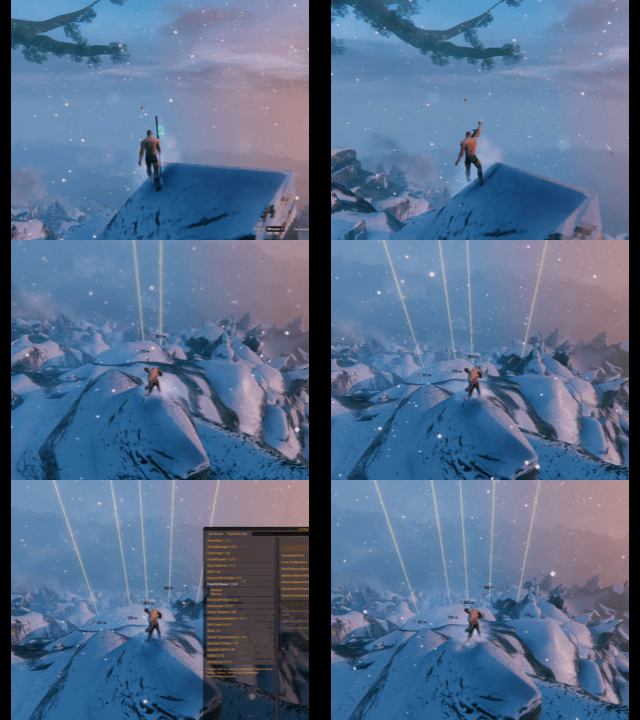
Track up to five thrown spears automatically.

Light beams with item icons and distances.

HUD-only markers.

Screen-edge markers guide you toward spears outside your view.
FearNoSpear helps prevent thrown spears from disappearing and shows where to find them. It also tracks your tombstones, prevents accidental auto-pickup by other players, and protects tombstone access.
Find Your Spears
Markers appear after your spear lands or is rescued. Show your nearest spear by default, or up to five at once. Nearby markers follow moving drops; distant positions refresh from the server about every five seconds, including unloaded areas. A new distant drop may take about ten seconds to first appear.
| Display mode | What you see | | --- | --- | | BeamAndHud | A light beam, item icon, and distance. Default. | | Beam | A light beam only. | | Hud | An item icon and distance, with screen-edge direction markers. | | Off | No indicators or queries for that target type. Protection stays active. |
Weapon beams are yellow; tombstone beams are bright lavender. Beams extend 500 meters upward and widen with distance, from 0.1 to 1 meter. Terrain and render distance can hide them; HUD markers remain visible through terrain and beyond the world rendering range.
SecondaryAttacks copied throws, including ImpactBurst, also work with weapons other than spears. They use the original weapon's icon and share the same display limit. Only recoverable throws are protected: virtual SpearRain projectiles and boomerangs already returned to inventory are excluded.
Only drops tagged with your thrower ID are tracked. Markers disappear when you pick them up. The mod does not add chat commands or spear map pins.
Auto-Pickup
Only the thrower can automatically attract and pick up a tagged weapon. Other players can still pick it up manually.
CaptainValheim shield drops and SecondaryAttacks recoverable copied throws can also provide their thrower ID for this rule. Use the updated throwing mod and FearNoSpear on participating clients. The integration adds no required mod dependency or extra settings. Shield returns stay under CaptainValheim's control; this does not add shield indicators or shield rescue.
Weapons dropped from inventory and items without a thrower tag keep normal pickup behavior. This rule is always active, including when indicators are off.
Tombstones
Your newest remaining tombstone is shown by default. Set MaxDisplayedTombstones to show 1 to 5 at once. The HUD shows the death icon, distance on its right, and age below it, such as 2d 12h. This means two in-game days and twelve in-game hours since creation, not a calendar date or real elapsed time. Sleeping advances the age; it uses the world's current day length.
Tombstones are selected newest first, independently of the nearest-weapon limit. Nearby markers follow the actual tombstone; distant locations refresh from the server about every five seconds. A new distant tombstone may take about ten seconds to first appear. Fully recovered or removed tombstones leave the display, while partially looted ones remain. A death without a tombstone has no indicator.
Use TombstoneIndicatorStyle to choose BeamAndHud, Beam, Hud, or Off. It is separate from weapon indicators and death-pin cleanup. Deleting a map pin does not hide its tombstone indicator. Only your own tombstones are shown, not those of clanmates.
By default, only the owner can open or recover a tombstone, with two exceptions:
- Server admins and the local host can bypass this mod's lock while in debug mode. On a dedicated server, this requires FearNoSpear on the server and completed ServerSync permission synchronization.
- With Clan, members of your active roster, including Guests, can recover clanmates' tombstones.
These exceptions do not bypass other mods' locks, full inventories, or containers already in use.
Death-pin cleanup removes your map pin when your tombstone is recovered. If a death creates no tombstone, it removes the pin after an eight-second grace period.
Settings
All settings are in [General].
| Setting | Default | Effect | | --- | --- | --- | | Lock Configuration | On | Locks the tombstone access setting to the server's value. | | SpearIndicatorStyle | BeamAndHud | Display mode for your thrown weapons. | | MaxDisplayedSpears | 1 | Show 1 to 5 of your nearest tracked weapon drops. | | TombstoneIndicatorStyle | BeamAndHud | Display mode for your tombstones. | | MaxDisplayedTombstones | 1 | Show 1 to 5 of your newest remaining tombstones. | | CleanDeathPins | true | Clean up your death pins. | | OwnerOnlyTombstones | true | Apply the owner, admin, and Clan access rules. |
Indicator and death-pin settings are personal. Only OwnerOnlyTombstones is synchronized through ServerSync.
Built-In Protection
These rules are always active and have no config switches:
Highlights
From source dataLoaders
Runs on BepInEx.
Footprint
Rated a light load on a server.
Dependencies
Needs 1 other project installed alongside it.
FearNoSpear on Nxeon
From our catalogue- One-click install
- Supported on Nxeon Valheim servers, for BepInEx servers. We download it from Thunderstore, place it, and restart the server.
- Server side
- Optional on the server
- Server type needed
- BepInEx
- Server load
- light
- Smallest plan we suggest
- Valheim — 4 GB (4 GB RAM). This follows our own load rating above, not a benchmark.
- Latest build
- 1.1.3, released 2026-10-18
Game versions by loader
| Loader | Game versions | Newest |
|---|---|---|
| BepInEx |
From 12 recorded builds of FearNoSpear.
Recent builds
| Build | Released | Game versions | Loaders |
|---|---|---|---|
| 1.1.3 | 2026-10-18 | n/a | BepInEx |
| 1.1.2 | 2026-10-05 | n/a | BepInEx |
| 1.1.1 | 2026-10-04 | n/a | BepInEx |
| 1.1.0 | 2026-10-03 | n/a | BepInEx |
| 1.0.9 | 2026-10-03 | n/a | BepInEx |
| 1.0.8 | 2026-09-12 | n/a | BepInEx |
Dependencies
- Required: BepInExPack Valheim
Declared by the newest build that lists any. Required ones are installed with it on one-click installs.
Run FearNoSpear on a Valheim server
Pick a server or deploy a new one above; it is installed in one click.
What kind of mod it is
From the catalogAdmin & protection
Permissions, moderation, anti-cheat and land protection for the people running the server.
Works on a server
From source side supportThunderstore lists server-side support for FearNoSpear as optional: it can run on a server, but isn’t required there.
Compatibility
- Game
- Valheim
- Loaders
- BepInEx
- Runs on
- Serveroptional on the server
- Requires
- One-click install needs a BepInEx server. 1 other project installed alongside it.
Verified at the source
- ✓ThunderstoreOfficial listing, checked 2026-10-18Open ↗
- ✓Authorsighsorry, as published on Thunderstore
- ✓LicenseNot published by the sourceFree















