







About HarnessPrefabs
From ThunderstoreUnlock and harness existing vanilla and modded prefabs with server-synced YAML policies, public Hammer access, admin-only debug groups, and safer prefab filtering. Use the Dvergr barrel as a fermenter and swap equipment with armor stands.
HarnessPrefabs
Scans vanilla Valheim and loaded prefab-adding mods for existing prefabs that are not normally available in the Hammer build table, then lets the server decide which ones become public build pieces and which ones stay admin-only.
It does not add new prefabs. It helps you harness the prefabs that are already there.
Targets Valheim 1.0.7 with BepInExPack Valheim 5.4.2350. Jotunn is no longer required by HarnessPrefabs; keep it installed if other mods require it.
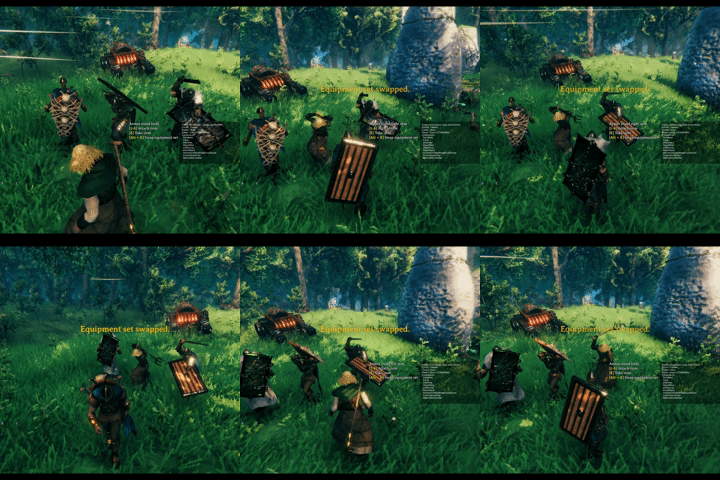
Swap equipment with the vanilla armor stand and the additional armor stands unlocked by HarnessPrefabs.

Dvergr barrel(enhanced lod) can be used as a fermenter. Fermenting time is configurable.
Why Use It
- Open useful vanilla and modded prefabs without shipping another hard-coded prefab dump.
- Keep normal players on curated public build tabs while giving admins debug-only review tabs.
- Replace MoreVanillaBuildPrefabs-style public unlocks with YAML policy files you can review, copy, and override.
- Use MVBP-informed defaults for categories, requirements, placement flags, snap fixes, and icon behavior where those defaults are known.
- Keep the server as the source of truth through ServerSync, so clients receive the active prefab policy and localization text.
- Avoid Hammer clutter from runtime-only objects such as effects, projectiles, ragdolls, creatures, humanoids, and item drops.
What It Does
HarnessPrefabs builds a safe review workflow around hidden prefabs:
- Discover buildable-looking prefabs from Valheim and loaded mods.
- Ignore prefabs that are unsafe for Hammer placement, such as characters, item drops, spawners, runtime effects, projectiles, ragdolls, and similar controller objects.
- Seed defaults from reviewed MoreVanillaBuildPrefabs data when a prefab is known there.
- Classify the rest into public or admin categories based on components and prefab shape.
- Write reference YAML files for review.
- Apply only the overrides you choose to write.
- Sync the active policy from the server to clients.
This makes it useful both as a MoreVanillaBuildPrefabs replacement for curated public pieces and as an admin review tool for larger modpacks.
Hammer Categories
In Valheim 1.0.7, admin-only prefabs appear in a top-level HarnessPrefabs section beside Categories, Materials, Recent, and Favorites. The section appears only for an administrator with Valheim debugmode enabled. Its prefabs do not enter the native lists, so they cannot leak through Categories, Materials, Recent, or Favorites. The Show Harness Tabs configuration key keeps its existing name and can hide the section.
Public groups retain the existing YAML category names:
MiscCraftingBuildingBuildingStonecutterFurniture
The HarnessPrefabs section contains three admin-only groups:
Harness NatureHarness StructuresHarness Props
The client-side Show Harness Tabs config can hide the entire HarnessPrefabs section even while debugmode is on.
Default Classification
Known MVBP public pieces default to public access. Other discovered prefabs default to the Harness Nature, Structures, or Props admin groups unless an explicit YAML policy assigns a public category.
Both enabled public and admin prefabs receive a Piece component when needed, even while the admin tab is hidden. A root ZNetView is required for build registration; a missing view or one only on a child causes the prefab to be skipped with a warning. Discovery/reference YAML can still list such a prefab. Disabling a rule stops new build-menu exposure but does not remove an already added component.
Newly added Piece components exclude instances without a player creator from AI target selection while retaining the target flags for player-built instances. Existing native Piece target settings are preserved. Shared prefab changes, including supported collider and snap-point fixes, still apply; this does not make natural objects completely unaffected by the mod.
General classification uses prefab components and names:
Harness Nature: plants, pickables, trees, logs, rocks, ore rocks, crops, and natural static prefabs.Harness Structures: walls, floors, arches, pillars, stairs, gates, doors, containers, portals, beds, crafting stations, fires, ships, carts, destructibles, and other build-like interactives.Harness Props: decor, static props, banners, rugs, tables, chairs, statues, treasure, CreatorShop-style props, clutter, fragments, and LOD-like objects.
Runtime objects are intentionally ignored. Prefabs named fx_*, vfx_*, or sfx_*, MVBP effect defaults, and prefabs with components such as TimedDestruction, Aoe, CamShaker, Projectile, or Ragdoll are not written to reference files and are not added to Hammer tabs.
Prefabs with ItemDrop, Humanoid, or Character anywhere in their hierarchy are ignored.
Policy Files
HarnessPrefabs stores policy files under:
BepInEx/config/HarnessPrefabs/Editable override files:
prefabs.yml
prefabs_*.yml
Generated review files:
prefabs.reference.yml
prefabs.full.yml
prefabs.yml is created automatically. Extra files such as prefabs_public.yml or prefabs_admin.yml are loaded after the base file and can override the same prefab entries.
Do not edit prefabs.reference.yml or prefabs.full.yml directly. Copy entries from them into prefabs.yml or prefabs_*.yml.
Minimal Overrides
Override files use a top-level YAML list. You can copy only the fields you want to change:
- prefab: blackmarble_1x1
  enabled: true
  category: BuildingStonecutter
  requirements:
    - BlackMarble: 2

- prefab: GoblinTotem
  enabled: false
enabled: true exposes a prefab. Public categories expose it to normal clients. Harness categories expose it only to admins in debugmode.
Highlights
From source dataLoaders
Runs on BepInEx.
Footprint
Rated a light load on a server.
Last update
Its author last shipped an update 11d ago.
HarnessPrefabs on Nxeon
From our catalogue- One-click install
- Supported on Nxeon Valheim servers, for BepInEx servers. We download it from Thunderstore, place it, and restart the server.
- Server side
- Optional on the server
- Server type needed
- BepInEx
- Server load
- light
- Smallest plan we suggest
- Valheim — 4 GB (4 GB RAM). This follows our own load rating above, not a benchmark.
- Latest build
- 1.1.6, released 2026-10-24
Game versions by loader
| Loader | Game versions | Newest |
|---|---|---|
| BepInEx |
From 16 recorded builds of HarnessPrefabs.
Recent builds
| Build | Released | Game versions | Loaders |
|---|---|---|---|
| 1.1.6 | 2026-10-24 | n/a | BepInEx |
| 1.1.5 | 2026-10-13 | n/a | BepInEx |
| 1.1.4 | 2026-10-08 | n/a | BepInEx |
| 1.1.3 | 2026-10-03 | n/a | BepInEx |
| 1.1.2 | 2026-09-14 | n/a | BepInEx |
| 1.1.1 | 2026-09-12 | n/a | BepInEx |
Dependencies
- Required: BepInExPack Valheim
Declared by the newest build that lists any. Required ones are installed with it on one-click installs.
Run HarnessPrefabs on a Valheim server
Pick a server or deploy a new one above; it is installed in one click.
What kind of mod it is
From the catalogQuality of life & UI
Small conveniences, tweaks and interface improvements players notice straight away.
Works on a server
From source side supportThunderstore lists server-side support for HarnessPrefabs as optional: it can run on a server, but isn’t required there.
Compatibility
- Game
- Valheim
- Loaders
- BepInEx
- Runs on
- Serveroptional on the server
- Requires
- One-click install needs a BepInEx server.
Verified at the source
- ✓ThunderstoreOfficial listing, checked 2026-10-25Open ↗
- ✓Authorsighsorry, as published on Thunderstore
- ✓LicenseNot published by the sourceFree












