About Homestead
From ThunderstoreAll-in-one construction mod with blueprints, blueprint shop to trade blueprints, area save/dismantle, adjustable dvergr circlet light attached to buildcamera and placement helpers
Homestead

Homestead is a Valheim building mod focused on saving, rebuilding, trading, and cleaning up player structures. It brings blueprint workflows into the hammer tab, with Area Save, Area Dismantle, a Blueprint Store, build camera controls, placement helpers, and Dvergr circlet quality-of-life features.

Homestead tab within vanilla hammer.
Area save to make a blueprint, Area dismantle to teardown the builds, blueprint shop to sell the blueprints

Use build camera and area save to make blueprints.

Place your blueprint and put according materials into blueprint chest and confirm it. (Stations are needed to)
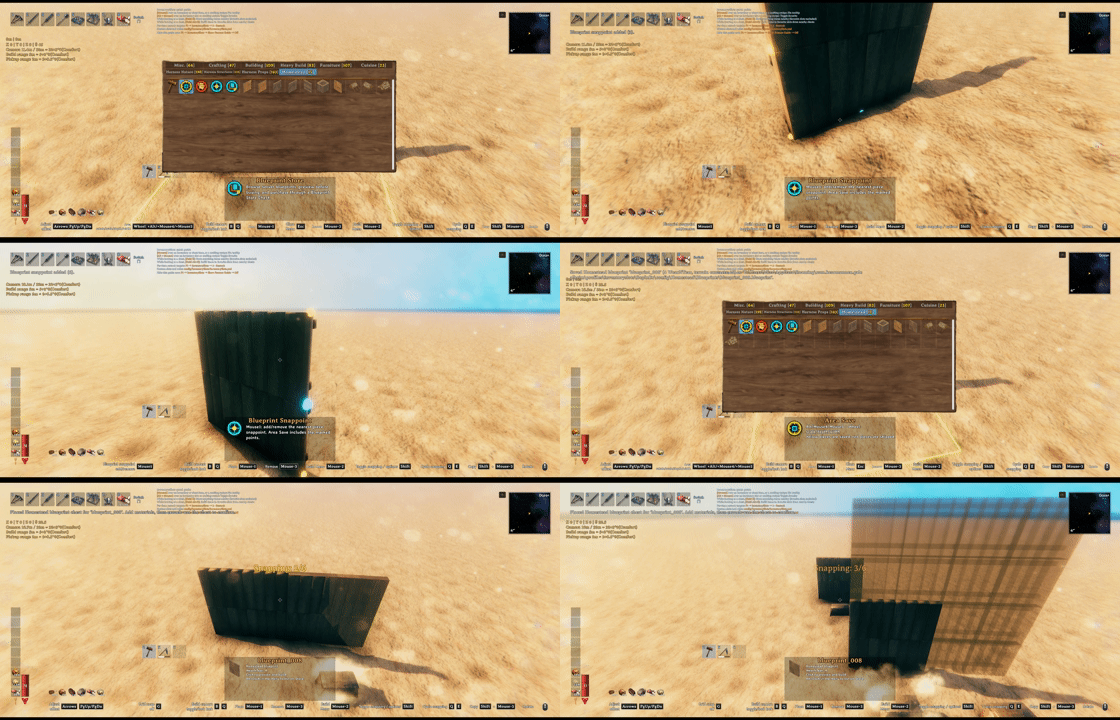
You can set snappoints on the build and save those snappoints in the blueprint.

Alt+click your blueprint and put it on the ground and put a price on your blueprint and list in on blueprint store

You can offer price for blueprints and get notifications for blueprints being enlisted and for offers being accepted/declined/suggested

Buy the blueprints and pay the price for it. And if you have sold your blueprints you can withdraw that from the store.
.

No more clicking all the pieces or using sledge hammer to teardown the build. You can use the tool area dismantle (Only dismantles what each player has built, respectively)

Build camera, dvergr circlet attached to build camera, dvergr circlet light adjustment, lock in pov (freefly feature), position adjustment
What It Adds
- Homestead hammer tab for Area Save, Area Dismantle, Blueprint Store, and saved blueprints.
- Native blueprints that preserve build pieces, required materials, preview placement, and final confirmation.
- Blueprint Store for listing, buying, offering, notifications, and seller payouts.
- Area Dismantle for removing owned builds in a selected rectangle and returning materials.
- Build camera for easier large-scale building from a detached view.
- Placement helpers for grid snap, nudging, rotation step, and X/Z rotation offsets.
- Dvergr circlet controls for light toggle, intensity, range, durability drain, and synced visuals.
- File location:
%USERPROFILE%\AppData\LocalLow\IronGate\Valheim\Homestead
Core Flow
Save And Build
- Equip the hammer.
- Open the
Homesteadtab. - Select
Area Save. - Mark a structure and save it as a blueprint.
- Select the saved blueprint from the Homestead tab.
- Place the blueprint chest.
- Deposit the required materials.
- Confirm the build with
Alt + E
Server owners can configure tab access (keep Lock Configuration = On to enforce synced settings):
- 01 - General / Homestead Tab Access:
Everyone(default) orAdminsOnly. Uses the server's ServerSync admin status, hides the hammer tab/tools for other players, and cancels active tool selection when access is removed. Existing network chests remain available. This controls the normal UI; it is not an anti-cheat restriction on modified clients or all Homestead features.
The upper-left status HUD groups selected area size, placement values and controls, Grid Snap, build camera conditions and ranges, and area repair radius. Circlet adjustments appear briefly at the bottom. Its position and font size use the existing 02 - Client / Status HUD settings, and its height follows the visible content. New configs default to X=30, Y=150 and font size 18; saved values are preserved. Shortcuts use orange keys in a key: action format.
02 - Client / HUD Controls Help (default On) controls the camera, arrow/PgUp/PgDn, rotation and Grid Snap help lines in this HUD. Turning it off keeps numeric status and area repair information. It replaces Build Camera Tooltip without reading or migrating that old setting, and works independently of Valheim's key hints. Cultivators show grid help without hammer-only movement controls; Area Save/Dismantle show movement help without grid. Keyboard placement help is hidden while using a controller.
Selecting repair shows its actual radius below the camera ranges, even with the camera off, and leaves the game's original repair description intact. The radius is base radius plus comfort scale times the cube root of cozy comfort; without cozy comfort only the base radius applies. This information is hidden when Homestead area repair is disabled or another supported area repair mod handles it.
Any player can confirm a construction plan chest; there is no creator-only confirmation setting. Shop listing/purchase/payout authorization is unchanged. Finished pieces keep the original chest creator. The person confirming supplies the existing knowledge/station/no-cost checks and optional inventory/AzuCraftyBoxes material pull.
Highlights
From source dataLoaders
Runs on BepInEx.
Footprint
Rated a light load on a server.
Last update
Its author last shipped an update 5d ago.
Homestead on Nxeon
From our catalogue- One-click install
- Supported on Nxeon Valheim servers, for BepInEx servers. We download it from Thunderstore, place it, and restart the server.
- Server side
- Optional on the server
- Server type needed
- BepInEx
- Server load
- light
- Smallest plan we suggest
- Valheim — 4 GB (4 GB RAM). This follows our own load rating above, not a benchmark.
- Latest build
- 1.3.3, released 2026-10-11
Game versions by loader
| Loader | Game versions | Newest |
|---|---|---|
| BepInEx |
From 30 recorded builds of Homestead.
Recent builds
| Build | Released | Game versions | Loaders |
|---|---|---|---|
| 1.3.3 | 2026-10-11 | n/a | BepInEx |
| 1.3.2 | 2026-10-08 | n/a | BepInEx |
| 1.3.1 | 2026-10-08 | n/a | BepInEx |
| 1.3.0 | 2026-10-05 | n/a | BepInEx |
| 1.2.19 | 2026-10-04 | n/a | BepInEx |
| 1.2.18 | 2026-09-26 | n/a | BepInEx |
Dependencies
- Required: BepInExPack Valheim
Declared by the newest build that lists any. Required ones are installed with it on one-click installs.
Run Homestead on a Valheim server
Pick a server or deploy a new one above; it is installed in one click.
What kind of mod it is
From the catalogAdmin & protection
Permissions, moderation, anti-cheat and land protection for the people running the server.
Works on a server
From source side supportThunderstore lists server-side support for Homestead as optional: it can run on a server, but isn’t required there.
Compatibility
- Game
- Valheim
- Loaders
- BepInEx
- Runs on
- Serveroptional on the server
- Requires
- One-click install needs a BepInEx server.
Verified at the source
- ✓ThunderstoreOfficial listing, checked 2026-10-11Open ↗
- ✓Authorsighsorry, as published on Thunderstore
- ✓LicenseNot published by the sourceFree