







About ZoneSavior
From ThunderstoreArchive inactive-player structures and tamed animals per zone, save/load/restore zone bundles, track player activity, configure archive exclusions, and enforce per-zone WearNTear limits.
ZoneSavior
Archive inactive-player structures and tamed animals per zone, save/load/restore zone bundles, track player activity, configure archive exclusions, and enforce per-zone WearNTear limits.
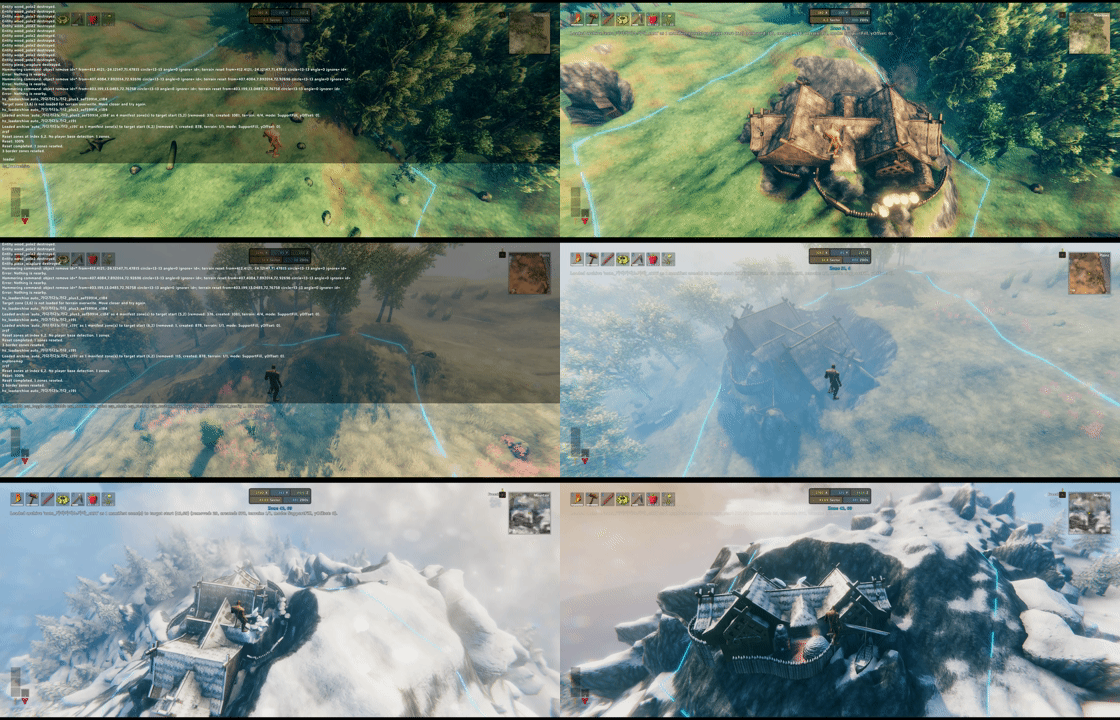

ZoneSavior is a Valheim server maintenance mod for zone-based cleanup, archive, restore, and build-count control.
It can:
- archive inactive player structures into zone bundle files
- restore saved bundles to the original place or a new zone
- optionally reset archived source zones
- enforce per-zone WearNTear limits from
zones.yml - block selected building prefabs in matching zones before normal player placement
- track player activity for inactive-owner cleanup
- provide an optional client zone UI
The zone UI hotkey (F8 by default) displays the current zone boundary with eight 64m corner extensions. The lines follow the terrain, with height samples every 4m, to help estimate neighboring zones.
Files
ZoneSavior uses one BepInEx config file and one data folder:
BepInEx/config/
  sighsorry.ZoneSavior.cfg
  ZoneSavior/
    activity.yml
    zones.yml
    Diagnostics/
    ZoneBundles/
      tag_name/
        manifest.yml
        bundle001_<generation>.zonebundle.yml.gz
activity.yml stores player activity, scan state, and recent scan records. ZoneSavior reloads it conservatively at runtime: broken YAML, dirty runtime state, and active scans are ignored.
zones.yml stores zone limits and archive protection rules. Every rule must declare a non-negative limit. Steam IDs are the best long-term protection key; player names are convenient but can change.
Building rules
Rules match zone coordinates inclusively, from top to bottom. The first match supplies both the count policy and the optional blocked_pieces list; lists from overlapping rules are not merged. A limit applies to each individual zone, not the entire matching rectangle.
defaults:
  count_creatorless: false
rules:
  - name: center_keep
    x: [-1, 1]
    z: [-1, 1]
    limit: 50
    count_creatorless: true
    blocked_pieces:
      - portal_wood
      - piece_workbench
  - name: outer_ring
    x: [-2, 2]
    z: [-2, 2]
    limit: 100
blocked_pieces uses exact, case-sensitive prefab names, not translated display names or wildcards. Omitted, null or empty lists allow all prefab types; blank entries are rejected and an invalid reload retains the previous configuration. Repeated names are deduplicated. The example blocks only new normal player placement of wooden portals and workbenches in the center zones. Existing objects, network loading and administrative bundle restore are unaffected. Administrators using normal placement follow the same rule.
Piece bans operate independently of Zone WearNTear Limit, which still controls only the existing WearNTear quantity restriction. They also cover building pieces without WearNTear; count_creatorless changes only what contributes to the quantity count. A count limit of 50 allows 50 counted objects; it rejects the next one.
For dedicated servers, install this updated ZoneSavior build on both server and clients. The server supplies the YAML through the existing settings synchronization; the placing client rejects a banned prefab after refreshing the target position and before creating an object or spending materials, stamina or durability. This is not a server-only anti-bypass system. Other mods that directly instantiate objects or bypass Player.TryPlacePiece require separate integration. The existing count limit still uses loaded local structures and post-placement removal; it does not reserve capacity on the server for simultaneous builders.
Localization
Building-limit/blocked-piece messages and the F8 zone/support-grace HUD use the game's selected language. English and Korean YAML are embedded in the DLL, so no external file is required. Untranslated keys/languages fall back to English. Administrative commands, diagnostics, logs and configuration descriptions retain their existing text.
Following Homestead's translation file convention, optional ZoneSavior.<Language>.yml or .yaml files anywhere under BepInEx/plugins override that language's bundled entries. Use the game's language name, for example ZoneSavior.Korean.yml. Restart after editing external files; changing the in-game language updates the registered translations and F8 HUD. Preserve the numbered formatting placeholders such as {0} and {1} when translating.
Release packages include ZoneSavior.English.yml and ZoneSavior.Korean.yml next to the DLL in both Thunderstore and Nexus ZIPs. These files are editable translation templates as well as runtime overrides when installed under plugins; keep only one external file per language to avoid duplicate overrides.
ZoneBundles/<tag>/manifest.yml records the archive shape. Each bundleNNN_<generation>.zonebundle.yml.gz stores one source zone as a compact, gzip-compressed YAML bundle. ZoneSavior reads and writes these files directly; no manual extraction is required. New bundle files are committed by replacing the manifest only after every zone is saved successfully.
Manifest versions 2 and 3 and compressed bundle payload version 3 are supported. Older formats, including uncompressed legacy zone bundles, are not loaded or converted. If the original world data is still available, create a new archive from the live world with the current ZoneSavior version before restoring it.
Diagnostics/ contains YAML reports written by zs_debugzone.
Config
Config sections:
Highlights
From source dataLoaders
Runs on BepInEx.
Footprint
Rated a light load on a server.
Last update
Its author last shipped an update 6d ago.
ZoneSavior on Nxeon
From our catalogue- One-click install
- Supported on Nxeon Valheim servers, for BepInEx servers. We download it from Thunderstore, place it, and restart the server.
- Server side
- Optional on the server
- Server type needed
- BepInEx
- Server load
- light
- Smallest plan we suggest
- Valheim — 4 GB (4 GB RAM). This follows our own load rating above, not a benchmark.
- Latest build
- 1.3.2, released 2026-10-29
Game versions by loader
| Loader | Game versions | Newest |
|---|---|---|
| BepInEx |
From 22 recorded builds of ZoneSavior.
Recent builds
| Build | Released | Game versions | Loaders |
|---|---|---|---|
| 1.3.2 | 2026-10-29 | n/a | BepInEx |
| 1.3.1 | 2026-10-17 | n/a | BepInEx |
| 1.3.0 | 2026-10-08 | n/a | BepInEx |
| 1.2.11 | 2026-09-09 | n/a | BepInEx |
| 1.2.10 | 2026-09-08 | n/a | BepInEx |
| 1.2.9 | 2026-09-04 | n/a | BepInEx |
Dependencies
- Required: BepInExPack Valheim
Declared by the newest build that lists any. Required ones are installed with it on one-click installs.
Run ZoneSavior on a Valheim server
Pick a server or deploy a new one above; it is installed in one click.
What kind of mod it is
From the catalogAdmin & protection
Permissions, moderation, anti-cheat and land protection for the people running the server.
Works on a server
From source side supportThunderstore lists server-side support for ZoneSavior as optional: it can run on a server, but isn’t required there.
Compatibility
- Game
- Valheim
- Loaders
- BepInEx
- Runs on
- Serveroptional on the server
- Requires
- One-click install needs a BepInEx server.
Verified at the source
- ✓ThunderstoreOfficial listing, checked 2026-10-29Open ↗
- ✓Authorsighsorry, as published on Thunderstore
- ✓LicenseNot published by the sourceFree











