About MapFogCleaner
From ThunderstoreAutomatically fills in small, fully-enclosed fog-of-war gaps on the map as you explore, so tiny unrevealed specks don't clutter an otherwise fully mapped area. Large unexplored zones are left untouched.
MapFogCleaner
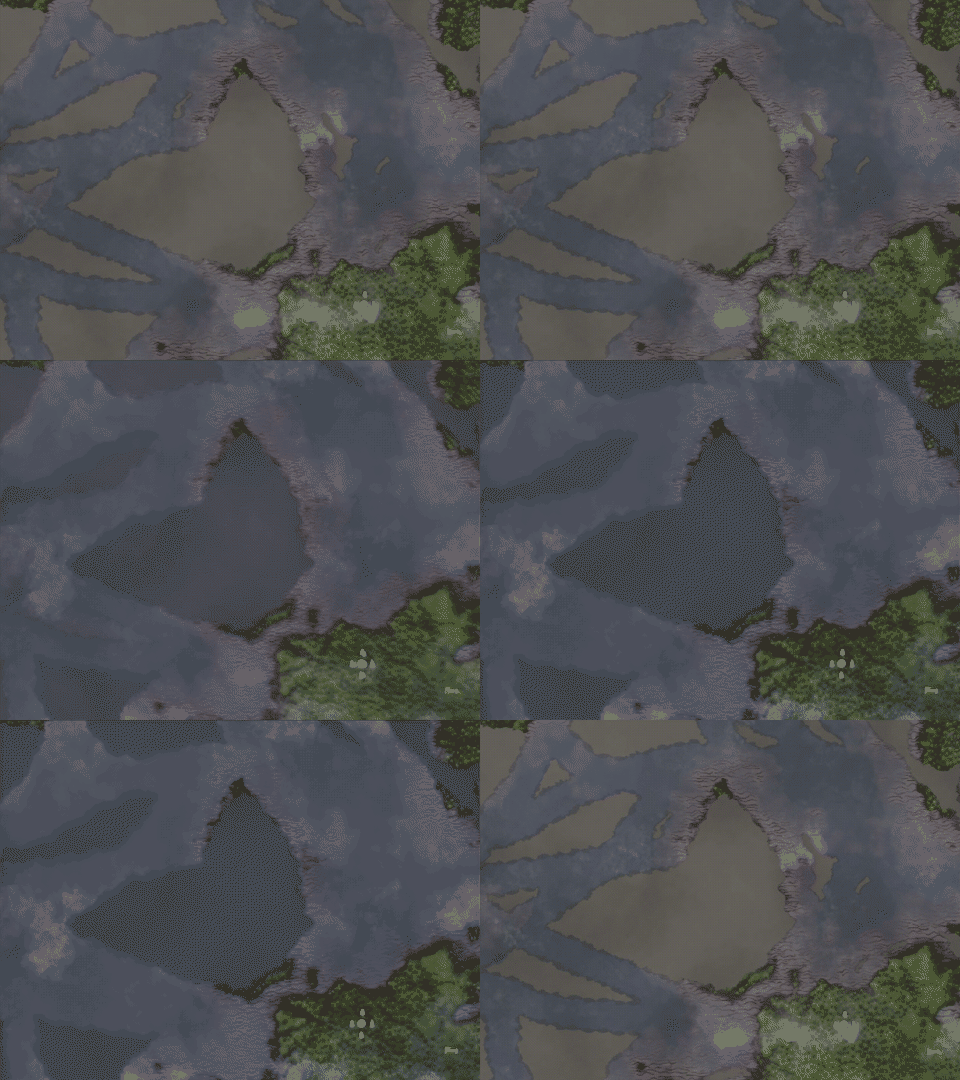
Tidies up your map by automatically clearing tiny, fully-enclosed fog-of-war pockets left behind by the way exploration actually works in Valheim — following paths rather than sweeping every square meter. Those little grey specks sitting inside otherwise fully-revealed terrain get filled in on their own, while genuinely large unexplored areas are always left alone.
How it works
Every few seconds, the mod scans the map's fog data for connected patches of unrevealed area. Any patch small enough to fit within the configured radius gets revealed automatically, exactly as if you'd walked through it — it's real exploration progress, not just a visual trick, and it persists with the rest of your map data. Patches larger than the threshold (oceans, unexplored biomes, anything meaningful) are never touched. The scan is spread across multiple frames so it won't cause hitching, even on worlds with a very large, high-resolution fog map.
Configuration
Available via ConfigurationManager (F1) in-game, or the config file BepInEx/config/sopmehua.valheim.mapfogcleaner.cfg:
Enabled— turn the mod on/off.MaxIslandRadius— the largest enclosed fog patch (approximate radius, in meters) that will be auto-filled. Default 100. Raise it to clean up bigger gaps, lower it to be more conservative.ScanInterval— how often (in seconds) to scan for new small patches. Default 4.HideCloudShadows— hide the moving cloud shadows on the large map and minimap. Purely visual, doesn't affect fog-of-war or exploration. Default off.
Notes
This only affects your own local exploration data, the same as normal walking-based fog clearing — it doesn't sync anything over the network and doesn't need anyone else to have the mod installed.
Highlights
From source dataLoaders
Runs on BepInEx.
Footprint
Rated a light load on a server.
Last update
Its author last shipped an update 4 mo ago.
MapFogCleaner on Nxeon
From our catalogue- One-click install
- Supported on Nxeon Valheim servers, for BepInEx servers. We download it from Thunderstore, place it, and restart the server.
- Server side
- Optional on the server
- Server type needed
- BepInEx
- Server load
- light
- Smallest plan we suggest
- Valheim — 4 GB (4 GB RAM). This follows our own load rating above, not a benchmark.
- Latest build
- 1.1.1, released 2026-07-22
Game versions by loader
| Loader | Game versions | Newest |
|---|---|---|
| BepInEx |
From 3 recorded builds of MapFogCleaner.
Recent builds
| Build | Released | Game versions | Loaders |
|---|---|---|---|
| 1.1.1 | 2026-07-22 | n/a | BepInEx |
| 1.1.0 | 2026-07-22 | n/a | BepInEx |
| 1.0.0 | 2026-07-22 | n/a | BepInEx |
Run MapFogCleaner on a Valheim server
Pick a server or deploy a new one above; it is installed in one click.
What kind of mod it is
From the catalogAdmin & protection
Permissions, moderation, anti-cheat and land protection for the people running the server.
Works on a server
From source side supportThunderstore lists server-side support for MapFogCleaner as optional: it can run on a server, but isn’t required there.
Compatibility
- Game
- Valheim
- Loaders
- BepInEx
- Runs on
- Serveroptional on the server
- Requires
- One-click install needs a BepInEx server.
Verified at the source
- ✓ThunderstoreOfficial listing, checked 2026-10-02Open ↗
- ✓AuthorSOPMEHUA, as published on Thunderstore
- ✓LicenseNot published by the sourceFree