About XPortal
From ThunderstoreSelect portal destination from a list of existing portals. No more tag pairing, and no more portal hubs! XPortal is a complete rewrite of the popular mod AnyPortal.
XPortal
An AnyPortal revamp.
Description
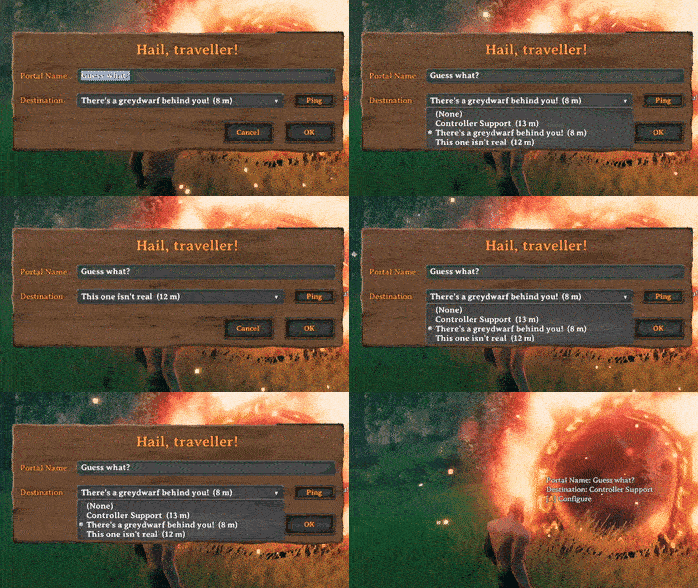
XPortal lets you select a portal destination from a list of existing portals.
No more tag pairing, and no more portal hubs!
Features
Select a destination
When interacting with a portal, instead of entering a tag which has to match another portal's, XPortal lets you choose the portal's destination from a list. For your convenience, this list also shows you how far away the portals are.
Default destination
A Portal can be marked as the "Default Portal". When a Default Portal has been set, all newly built portals will immediately connect with that portal, without you having to go into the portal configuration panel.
Longer names
XPortal completely removes the character length restriction on portal names, so that you can give your portals clear and descriptive titles.
Ping a portal location
Forgot where you put your portal? You don't need to teleport to it to find out. Just click the Ping button next to the list, and XPortal will show the selected portal on your map, while also pinging its location to all players on the server.
If you prefer to play without a map, this button can be hidden, either by using the nomap global key, or by setting PingMapDisabled to True.
Multiplayer
XPortal has been built with multiplayer support at its core. All players must run the same version of XPortal. If you play on a dedicated server, that too needs to have same version of XPortal installed.
Gamepad support
The XPortal UI will respond to gamepad input when configuring your portal. As of v1.2.10 it even shows you the gamepad keyhints!
Note: Currently gamepad hints are not showing correctly, and opening the Portal configuration panel will show some warnings in the console. I aim to address this in a future update.
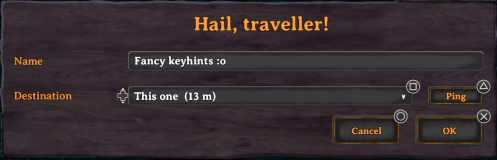
The controls are as follows:
A/Cross- Submit (i.e. press the OK button)B/Circle- CancelY/Triangle- Ping the selected portalX/Square- Show/hide the contents of the dropdownD-Pad Up/D-Pad Down- Select the previous / next item in the dropdown
Mod compatibility and integration
XPortal has been made fully compatible with the following mods:
- Nexus Update Check by aedenthorn
- Stone Portal by Jere Kuusela
- Advanced Portals by Randy Knapp
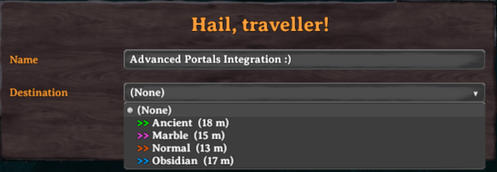
Furthermore, XPortal has a configuration option to fully integrate with Advanced Portals. If you set DisplayPortalColour to True, each portal in XPortal's dropdown list will be prepended by a ">>" tag that has the same colour as the light that the portal emits. As of v1.2.10, Stone Portals also get their own colour!
XPortal is known to be fully incompatible with:
- AnyPortal by sweetgiorni
- ComfyGizmo by redseiko
- Custom Meshes by aedenthorn
Configuration
XPortal's config file, which can be found at Valheim\BepInEx\config\yay.spikehimself.xportal.cfg, contains the following settings:
PingMapDisabled
Disable the Ping Map button completely. For players who wish to play without a map. This setting is enforced (but not overwritten) by the server.
DisplayPortalColour
Show a coloured ">>" tag in the list of portals to indicate the portal type (integration with Advanced Portals and Stone Portal).
DoublePortalCosts
Since XPortal is essentially a cheat, in that you only need half the amount of portals now, this setting allows you to compensate for that by doubling portal costs. This setting is enforced (but not overwritten) by the server.
HidePortalDistance
If you don't want to see how far away the portals in the list are, you can use this option to remove that. This setting is enforced (but not overwritten) by the server.
DefaultPortal
This configuration option exists to save your personal Default Portal. Its value will be set by checking the Default Portal checkbox on the portal configuration panel. This value should not be manually edited in the file.
Installation instructions
XPortal is a BepInEx plugin. As such, you must have BepInEx installed. Most other Valheim mods are also BepInEx plugins, so chances are you already have this.
XPortal makes use of the Jotunn library, so you must install that before installing XPortal. If you do not install Jotunn, XPortal will simply not be loaded by your game and it will not work.
I very strongly recommend using a mod manager such as Vortex or r2modman. They will take care of everything for you and you don't have to worry about which files go where. I recommend against manual installation.
- Make sure you have BepInEx installed.
Highlights
From source dataLoaders
Runs on BepInEx.
Footprint
Rated a light load on a server.
Dependencies
Needs 2 other projects installed alongside it.
XPortal on Nxeon
From our catalogue- One-click install
- Supported on Nxeon Valheim servers, for BepInEx servers. We download it from Thunderstore, place it, and restart the server.
- Server side
- Optional on the server
- Server type needed
- BepInEx
- Server load
- light
- Smallest plan we suggest
- Valheim — 4 GB (4 GB RAM). This follows our own load rating above, not a benchmark.
- Latest build
- 1.2.26, released 2026-10-08
Game versions by loader
| Loader | Game versions | Newest |
|---|---|---|
| BepInEx |
From 26 recorded builds of XPortal.
Recent builds
| Build | Released | Game versions | Loaders |
|---|---|---|---|
| 1.2.26 | 2026-10-08 | n/a | BepInEx |
| 1.2.25 | 2026-09-12 | n/a | BepInEx |
| 1.2.24 | 2026-02-07 | n/a | BepInEx |
| 1.2.23 | 2025-04-01 | n/a | BepInEx |
| 1.2.22 | 2025-03-04 | n/a | BepInEx |
| 1.2.21 | 2024-05-19 | n/a | BepInEx |
Dependencies
- Required: BepInExPack Valheim
- Required: Jotunn
Declared by the newest build that lists any. Required ones are installed with it on one-click installs.
Run XPortal on a Valheim server
Pick a server or deploy a new one above; it is installed in one click.
What kind of mod it is
From the catalogQuality of life & UI
Small conveniences, tweaks and interface improvements players notice straight away.
Works on a server
From source side supportThunderstore lists server-side support for XPortal as optional: it can run on a server, but isn’t required there.
Compatibility
- Game
- Valheim
- Loaders
- BepInEx
- Runs on
- Serveroptional on the server
- Requires
- One-click install needs a BepInEx server. 2 other projects installed alongside it.
Verified at the source
- ✓ThunderstoreOfficial listing, checked 2026-10-09Open ↗
- ✓AuthorSpikeHimself, as published on Thunderstore
- ✓LicenseNot published by the sourceFree