






About XStorage
From ThunderstoreOpen multiple chests at once, rename them, and move items/stacks to the most suitable chest.
XStorage
XStorage lets you open multiple chests at once, rename them, and move items/stacks to the most suitable chest.
Features
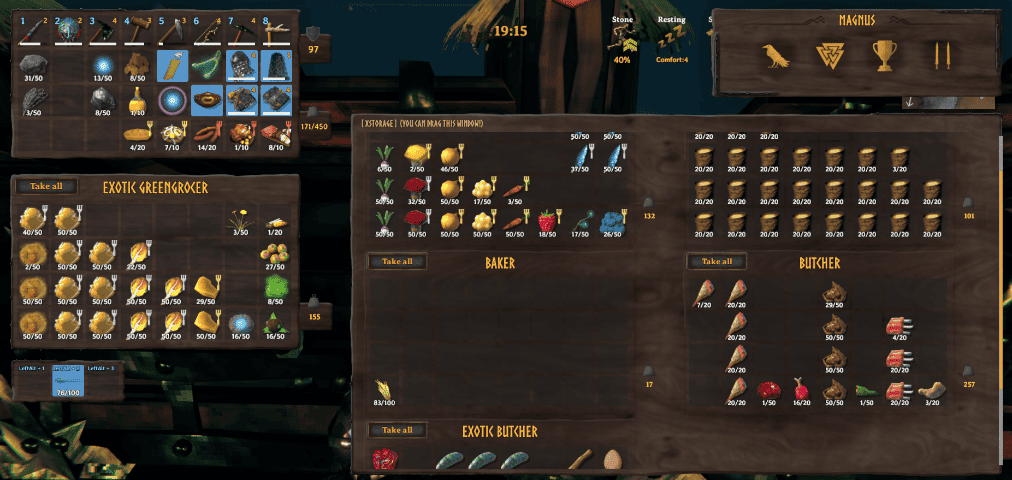
Name your chests
By pressing alt-interact (Shift + E by default), you can give your chests a name. This name is shown when you hover over the chest, and also in the panel above the inventory when a chest is opened.
Open many chests
To display multiple chests, XStorage creates a new panel in the UI. The panel will automatically expand to fit in as many chests as it can. You can restrict the width and height in XStorage's config.
When you open more chests than XStorage can display on the screen, this panel will become scrollable.
Moving items/stacks to the most suitable chest
When you auto-move an item from your inventory (via Ctrl + Click), XStorage tries to find the most suitable chest to put the item/stack in. It does so by picking the chest containing the highest quantity of the item you are moving, from all opened chests that still have free space.
Ctrl + Click-ing an item or stack in any of the chests will always make it go to the player inventory (equal to vanilla behaviour).
Multiplayer
In multiplayer games, all players need to have XStorage installed, or it will not work. If you play on a dedicated server, the server also has to have XStorage installed.
Mod compatibility
As of v1.1.3, XStorage can be stopped from opening nearby chests, if the chest being opened is marked with the XStorage "SkipMark". This allows other mods, such as Seidr Chest, to function as intended.
To do this, set the XStorage_SkipMark to true in the Container's ZDO, like so:
container.m_nview.GetZDO().Set("XStorage_SkipMark", true);If you need assistance with this, reach out to me on XStorage's GitHub page.
Known shortcomings
There are a few things that, at this stage, XStorage does not do well, or at all:
- Gamepad input: XStorage does not deal with gamepad input at all. That is to say, the UI kind of breaks when you use a gamepad. I will look into this in the future, but for now this mod is pretty much mouse/keyboard only.
XStorage looks best when playing at a 16:9 ratio with a UI scaling of 95% or smaller.
Configuration
XStorage's config file, which can be found at Valheim\BepInEx\config\yay.spikehimself.xstorage.cfg, contains the following settings:
NearbyChestRange
The radius in meters within which to look for nearby chests. Setting this too high might cause performance issues!
MaxOpenChests
The maximum amount of chests to open at once. 0 or fewer means infinite.
Panel Position
The Panel Position section contains the saved screen positions of each panel (per panel size). It is not recommended to edit these values manually.
MaxColumns and MaxRows
The maximum amount of rows and columns that XStorage can expand the containers panel to.
PanelScale
The relative size of XStorage's panel. Can be any value between 0.5 and 1.5, where 0.5 = 50%, 1 = 100%, and 1.5 = 150%
Installation instructions
XStorage is a BepInEx plugin. As such, you must have BepInEx installed. Most other Valheim mods are also BepInEx plugins, so chances are you already have this.
XStorage makes use of the Jotunn library, so you must install that before installing XStorage. If you do not install Jotunn, XStorage will simply not be loaded by your game and it will not work.
I very strongly recommend using a mod manager such as Vortex or r2modman. They will take care of everything for you and you don't have to worry about which files go where. I recommend against manual installation.
- Make sure you have BepInEx installed.
- Install Jotunn.
- On Nexus Mods click 'Mod manager download', or on Thunderstore click 'Install with Mod Manager'.
To install XStorage on a dedicated server, copy all of the contents of the plugins\ directory found inside the .zip file download to the Valheim\BepInEx\plugins\ directory on your server.
Bugs and Feature Requests
To report a bug, please navigate to the Issues page, click New issue, choose Bug report, and fill out the template.
For feature requests, choose Feature request on the New issue page.
I did more too!
Please have a look at my other mod too! XPortal lets you select a portal destination from a list of existing portals, so that you don't have to match portal tags anymore.
Highlights
From source dataLoaders
Runs on BepInEx.
Footprint
Rated a light load on a server.
Dependencies
Needs 2 other projects installed alongside it.
XStorage on Nxeon
From our catalogue- One-click install
- Supported on Nxeon Valheim servers, for BepInEx servers. We download it from Thunderstore, place it, and restart the server.
- Server type needed
- BepInEx
- Server load
- light
- Smallest plan we suggest
- Valheim — 4 GB (4 GB RAM). This follows our own load rating above, not a benchmark.
- Latest build
- 1.1.7, released 2023-11-07
Game versions by loader
| Loader | Game versions | Newest |
|---|---|---|
| BepInEx |
From 11 recorded builds of XStorage.
Recent builds
| Build | Released | Game versions | Loaders |
|---|---|---|---|
| 1.1.7 | 2023-11-07 | n/a | BepInEx |
| 1.1.6 | 2023-10-14 | n/a | BepInEx |
| 1.1.5 | 2023-09-22 | n/a | BepInEx |
| 1.1.4 | 2023-08-26 | n/a | BepInEx |
| 1.1.3 | 2023-04-10 | n/a | BepInEx |
| 1.1.2 | 2023-03-14 | n/a | BepInEx |
Dependencies
- Required: BepInExPack Valheim
- Required: Jotunn
Declared by the newest build that lists any. Required ones are installed with it on one-click installs.
Run XStorage on a Valheim server
Pick a server or deploy a new one above; it is installed in one click.
What kind of mod it is
From the catalogWeapons, items & crafting
New weapons, gear, items and the recipes to make them.
Compatibility
- Game
- Valheim
- Loaders
- BepInEx
- Requires
- One-click install needs a BepInEx server. 2 other projects installed alongside it.
Verified at the source
- ✓ThunderstoreOfficial listing, checked 2026-10-02Open ↗
- ✓AuthorSpikeHimself, as published on Thunderstore
- ✓LicenseNot published by the sourceFree















