







About BagOHeim
From ThunderstoreBag O' Heim: packs that always hold the same things (potions, food, arrows, two portals' worth of materials, or anything you like), and refill themselves from your base's chests with one key press.
Bag O' Heim
Packs that always hold the same things. Tell a pack what it should contain: potions, food, arrows, two portals' worth of materials (and the wood for a workbench), or anything you like. Click Refill and it tops itself up, from your inventory and from the chests in your base.
No more counting arrows into a quiver or hunting for the mead before you leave. Grab your Bag O' Potions, press K in your base, and it's full again.
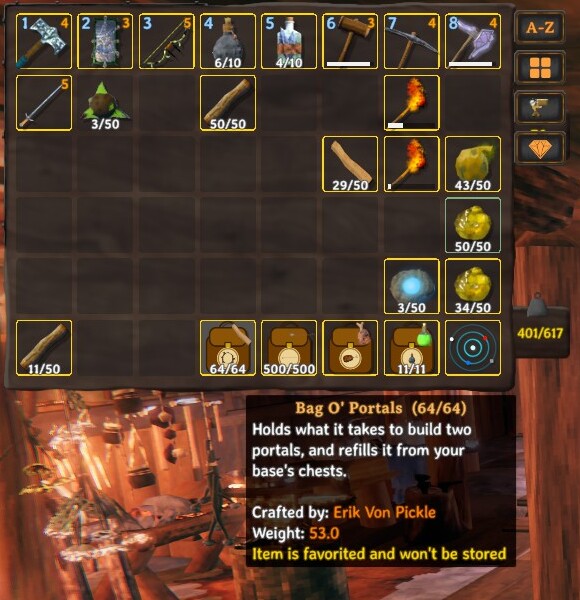
Contents
The packs
| Pack | Holds | Made at a workbench from | | --- | --- | --- | | Bag O' Potions | potions and meads | 6 Leather scraps, 2 Deer hide, 2 Resin | | Bag O' Lunch | food | 6 Wood, 2 Leather scraps | | Bag O' Arrows | arrows and bolts | 4 Deer hide, 4 Leather scraps, 2 Wood | | Bag O' Portals | portal materials, preset to two portals' worth plus 20 Wood for a workbench | 4 Deer hide, 4 Leather scraps, 2 Greydwarf eyes | | Bag O' Stuff | anything | 6 Deer hide, 8 Leather scraps |
Each pack looks like a backpack with the game's own icon on it, like an iron-on patch (a mead, cooked meat, an arrow, a portal, a chest), large and outlined in white so it's easy to see. Prefer just the icon? Set Packs / IconStyle to IconOnly. A small icon of what's inside shows in the corner of its slot, along with how full it is (e.g. 18/20).
Using a pack
- Right-click a pack in your inventory (or press its hotbar key) to open it. It opens like a chest: drag items in and out.
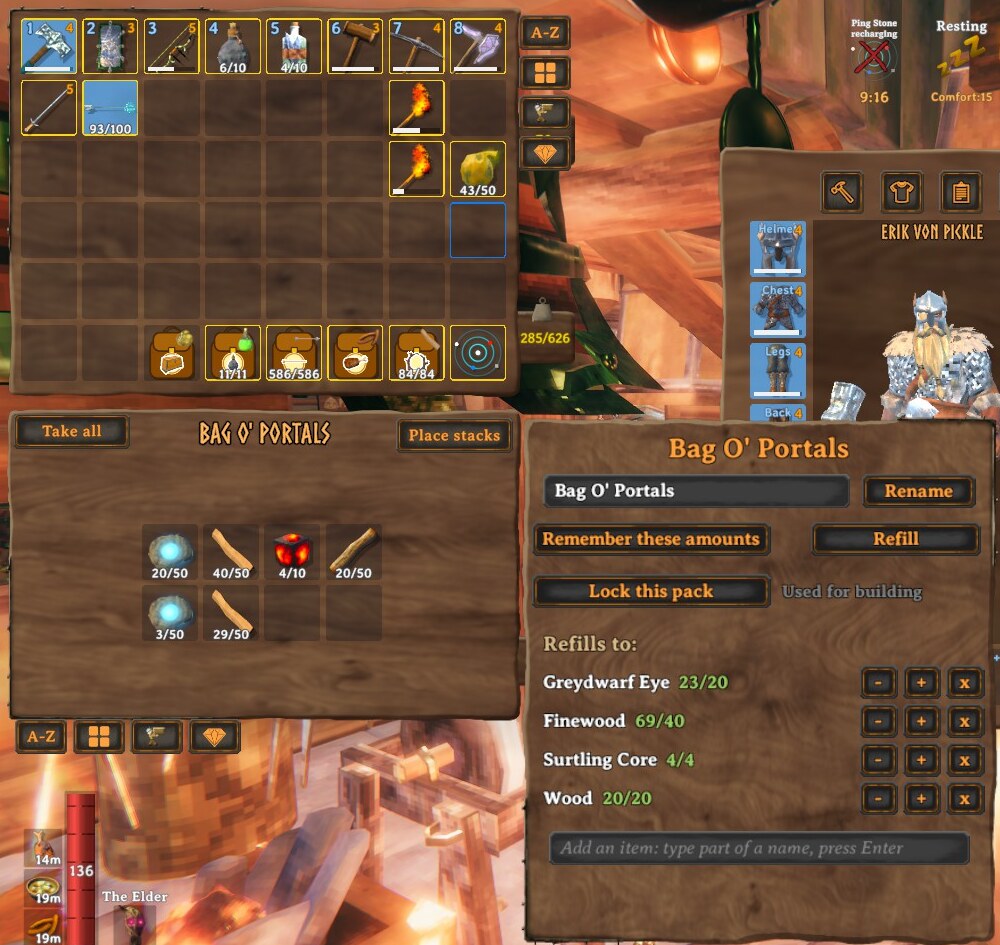
- Next to it, a panel lets you:
- Choose icon...: pick any item's icon from a searchable list; it shows large on the bag with a white border, like a patch.
- Auto-pickup: things you pick up that are in the pack's list go into it first, until it's full (locked packs are skipped).
- Drag the panel anywhere (double-click it to reset); there's an X to close it, and another on the contents window. You can also drag an item from your inventory onto a pack to put it inside.
- Rename the pack. Leave the name empty to go back to the default.
- Remember these amounts: fill the pack the way you like it, click this, and that's what it refills to.
- Edit amounts with − / + (hold Shift for ×10) or remove items. Search for items to add, even ones you don't have yet.
- Refill: tops the pack up to what it's set to hold. A fresh Bag O' Portals refills to two portals' worth of materials.
Refilling
A pack refills from two places, in this order:
- Your own inventory (
Refill / TakeFromInventory, on by default): matching items you're carrying. It never takes what you're wearing or holding, or other packs. This works anywhere, so you can refill a Bag O' Portals in the middle of nowhere if you're carrying the materials. - Ordinary chests in your base for anything still missing: the area covered by the workbench you're near, with overlapping workbenches counting as one base.
- Click Refill in an open pack to refill that pack, or press K to refill every pack you're carrying.
- Or put a pack in a chest in your base and take it out again.
- Optional: turn on
AutoRefillOnEnteringBaseto refill whenever you walk into your base (off by default).
If something can't be filled, you're told what's missing. Packs only take from chests you could open yourself, and skip chests someone has open, gravestones, ships and carts.
Building and crafting from a pack
You don't need to take materials out of a pack to use them. When the game checks whether you can build or craft something, it counts what's in the packs you're carrying, and when you do build, whatever your inventory can't cover is taken out of the packs. So a Bag O' Portals really does let you place a portal: the Finewood, Greydwarf Eyes and Surtling Cores (and the wood for a workbench) are used straight from the bag. Your inventory is used first. Turn it off with Packs / UsePackContentsForBuilding.
Lock a pack to keep it out of this. Open the pack and click Lock this pack: a locked pack's contents are never counted or taken automatically, whether for building, crafting or shooting arrows (its tooltip shows [locked]). Click Unlock this pack to use it again. Locking doesn't stop you taking things out by hand, or refilling it.
Equipping from a pack
Open a pack and right-click any equipment in it: a weapon, armour, a shield, a tool, or arrows. It moves into your inventory and equips in one step, the same as right-clicking it in your inventory. This is handy for a Bag O' Stuff used as a spare-gear bag. You need a free slot in your inventory. (Food and potions already work straight from a pack.) Turn it off with Packs / EquipFromPacks.
Shooting from a pack
You don't have to take arrows out by hand. A bow or crossbow uses the arrows in any pack you're carrying: the game only looks for ammo in your inventory, so when you start to draw or shoot and have none there, a stack of matching arrows or bolts moves out of your pack into your inventory (a message says what was taken), and you shoot as normal. Arrows that are already in your inventory are used first.
Highlights
From source dataLoaders
Runs on BepInEx.
Footprint
Rated a light load on a server.
Last update
Its author last shipped an update 10d ago.
BagOHeim on Nxeon
From our catalogue- One-click install
- Supported on Nxeon Valheim servers, for BepInEx servers. We download it from Thunderstore, place it, and restart the server.
- Server type needed
- BepInEx
- Server load
- light
- Smallest plan we suggest
- Valheim — 4 GB (4 GB RAM). This follows our own load rating above, not a benchmark.
- Latest build
- 1.4.4, released 2026-10-26
Game versions by loader
| Loader | Game versions | Newest |
|---|---|---|
| BepInEx |
From 7 recorded builds of BagOHeim.
Recent builds
| Build | Released | Game versions | Loaders |
|---|---|---|---|
| 1.4.4 | 2026-10-26 | n/a | BepInEx |
| 1.4.3 | 2026-10-26 | n/a | BepInEx |
| 1.4.1 | 2026-10-26 | n/a | BepInEx |
| 1.4.0 | 2026-10-25 | n/a | BepInEx |
| 1.3.3 | 2026-10-22 | n/a | BepInEx |
| 1.3.1 | 2026-10-22 | n/a | BepInEx |
Dependencies
- Required: Jotunn
- Required: BepInExPack Valheim
Declared by the newest build that lists any. Required ones are installed with it on one-click installs.
Run BagOHeim on a Valheim server
Pick a server or deploy a new one above; it is installed in one click.
What kind of mod it is
From the catalogGameplay & overhauls
New mechanics, content and overhauls that change how the game plays.
Compatibility
- Game
- Valheim
- Loaders
- BepInEx
- Requires
- One-click install needs a BepInEx server.
Verified at the source
- ✓ThunderstoreOfficial listing, checked 2026-10-26Open ↗
- ✓AuthorSvaha, as published on Thunderstore
- ✓LicenseNot published by the sourceFree















