






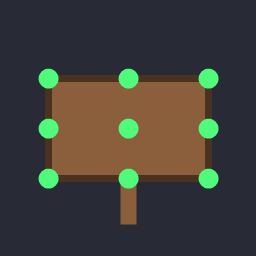
About SnappySigns
From ThunderstoreAdds build snap points (corners, edges, center) to all signs so they align cleanly to walls, beams and posts.
Snappy Signs
A small BepInEx plugin for Valheim that gives signs build snap points, so they align cleanly to walls, beams, posts, and other build pieces during placement — the same way most build pieces already snap.
By default vanilla signs have no snap points, which makes them fiddly to position. Snappy Signs adds snap points at the corners, edge midpoints, and center of each sign's board.
How it works
The plugin Harmony-patches ZNetScene.Awake. After the game registers all prefabs, it finds every prefab that has both a Sign and a Piece component (so it works for any sign, including modded/future ones — no hardcoded prefab names) and injects empty child GameObjects tagged snappoint. Valheim's placement system (Piece.GetSnapPoints) reads those direct children automatically.
Snap point positions are derived from each sign's mesh bounds, so they fit each sign type automatically. Signs that already have snap points (vanilla or added by another mod) are left untouched, and the patch is idempotent.
Configuration
After running once, BepInEx/config/com.syloreon.snappysigns.cfg:
| Section | Key | Default | Description | |--------------|----------------|---------|--------------------------------------------------| | General | Enabled | true | Master toggle. | | SnapPoints | Corners | true | Snap points at the four corners. | | SnapPoints | EdgeMidpoints| true | Snap points at the midpoint of each edge. | | SnapPoints | Center | true | Snap point at the board center. |
Changes apply on the next world/game load (prefabs are patched at scene setup).
Building
Requires the .NET SDK and a local Valheim install (for the game assemblies).
# Uses VALHEIM_INSTALL or the default path baked into the .csproj
dotnet build -c Release

# Override the game path and auto-deploy the DLL to your plugins folder:
dotnet build -c Release \
  -p:ValheimInstall="F:\SteamLibrary\steamapps\common\Valheim" \
  -p:DeployDir="F:\SteamLibrary\steamapps\common\Valheim\BepInEx\plugins\SnappySigns"
The compiled SnappySigns.dll is written to bin/Release/.
Installing
- Install BepInEx for Valheim.
- Copy
SnappySigns.dllintoValheim/BepInEx/plugins/. - Launch the game.
Notes / limitations
- Snap points are placed on the board's mid-plane. For signs that include a mounting post
in the same mesh, the computed board face may include the post; this is fine for the common wood sign but may be refined later.
Development
Developed with AI assistance (Claude). This mod is tagged AI Generated on Thunderstore.
Highlights
From source dataLoaders
Runs on BepInEx.
Footprint
Rated a light load on a server.
Last update
Its author last shipped an update 5 mo ago.
SnappySigns on Nxeon
From our catalogue- One-click install
- Supported on Nxeon Valheim servers, for BepInEx servers. We download it from Thunderstore, place it, and restart the server.
- Server type needed
- BepInEx
- Server load
- light
- Smallest plan we suggest
- Valheim — 4 GB (4 GB RAM). This follows our own load rating above, not a benchmark.
- Latest build
- 1.0.0, released 2026-05-24
Game versions by loader
| Loader | Game versions | Newest |
|---|---|---|
| BepInEx |
From 1 recorded build of SnappySigns.
Dependencies
- Required: BepInExPack Valheim
Declared by the newest build that lists any. Required ones are installed with it on one-click installs.
Run SnappySigns on a Valheim server
Pick a server or deploy a new one above; it is installed in one click.
What kind of mod it is
From the catalogBuilding & decoration
Blocks, furniture, decorations and building tools.
Compatibility
- Game
- Valheim
- Loaders
- BepInEx
- Requires
- One-click install needs a BepInEx server.
Verified at the source
- ✓ThunderstoreOfficial listing, checked 2026-10-02Open ↗
- ✓AuthorSyloreon, as published on Thunderstore
- ✓LicenseNot published by the sourceFree















