






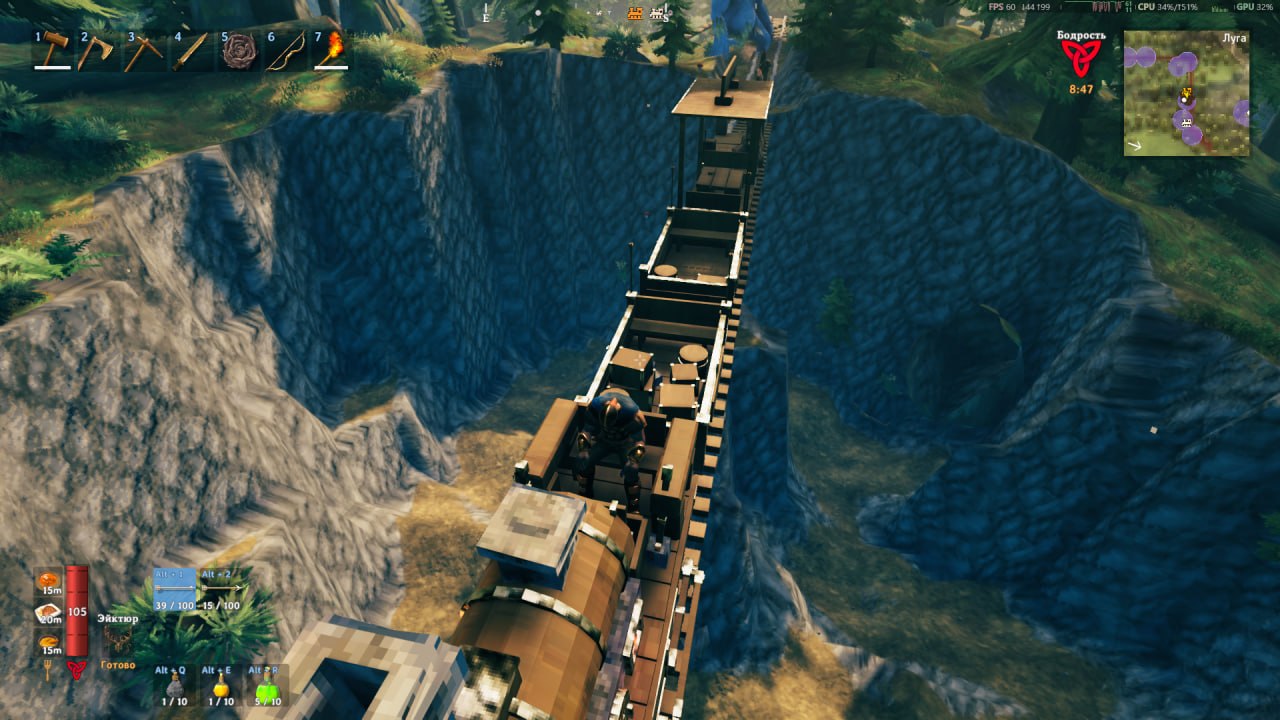

About Railroads
From ThunderstoreStone railroads for Valheim. A coal locomotive, wagons, stations and switches. Trains keep running when nobody is near.
Railroads
Vikings had ships. Now they have trains.
You lay stone track with the hammer, put a station sign beside it, give the sign a name and send a locomotive there. Or sit on the bench and drive it yourself, like in Factorio.
You can play it alone, host a game for friends or run it on a dedicated server. Trains keep going when nobody is near, and the server plans the routes, so 2 trains never get the same track.
What you get:
- 24 track pieces: straights from 1 to 32 m, curves, slopes, switches, a crossing, a turning loop, a T and an X junction
- fitted track, 1 piece up to 32 m that bends between 2 free track ends, also when they do not line up or stand at different heights
- station signs with a name board, and train consoles that call a train to their sign
- a whole station in 1 step, a platform with its sign and console, once you can build the train console
- supports for track and stations: press G to pick wood, core wood or iron poles, built down to the ground with the track
- a locomotive that burns coal, with a speed lever, a switch lever and a steam whistle
- trains that feel their load and slopes: a heavy train is slower to start and stop and burns more coal, a steep climb slows it down
- gauges on the boiler that show the load and the speed
- an item stand on the front of the locomotive for a trophy or any other item
- wagons with 18 slots of storage, a bench for 2 and a sign you write yourself
- a wagon restaurant with a stone stove to grill meat on and rest at, and a table that shows the food you put on it
- a portal wagon, a portal that travels with the train
- a flatbed wagon, an empty deck of 4 by 6 m to build on, a portal and a bed too
- a hand cart for 1 or 2 players that you pump with Space, it needs no coal and no workbench
- a drawbridge, 16 m of track that opens for ships
- a feedback post to report problems or send any kind of feedback right in the game, it sends the game logs of the players who agreed to it, see Privacy
- support for VR with VHVR: menus in the headset, levers and couplers by hand, and a hand cart you pump with your hands
- track, stations and trains with their names on the map
Everything is in the Transport tab of the hammer. A train at full speed hits whatever stands on the track, so don't stand on the track.
Your first train
- Take the hammer and lay track from the Transport tab. Track snaps to track.
- Put a station sign up to 10 m from straight track and press E on it to give it a name. A sign with no name is not in the menu.
- Put a locomotive on the track. It needs a workbench near.
- Press E on a fire door of the locomotive to put coal in. Hold E to put in more.
- Press E on the locomotive and pick a station.
Controls
- E on the locomotive: the station menu
- Gamepad in the station menu: the stick or the D-pad picks a station, A sends the train, B closes the menu
- E on the bench of the locomotive: sit down and drive
- W and S: the speed lever, forward, stop and backward. One tap, you hold nothing
- A and D: the switch lever, which way the train goes at the next switch
- E while you sit on the bench: the station menu, you stay seated and ride along
- Space: get up, the train brakes
- H on the bench, or E on the whistle lever: the whistle
- a hotbar key on the iron knob at the front of the locomotive: hang that item there, hold E to take it back
- E on the board on the side of the boiler: give the train a name
- Shift + E on a wagon, or E on a coupler: couple or uncouple
- E on the stove: under the table it takes coal, on top it takes raw meat and gives back cooked meat
- G with track on the hammer: the supports placed under it, none, wood, core wood or iron
- Fitted track on the hammer: press on a free track end, then on another. A press on the first end again drops it
- a half turn of a station sign on the hammer: the side of the stop the ghost train shows its wagons on
- E on a train console: call a train to its station sign
- E on a handle of the hand cart: take it, E again lets go
- Space on the hand cart: hold to push the handle down, let go to pull it up. In VR you can also move your hands up and down
- W and S, A and D on the hand cart: the way lever and the switch lever, like on the locomotive
- E on a lever of the drawbridge: raise or lower it
- E on the feedback post: write your feedback
Install it with a mod manager, or copy the folder Railroads into BepInEx/plugins. The server and every player need the same version. With another version you get a message and no rail pieces.
Highlights
From source dataLoaders
Runs on BepInEx.
Footprint
Rated a light load on a server.
Last update
Its author last shipped an update 1d ago.
Railroads on Nxeon
From our catalogue- One-click install
- Supported on Nxeon Valheim servers, for BepInEx servers. We download it from Thunderstore, place it, and restart the server.
- Server side
- Optional on the server
- Server type needed
- BepInEx
- Server load
- light
- Smallest plan we suggest
- Valheim — 4 GB (4 GB RAM). This follows our own load rating above, not a benchmark.
- Latest build
- 0.4.2, released 2026-11-03
Game versions by loader
| Loader | Game versions | Newest |
|---|---|---|
| BepInEx |
From 30 recorded builds of Railroads.
Recent builds
| Build | Released | Game versions | Loaders |
|---|---|---|---|
| 0.4.2 | 2026-11-03 | n/a | BepInEx |
| 0.4.1 | 2026-11-01 | n/a | BepInEx |
| 0.4.0 | 2026-10-31 | n/a | BepInEx |
| 0.3.8 | 2026-10-30 | n/a | BepInEx |
| 0.3.7 | 2026-10-30 | n/a | BepInEx |
| 0.3.6 | 2026-10-29 | n/a | BepInEx |
Dependencies
- Required: BepInExPack Valheim
Declared by the newest build that lists any. Required ones are installed with it on one-click installs.
Run Railroads on a Valheim server
Pick a server or deploy a new one above; it is installed in one click.
What kind of mod it is
From the catalogBuilding & decoration
Blocks, furniture, decorations and building tools.
Works on a server
From source side supportThunderstore lists server-side support for Railroads as optional: it can run on a server, but isn’t required there.
Compatibility
- Game
- Valheim
- Loaders
- BepInEx
- Runs on
- Serveroptional on the server
- Requires
- One-click install needs a BepInEx server.
Verified at the source
- ✓ThunderstoreOfficial listing, checked 2026-11-03Open ↗
- ✓AuthorVladasZ, as published on Thunderstore
- ✓LicenseNot published by the sourceFree











