







About SurtlingSkyfarer
From ThunderstoreA Surtling-powered aircraft for one pilot and four passengers. Upgrade cargo to 30 slots, bind a wisp to clear mist ahead, reverse on water, and recover stuck planes. Configurable recipe, speed and optional durability.
Surtling Skyfarer
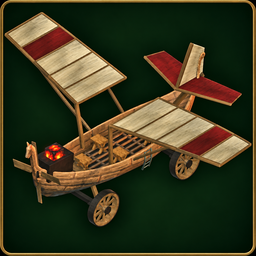
A wooden, Surtling-powered airplane for Valheim. Bring one pilot and four passengers, roll down a runway on wagon wheels, and carry supplies in a cargo chest upgradeable from 10 to 30 slots.
Current version: 0.1.8 · Download · Report a bug · View the in-game aircraft
New in 0.1.8: forward mist clearing, conventional flight
The bound wisp now clears a 35-metre radius, centred about 20 feet (6.1 metres) beyond the nose. The visible wisp stays on the plane; its clearing area follows the aircraft's heading to open the mist ahead before you reach it. Previously purchased wisp upgrades gain the new coverage automatically.
VTOL has been removed. Take off using normal forward flight. The mod no longer uses V, so Valheim's auto-pickup toggle works normally. Old VTOL config entries and saved hover flags are ignored; there is no hover mode to enable.
Cargo upgrades, water reverse, unstuck and the previous wing/streaming fixes remain. Durability is still off by default. Update every client and server together, preserving your edited config. This revised package keeps version 0.1.8: replace the DLL on every client and server even if 0.1.8 is already installed.
Features
- Wooden boat hull, cloth wings, glowing Surtling core, and a carved propeller.
- Five seats: one pilot and four passengers.
- Four wagon wheels with suspension, steering, brakes, and land/water reverse.
- Full loops, barrel rolls, and rudder control.
- Throttle stays set while someone remains seated or standing on deck. When
everyone leaves, power cuts out and the plane slows and descends.
- 10 storage slots, upgradeable to 20 or 30 per aircraft. Cargo saves
with the plane and drops when you dismantle it.
- Optional bound wisp clears a 35-metre radius ahead of the plane.
- A collision-checked unstuck action for parked aircraft.
- An indestructible-by-default hull, optional configurable durability, and unlimited core power. Collisions still apply;
hammer dismantling remains available. The hull floats for water landings.
Requirements
Install these on every player's computer and on the server:
| Dependency | Tested version | Download and setup | | --- | --- | --- | | BepInExPack Valheim | 5.4.2351 | BepInExPack Valheim | | Jötunn, the Valheim Library | 2.30.2 | Jötunn | | Surtling Skyfarer | 0.1.8 | GitHub releases |
Use the same Skyfarer version on all clients and the server. This release was tested with the Valheim l-1.0.21 client and l-1.0.21 dedicated server, both using Unity 6000.0.75f1.
The Skyfarer download contains the mod itself. Install BepInEx and Jötunn separately; their files are not bundled. The package manifest declares both dependencies for Thunderstore-compatible mod managers.
Installation
Manual installation
- Close Valheim, or stop the dedicated server.
- Install BepInExPack Valheim using its instructions for your operating
system. Launch once through BepInEx so its folders are created, then close it.
- Install Jötunn into the active
BepInEx/pluginsfolder. - Download
SurtlingSkyfarer-0.1.8.zipfrom
- Extract its
BepInExfolder into the game or server folder. The mod DLL
should end up at:
BepInEx/plugins/Skyfarer/Wise.Skyfarer.dll- Launch through your normal BepInEx-enabled method. On Linux, follow the
BepInEx pack's game or dedicated-server launcher instructions.
If you download the standalone DLL instead, put it in the same folder above. Keep one copy of Wise.Skyfarer.dll in your active plugin tree.
Mod-manager profiles
Install the two dependencies in your Valheim profile, then import the release ZIP using the manager's local-mod import option. If local import is unavailable, open the profile folder and copy the DLL into its BepInEx/plugins/Skyfarer folder. Start the game through that modded profile.
Dedicated servers and AMP
The server needs all three components too. Stop it, install or enable its BepInEx setup, and upload Jötunn and Skyfarer into its active BepInEx/plugins folder. In AMP, use the instance's File Manager and restart through its BepInEx-enabled launch method. The same Skyfarer DLL is used by Windows and Linux clients and servers.
Updating an existing installation
Stop the server and close each player's game. Replace the existing Wise.Skyfarer.dll, then restart everyone on the same version. Updating from an earlier release to 0.1.8 does not require reinstalling BepInEx or Jötunn when the tested versions above are already installed. Existing aircraft gain the cargo chest when loaded.
Build the plane
Equip a hammer, stand near a workbench, and open Transport. Look for Surtling Skyfarer, or type Skyfarer into the hammer menu's search field. Your character must discover the recipe materials first.
| Material | Amount | | --- | ---: | | Fine Wood | 80 | | Copper | 25 | | Deer Hide | 20 | | Surtling Core | 8 |
Edit durability, health, recipe, and speed
Open BepInEx/plugins/Skyfarer/Skyfarer.cfg with any text editor before starting the game or server. Keep it beside Wise.Skyfarer.dll:
[Aircraft]
DurabilityEnabled = false
MaxHealth = 1800
TopSpeed = 22
Recipe = FineWood:80,Copper:25,DeerHide:20,SurtlingCore:8Highlights
From source dataLoaders
Runs on BepInEx.
Footprint
Rated a light load on a server.
Last update
Its author last shipped an update 1d ago.
SurtlingSkyfarer on Nxeon
From our catalogue- One-click install
- Supported on Nxeon Valheim servers, for BepInEx servers. We download it from Thunderstore, place it, and restart the server.
- Server type needed
- BepInEx
- Server load
- light
- Smallest plan we suggest
- Valheim — 4 GB (4 GB RAM). This follows our own load rating above, not a benchmark.
- Latest build
- 0.1.8, released 2026-11-03
Game versions by loader
| Loader | Game versions | Newest |
|---|---|---|
| BepInEx |
From 4 recorded builds of SurtlingSkyfarer.
Recent builds
| Build | Released | Game versions | Loaders |
|---|---|---|---|
| 0.1.8 | 2026-11-03 | n/a | BepInEx |
| 0.1.7 | 2026-10-10 | n/a | BepInEx |
| 0.1.6 | 2026-10-10 | n/a | BepInEx |
| 0.1.5 | 2026-10-01 | n/a | BepInEx |
Dependencies
- Required: Jotunn
- Required: BepInExPack Valheim
Declared by the newest build that lists any. Required ones are installed with it on one-click installs.
Run SurtlingSkyfarer on a Valheim server
Pick a server or deploy a new one above; it is installed in one click.
What kind of mod it is
From the catalogVehicles & ships
Cars, boats, aircraft, ships and other things to drive or fly.
Compatibility
- Game
- Valheim
- Loaders
- BepInEx
- Requires
- One-click install needs a BepInEx server.
Verified at the source
- ✓ThunderstoreOfficial listing, checked 2026-11-03Open ↗
- ✓Authorwisedev, as published on Thunderstore
- ✓LicenseNot published by the sourceFree















