







About WorldPreGenerator
From ThunderstorePré-gera zonas do mundo pelo menu ESC ou console, mostra progresso e grade verde/amarela no mapa sem revelar o terreno inexplorado.
World Pre-Generator
Pre-generate Valheim world zones before exploring them. The mod uses the game's ghost-zone path and works in controlled batches, so the world can be prepared while the host follows progress.
Benefits
- Reduces pauses and processing spikes caused by generation during exploration.
- Leaves terrain, locations, and structures ready before players arrive.
- Keeps map exploration and exploration-related achievements tied to manual play.
- Saves progress at configurable intervals, allowing an interrupted generation to
continue later.
- Provides independent checking, time estimates, and safe cancellation.
- Binds the routine to the active world name and cancels automatically when returning
to the menu.
- Allows only one generation at a time; checking can follow an active generation.
- Displays which zones have been generated on the M map without revealing hidden
terrain.
- Restricts the map grid and management controls to the host or an authorized admin.
- Works in local worlds, multiplayer hosts, and dedicated servers. In a dedicated
connection the modal sends actions to the server, which keeps the counters and generates the dedicated save.
Screenshots
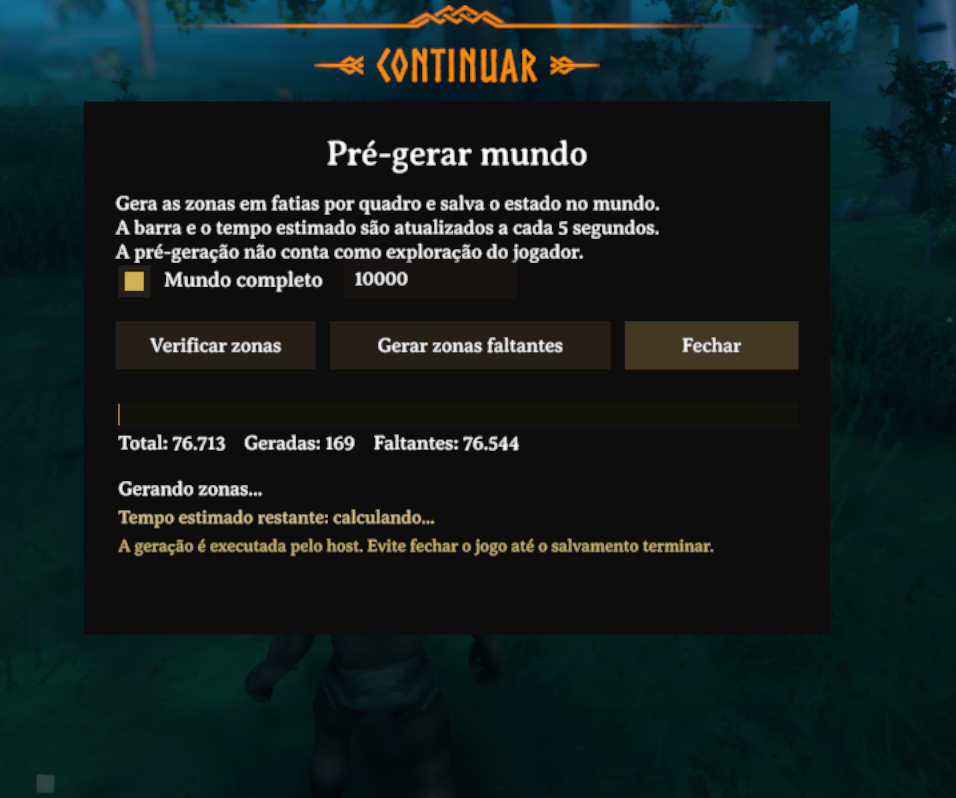
Modal for configuring, checking, generating, and cancelling pre-generation.
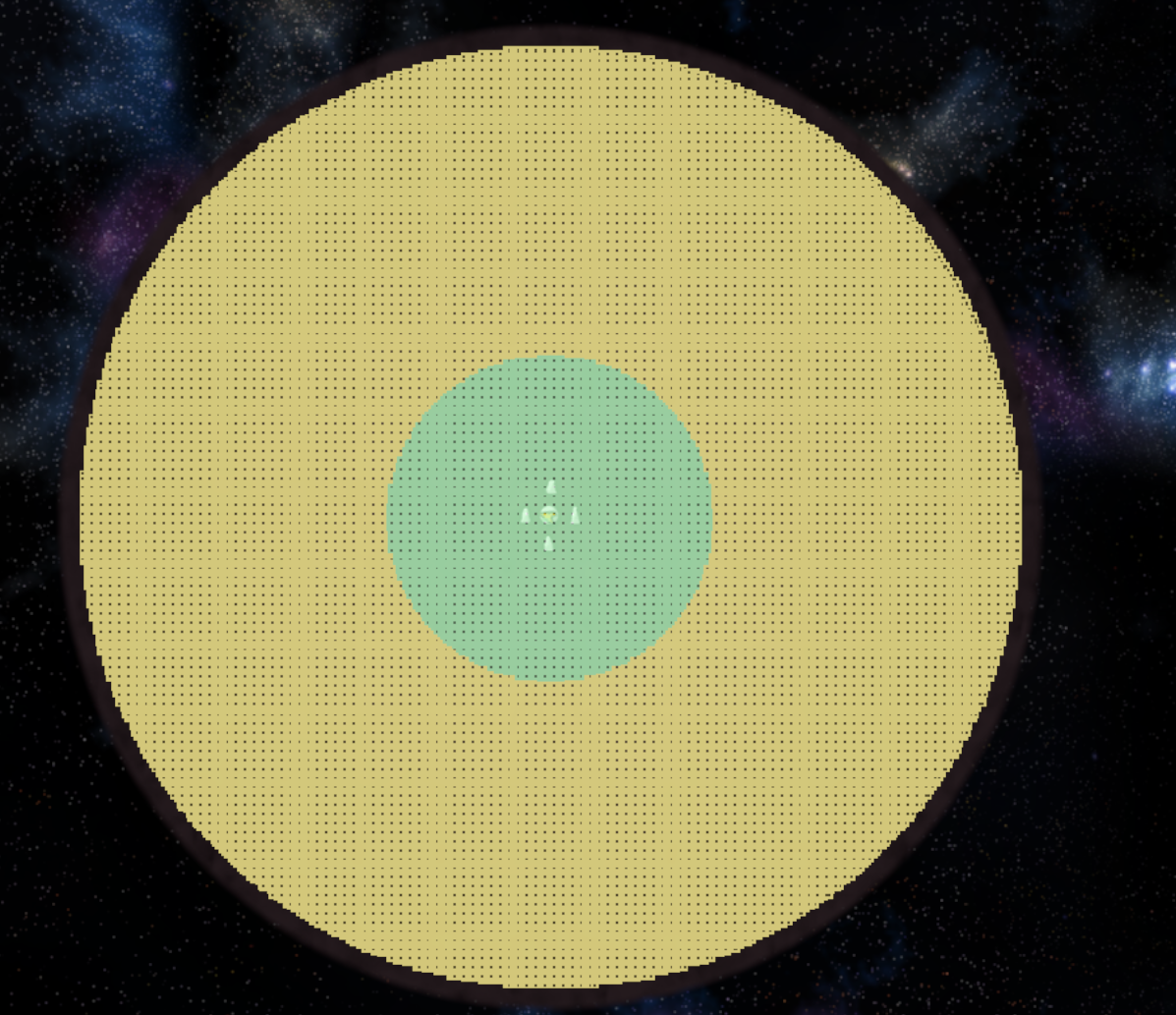
The grid shows zone state without revealing hidden terrain: green means generated and yellow means still missing.
Thunderstore package layout
The ZIP uploaded to Thunderstore keeps README.md, manifest.json, and icon.png at its root. The screenshots are also included in images/ for local previews and offline distribution. The README uses absolute HTTPS image URLs because Thunderstore does not resolve relative links to files inside a package page:
README.md
manifest.json
icon.png
images/worldpregen-modal.png
images/worldpregen-map-grid.png
Do not move the screenshots into BepInEx/plugins. If you replace the hosted images, keep direct HTTPS URLs that return PNG files and update the two Markdown links above.
Installation
- Install BepInExPack Valheim.
- Extract the contents of this ZIP into the Valheim folder.
- Confirm that the file is at
BepInEx/plugins/WorldPreGenerator/WorldPreGenerator.dll. - Start the game through your mod manager.
BepInEx Configuration Manager is optional. When installed, it exposes the mod options inside the game.
How to use in game
- Enter the world as a local player, host, or administrator.
- Open the pause menu with ESC and select Pre-generate world.
- Check Complete world, or clear it and enter a radius in metres.
- Click Check zones to update the generated and missing zone totals.
- Click Generate missing zones to start the cascade.
- The progress bar, counters, and estimated time update every 5 seconds.
- Use Close to hide the modal while generation continues. Use Cancel to stop
generation and save the progress already completed.
The host can check zones while a generation is active. Checking never starts a second generation.
When leaving the world, the routine is cancelled before the scene changes and saved progress is preserved. When entering another world, the modal state and counters start clean; use Check zones to read that save's state.
Map grid
Enable Map grid in the modal and open the map with M:
- green: zone already generated;
- yellow: zone still missing;
- transparency is reduced under fog to preserve the unexplored map;
- the grid shows generation state only and does not mark the map as explored;
- only the host or an authorized administrator can enable and view the grid;
- on a dedicated server, colors come from a compact snapshot of the server's
authoritative save state; generated zones appear green even if the client has not loaded them locally;
- points-of-interest icons stay hidden until the area is explored manually when
HideUnexploredLocationIcons is enabled.
Dedicated server
Install the plugin in the dedicated server's BepInEx/plugins folder as well. The server version must show Loading [World Pre-Generator ...] in its log. If the log shows Skipping ... because of process filters (valheim.exe), the DLL is old and does not include the valheim_server.exe process.
After an administrator joins, the client modal queries the save state on the server. Checking and generation run on the server, never on the client's local ZoneSystem. You can also use the commands directly in the server console:
The client plugin is optional for joining and playing on the server. Players without the plugin can connect normally, but they do not receive the tool state, modal, map grid, or progress messages. The client plugin is required only for the interface and progress display; the server plugin remains mandatory to generate the dedicated save.
Once generation starts on the server, the player who clicked the button may leave without interrupting it; the server continues the cascade by itself. When the server shuts down, the routine is cancelled before the network is destroyed and progress saved up to the last interval remains available to continue later. On completion or cancellation, the final state is sent to clients. When changing worlds, RPCs are registered again so the modal cannot inherit the previous save's state.
When leaving through the menu, the mod stops the routine before the scene changes and lets Valheim's normal save handle the world. This avoids a second save call that could stall singleplayer loading. If the player is not on the administrator list, the server returns a denial to the modal instead of leaving it stuck at “Request sent”.
Highlights
From source dataLoaders
Runs on BepInEx.
Footprint
Rated a light load on a server.
Last update
Its author last shipped an update 50d ago.
WorldPreGenerator on Nxeon
From our catalogue- One-click install
- Supported on Nxeon Valheim servers, for BepInEx servers. We download it from Thunderstore, place it, and restart the server.
- Server side
- Optional on the server
- Server type needed
- BepInEx
- Server load
- light
- Smallest plan we suggest
- Valheim — 4 GB (4 GB RAM). This follows our own load rating above, not a benchmark.
- Latest build
- 1.0.14, released 2026-09-15
Game versions by loader
| Loader | Game versions | Newest |
|---|---|---|
| BepInEx |
From 4 recorded builds of WorldPreGenerator.
Recent builds
| Build | Released | Game versions | Loaders |
|---|---|---|---|
| 1.0.14 | 2026-09-15 | n/a | BepInEx |
| 1.0.13 | 2026-09-15 | n/a | BepInEx |
| 1.0.9 | 2026-09-13 | n/a | BepInEx |
| 1.0.0 | 2026-09-13 | n/a | BepInEx |
Dependencies
- Required: BepInExPack Valheim
Declared by the newest build that lists any. Required ones are installed with it on one-click installs.
Run WorldPreGenerator on a Valheim server
Pick a server or deploy a new one above; it is installed in one click.
What kind of mod it is
From the catalogQuality of life & UI
Small conveniences, tweaks and interface improvements players notice straight away.
Works on a server
From source side supportThunderstore lists server-side support for WorldPreGenerator as optional: it can run on a server, but isn’t required there.
Compatibility
- Game
- Valheim
- Loaders
- BepInEx
- Runs on
- Serveroptional on the server
- Requires
- One-click install needs a BepInEx server.
Verified at the source
- ✓ThunderstoreOfficial listing, checked 2026-10-01Open ↗
- ✓AuthorXineladaLendaria, as published on Thunderstore
- ✓LicenseNot published by the sourceFree












