About Zenox
From ThunderstoreAll-in-one Valheim 1.0 QoL and server mod: Party system, auto-doors, tailwind sailing, permanent Guardian Power, boss finder, mass farming, nearby crafting, quick deposit, tree replanting, BetterUI HUD overhaul, server-synced settings, and more.
Zenox
All-in-one Valheim 1.0 quality-of-life and server mod, built to consolidate a whole stack of separate third-party mods into one custom, server-controlled package - including a built-in Party system (invite players, live HP/stamina HUD panel).
Bugs / suggestions: Discord
Features
- Auto Doors – doors and gates open/close automatically as you approach/leave.
- Sailing – ships always catch a tailwind; sail can be toggled near-invisible (synced across
the crew) without hiding the up/down state.
- Guardian Power – any boss's Forsaken Power becomes server-wide permanent and stackable;
hidden from the HUD but still visible in the Compendium.
- Boss Finder – a compass/map pin always points at the next boss in progression order, even
before you've found its altar.
- Server Button – one-click connect to the configured server from the main menu.
- Achievements – Steam achievements are never blocked, regardless of mods or cheats.
- Random Events – disable random raids/events entirely.
- Fog Control – optionally remove the Mistlands/Ashlands special fog.
- Instant Monster Loot Drop – killed monsters drop loot immediately instead of lingering as a
ragdoll.
- Deluxe Item Particles – enlarged, slower sparkle effect on dropped items.
- Mass Farming – holding the interact key mass-picks-up matching pickables/beehives in range,
and mass-plants a configurable grid of seeds at once with the Cultivator.
- Nearby Crafting – craft and build using materials from nearby eligible containers, plus a
Mass Quick Deposit hotkey.
- Tree Replanting – felled trees get the same vanilla sapling the Cultivator would plant,
automatically, a few seconds later - no seeds needed.
- /back Command – type
/backin chat within a short window after dying to teleport back to
your death position, with a cooldown before it can be used again.
- Animal Feeding – tameable creatures eat their normal food straight out of a nearby chest
instead of needing it dropped on the ground, and will drop the player as a target in favor of nearby food.
- Server Sync – gameplay-affecting settings are pushed from the server to every connecting
client automatically, so nobody can just loosen the rules locally.
- Recycle – a Recycle tab next to Craft/Upgrade breaks a crafted/upgraded item back down into
resources: downgrade it a quality level (refunding that level's materials) or, at quality 1, fully deconstruct it. Enabled, ResourceMultiplier and PreserveOriginalItem are server-synced.
- Party –
/invite <name>or look at a nearby player and press the party key (Party.InviteKey, default J,
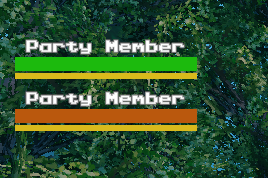
rebindable - deliberately not E, so it never clashes with doors) to invite them to a party (same key leaves it once you're grouped), accepted via a popup on their side. A movable/scalable HUD panel (F7 edit mode, like every other bar) then shows each online member's name, HP and stamina, kept live via a direct sync between clients. ShowHpBar/ShowStaminaBar toggle each bar independently. A small icon of each member's selected Forsaken power is shown next to their name (ShowGuardianPower, on by default; only for members running a version that has it). The party survives deaths and portals: a member who died shows a skull-and-crossbones icon, one who is far away (e.g. portalled) shows an arrow, both greyed out, and they return to normal when back in range. TogglePanelKey (unbound by default) shows/hides the panel. The party also survives logging out and server restarts: the party id is stored with your character, and members find each other again when they log in (no leader needed - anyone can invite, anyone can leave).
BetterUI HUD overhaul
- HUD editor: press F7 to toggle edit mode. While active, drag a HUD bar (health, stamina,
food, eitr, adrenaline) with the left mouse button to move it, or scroll while hovering it to resize it. Positions/sizes persist in the config.
- Item quality stars: item quality shown as gold star icons directly on the icon (inventory
and hotbar), instead of vanilla's plain number. HotbarEnabled lets you turn the hotbar ones off independently (leaving it exactly as vanilla, which never showed a quality indicator there) while keeping the inventory grid ones.
- Durability color: the durability bar is colored green/yellow/orange/red by remaining
percentage.
- Enemy HUD: configurable level display (vanilla stars, text prefix, or both), a live HP
number on the health bar, name color by alert state, a bigger/thicker bar, and enemies can be set to always show their HUD within a configurable distance instead of only while aimed at.
- Hover text extras: containers show free slot count, fermenters and cooking stations show
remaining time - all with selectable display styles.
- Character level bar: a combined level (summed across all skills) shown as an XP bar at the
bottom of the HUD.
- Character-select stats: kills/deaths/crafts/builds shown under the character name on the
character-select screen.
- Combined stats tooltip: hovering the armor value in the character panel shows a combined
weapon damage/block/armor/movement summary.
Configuration
All features are individually toggleable via the BepInEx config file (BepInEx/config/zenox.zenox.cfg), generated on first run.
Compatibility notes
Several features (tree replanting, instant loot drop, random-event disabling) act on whichever peer currently owns the affected object - on a dedicated server that is usually the server itself, so for full reliability install Zenox on the dedicated server as well as on clients.
Credits
Highlights
From source dataLoaders
Runs on BepInEx.
Footprint
Rated a light load on a server.
Last update
Its author last shipped an update 2d ago.
Zenox on Nxeon
From our catalogue- One-click install
- Supported on Nxeon Valheim servers, for BepInEx servers. We download it from Thunderstore, place it, and restart the server.
- Server side
- Required on the server
- Server type needed
- BepInEx
- Server load
- light
- Smallest plan we suggest
- Valheim — 4 GB (4 GB RAM). This follows our own load rating above, not a benchmark.
- Latest build
- 1.0.66, released 2026-10-14
Game versions by loader
| Loader | Game versions | Newest |
|---|---|---|
| BepInEx |
From 30 recorded builds of Zenox.
Recent builds
| Build | Released | Game versions | Loaders |
|---|---|---|---|
| 1.0.66 | 2026-10-14 | n/a | BepInEx |
| 1.0.65 | 2026-10-12 | n/a | BepInEx |
| 1.0.64 | 2026-10-07 | n/a | BepInEx |
| 1.0.63 | 2026-10-06 | n/a | BepInEx |
| 1.0.62 | 2026-10-06 | n/a | BepInEx |
| 1.0.61 | 2026-10-06 | n/a | BepInEx |
Dependencies
- Required: BepInExPack Valheim
Declared by the newest build that lists any. Required ones are installed with it on one-click installs.
Pick a server or deploy a new one above; it is installed in one click.
What kind of mod it is
From the catalogQuality of life & UI
Small conveniences, tweaks and interface improvements players notice straight away.
Runs on your server
From source side supportThunderstore lists Zenox as required on the server. Check its Thunderstore page to see whether players need it too.
Compatibility
- Game
- Valheim
- Loaders
- BepInEx
- Runs on
- Serverrequired on the server
- Requires
- One-click install needs a BepInEx server.
Verified at the source
- ✓ThunderstoreOfficial listing, checked 2026-10-14Open ↗
- ✓AuthorZenox, as published on Thunderstore
- ✓LicenseNot published by the sourceFree