






About Raphael
From ThunderstoreUnified client UI for V Rising server mods (Bloodcraft, Beelzebub, Uriel, Faust, Nyarlathotep, Kindred) plus a standalone chat window. Commands, stats and reports as buttons, forms and overlays. (Formerly BloodCraftHub.)
Raphael, Lord of Wisdom
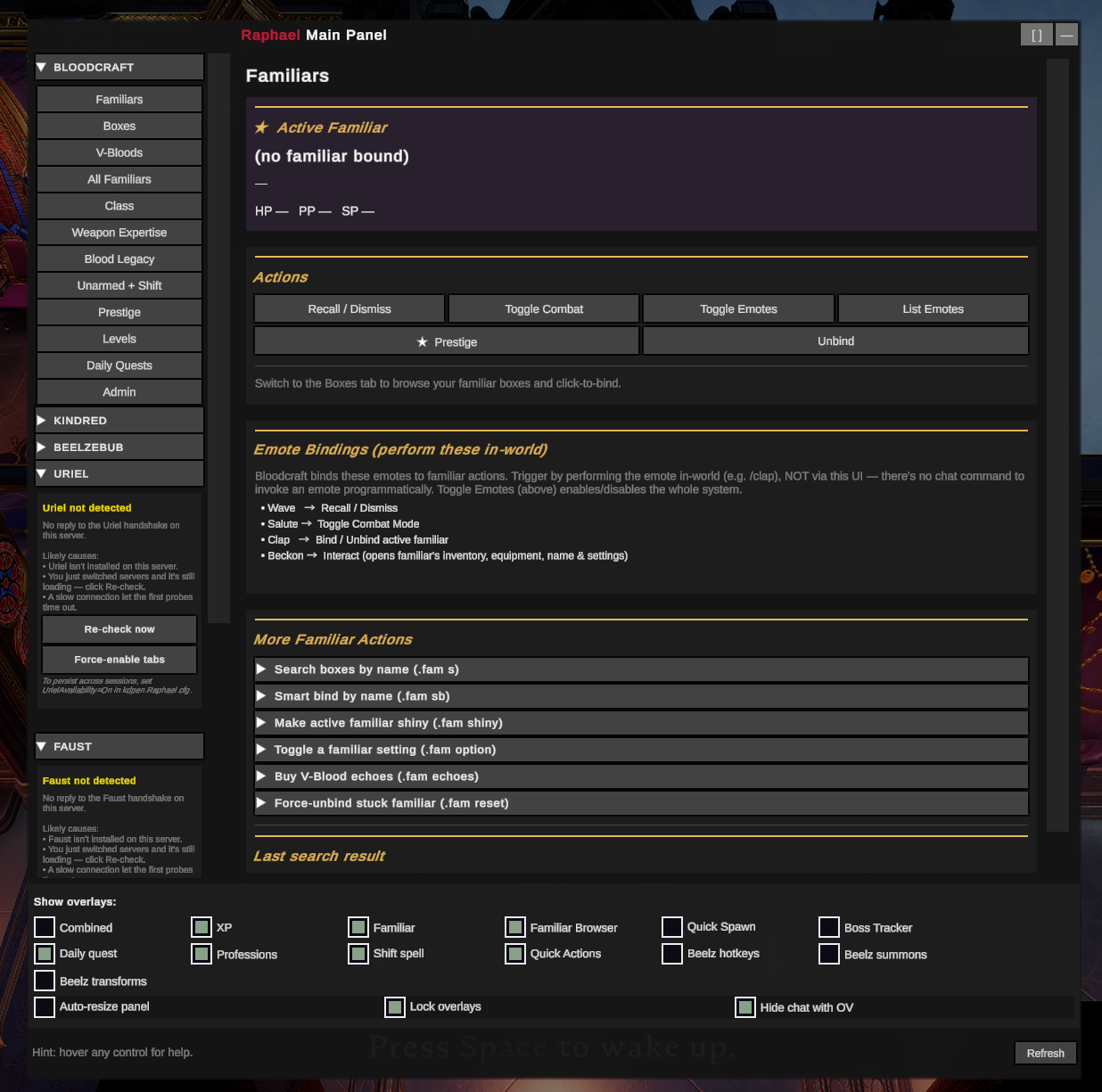
A client-side V Rising UI that turns the chat commands of popular server-side mods into buttons, forms, and on-screen overlays. Each mod's tabs appear only when that mod is detected on your server — so it works whether your server runs one, several, or none.
Works with: Bloodcraft · Beelzebub · Uriel · Faust · Nyarlathotep · KindredCommands · KindredLogistics — plus a standalone tabbed chat window that works on any server.
> 🟣 Formerly BloodCraftHub — same mod, renamed. Switching over? See Migrating from BloodCraftHub and don't run both at once. > > ⚠️ Pre-1.0 beta. It's daily-driven on a live server, but you may hit rough edges. The fastest way to get a fix is the Shadow Realm Discord.
What you get
- One panel for your server's mods — left-rail tab groups for Bloodcraft, Kindred, Beelzebub, Uriel, Faust, and Nyarlathotep; each shows only when detected.
- Commands as forms — player pickers, dropdowns, and number fields instead of typing
.lvl set <Player> <Level>into chat. - Live HUD overlays — XP, familiar, weapon/blood, professions, quests, shift-spell cooldown, and more. Each is draggable, resizable, and individually toggleable.
- Standalone chat window — tabbed per-channel chat (Global / Local / Clan / Whispers / System), whisper anyone online, custom colors, and per-channel history controls (keep conversation, drop noisy System floods). Needs no server mods.
- Chat & Diagnostics in one place — choose what Raphael hides from chat and what it logs, for itself and every server mod. Presets: Quiet, Normal, Show everything. Replies to commands you send always show.
- In-built game guide — a "V Rising Basics" tab explaining the base game (blood, Gear Level, V Bloods, castles, hazards) and how each mod changes it, so new players have a one-stop primer.
- Admin tooling — surfaced wherever the backing mod provides it: Kindred admin, Beelzebub ability shaping and lock groups, Faust server analytics, Uriel sharing/spawning, Nyarlathotep event control.
Full feature list
- Floating Raphael + OV buttons (top-right) — open the panel; OV is a master overlay show/hide (with optional timed auto-reappear and launcher hiding).
- Tab groups (each appears only when its server mod is detected):
- Bloodcraft — Familiars, Boxes, V-Bloods, All Familiars, Class, Weapon Expertise, Blood Legacy, Unarmed + Shift, Prestige, Levels, Daily Quests, Admin.
- Kindred — Logistics (+ admin), Commands, Admin: Players / Server / World.
- Beelzebub — Bestiary, Loadout (universal + per-weapon + per-form ability sets), Hotkeys, Transforms, Settings, admin Config / Players.
- Faust — Castle Info, Open/All Plots, Decay Watch, Castle Resources, Player Info, Clans, Player Positions, Server Stats, Boss Status, Leaderboards, World Map, admin Control / Oversight.
- Nyarlathotep — Live Events (wave countdowns), Leaderboards, My Stats, Settings, admin Events / Zones / Announce / Kill Switch.
- Settings & Help — Quick Start, per-mod Help guides, V Rising Basics (in-built base-game guide), Game Guide (external links), Settings, Chat & Diagnostics, About.
- Secondary overlays (toggle from the footer) — XP, Familiar, Familiar Browser, Daily Quest, Professions, Shift Spell, a Combined info overlay, Quick Actions, a Familiar Quick Spawn overlay, and a Faust Boss Tracker. Each is independently draggable/resizable with its own transparency; visibility persists across sessions.
- Freeze actions while the UI is open (opt-in) — stop moving/attacking/casting and block menu hotkeys while you click around the panel.
- "Last server response" panel — replies to read-data commands (
.wep get,.class l, …) show in-UI, not just in chat. - Live data via Bloodcraft's signed broadcast protocol, with chat-regex fallback for replies it doesn't cover.
- Fast opening — the panel opens right away; tabs fill in without freezing the game.
- Refresh button (panel footer, bottom-right; also Settings → Connection) — clears chat history and stale UI caches without touching settings. Use it if the game feels slower after a long session.
- Quality of life — hover tooltips on every control, auto-resizing panel, scrollable tabs + left rail, a two-zone color theme, a 50–400% text-size slider, and opt-in keyboard hotkeys.
Install
Client-side only — install on the player's V Rising client, not the server.
Mod manager (recommended): in Thunderstore Mod Manager or r2modman, open your V Rising profile → search Raphael → Install. Make sure BepInExPack_V_Rising is in the same profile, then launch from the manager.
Manual: install BepInEx for V Rising, drop Raphael.dll into BepInEx/plugins/, launch.
On your first connect to a modded server, a floating Raphael button appears top-right. Hover any control to see what it does (the description shows in the footer). Non-admin commands work for everyone; admin tabs need permissions.
⚠️ Before you install
Running Eclipse? (compatibility needs re-testing)
Historically, Raphael + Eclipse crashed the client on load (the fault is in Eclipse's HUD code, not Raphael). When Raphael detects Eclipse it stands down from its own passive Bloodcraft layer to avoid the crash: Eclipse drives the live HUD, while Raphael keeps its command buttons and chat window. Eclipse has since updated and this hasn't been re-verified — disable Eclipse while running Raphael to be safe.
Raphael looks empty on a Bloodcraft server?
Highlights
From source dataLoaders
Runs on BepInEx.
Footprint
Rated a light load on a server.
Last update
Its author last shipped an update 11d ago.
Raphael on Nxeon
From our catalogue- One-click install
- Not available. One-click install isn't available for this game's mods yet. Download it and upload it to your server in Files.
- Server type needed
- BepInEx
- Server load
- light
- Smallest plan we suggest
- V Rising — 6 GB (6 GB RAM). This follows our own load rating above, not a benchmark.
- Latest build
- 0.68.1, released 2026-10-04
Game versions by loader
| Loader | Game versions | Newest |
|---|---|---|
| BepInEx |
From 6 recorded builds of Raphael.
Recent builds
| Build | Released | Game versions | Loaders |
|---|---|---|---|
| 0.68.1 | 2026-10-04 | n/a | BepInEx |
| 0.65.6 | 2026-09-23 | n/a | BepInEx |
| 0.65.5 | 2026-07-15 | n/a | BepInEx |
| 0.64.0 | 2026-06-14 | n/a | BepInEx |
| 0.51.1 | 2026-06-12 | n/a | BepInEx |
| 0.30.0 | 2026-06-10 | n/a | BepInEx |
Dependencies
- Required: BepInExPack V Rising
Declared by the newest build that lists any. Required ones are installed with it on one-click installs.
Run Raphael on a V Rising server
Deploy a server above, then upload the file in Files.
What kind of mod it is
From the catalogChat & community
Chat, voice, Discord, clans and other community features.
Compatibility
- Game
- V Rising
- Loaders
- BepInEx
- Requires
- One-click install needs a BepInEx server.
Verified at the source
- ✓ThunderstoreOfficial listing, checked 2026-10-05Open ↗
- ✓AuthorTheShadowRealm, as published on Thunderstore
- ✓LicenseNot published by the sourceFree














