







About ZUI
From ThunderstoreAn overhaul UI framework for VRising mods.
ZUI - Modern UI Framework for V Rising
ZUI is a powerful, modular UI framework for V Rising that allows developers to create professional, interactive interfaces with minimal effort. Originally built upon the foundation of BloodCraftUI - OnlyFams, ZUI has evolved into a complete Client-Server Hybrid UI engine capable of spawning independent windows, rendering custom textures, streaming images from web URLs, and providing deep integration with both client-side and server-side systems.
ZUI features built-in support for BloodCraft, KinPonds, ScarletSigns, and KindredCommands, while providing a robust API for third-party modders to build their own standalone tools. Server mods can now create UIs dynamically via chat packets without requiring players to install additional client mods.
🖼️ UI Preview
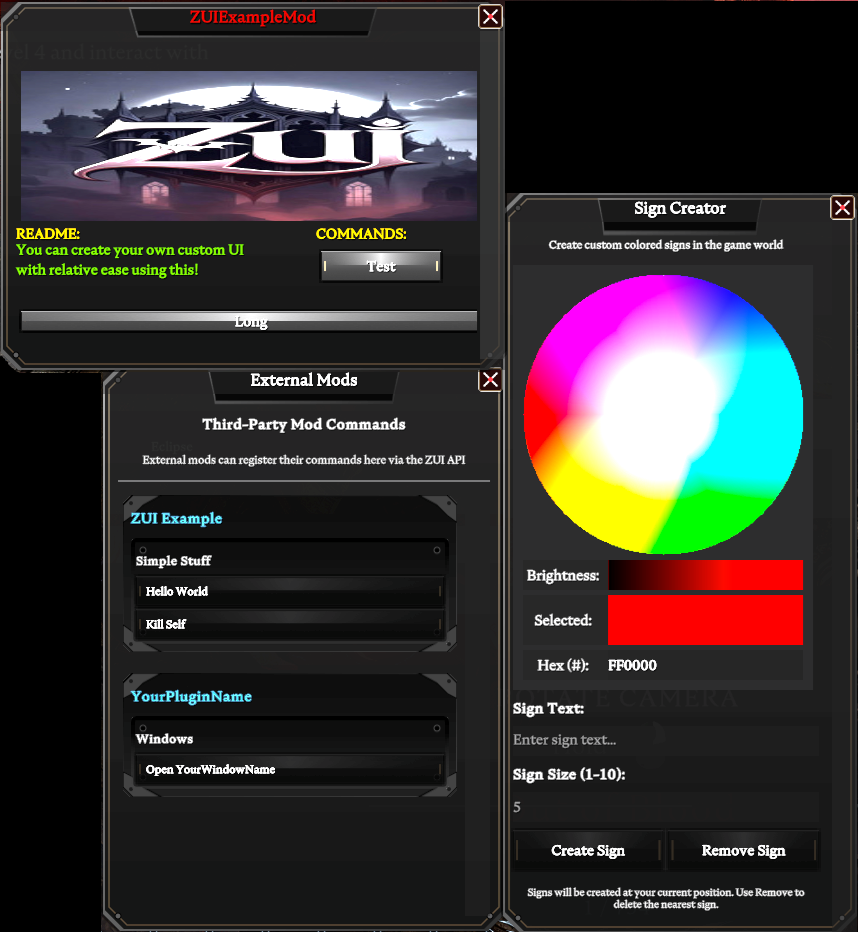
Note: ZUIExampleMod & ScarletSigns are not included with this package. Please download them individually.
✨ Key Features
- Client-Server Hybrid Architecture: Use ZUI from client mods OR server mods via JSON chat packets
- Server-Side Mod Support: Server mods can create UIs without requiring client-side mod installation
- Dynamic Image Loading: Stream images from web URLs (HTTP/HTTPS) with automatic caching
- Custom Window Engine: Create independent windows using pixel-perfect custom dimensions OR use the visual designer at https://zanakinz.github.io/ZUI to create your own UI visually
- Dynamic Content Registration: Add categories, text blocks, and interactive buttons to any window on the fly
- Custom Image Support: Load and render PNG/JPG textures from your mod's Sprites folder OR from web URLs
- Persistent Layouts: All windows support dragging and resizing with automatic data saving; your UI stays exactly where you left it
- Theming & 9-Slicing: Professional visual style using 9-sliced sprites for seamless button and panel scaling
- Reflection-based Integration: Third-party mods can integrate without compile-time dependencies
- Packet Protocol: Hidden chat-based packet system allows server mods to control client UIs
🛠️ Installation
- Download the latest release
- Place
ZUI.dlland theSpritesfolder into yourBepInEx/plugins/directory
- Note: The Sprites folder is required for the default framework visuals
- Configuration: By default, server-side integrations (like BloodCraft) are disabled. Enable them in the
ZUI.cfgfile if your server supports them
📚 Developer API & Examples
ZUI supports two integration methods: Client-Side (via reflection) and Server-Side (via chat packets).
🔷 Method 1: Client-Side Integration (Reflection-Based)
For client-side mods, use ZUI's "Context" based API via reflection. You set the plugin and window you want to work on, then add your content.
🔘 Basic Registration (Main Menu Integration)
By default, adding buttons without setting a custom UI context will place them in the global Main menu.
💡 Advanced Client-Side Example
using ZUI.API;

// Best practice: Set your plugin name first
ZUI.SetPlugin("MyAwesomeMod");

// Target the main menu
ZUI.SetTargetWindow("Main");

// Add buttons to the default Main menu
ZUI.AddCategory("General Tools");
ZUI.AddButton("Heal Me", ".heal", "Restores your health");
ZUI.AddButton("Speed Boost", ".buff speed", "Temporary speed increase");
🎨 Custom Window Creation
Create completely custom UI windows with precise control over layout and positioning:
// Initialize your plugin context
ZUI.SetPlugin("MyCustomMod");

// Target a custom window (creates it if it doesn't exist)
ZUI.SetTargetWindow("MyControlPanel");

// Set custom dimensions (width x height in pixels)
ZUI.SetUI(600, 400);

// Set the window title with color support
ZUI.SetTitle("<color=#FF6B6B>My Control Panel</color>");

// Add positioned text
ZUI.AddText("<color=#4ECDC4>Welcome to my mod!</color>", 20f, 50f);
ZUI.AddText("Version 2.0", 20f, 80f);

// Add positioned categories
ZUI.AddCategory("<color=#FFE66D>Settings:</color>", 20f, 120f);
ZUI.AddCategory("<color=#95E1D3>Actions:</color>", 320f, 120f);

// Add positioned buttons
ZUI.AddButton("Execute", ".mycommand", 20f, 160f);
ZUI.AddButton("Custom Action", ".action", 20f, 200f, 250f, 35f);  // With custom size

// Add images (from your mod's Sprites folder)
ZUI.AddImage("logo.png", 20f, 280f, 560f, 100f);
📋 API Reference
Highlights
From source dataLoaders
Runs on BepInEx.
Footprint
Rated a light load on a server.
Last update
Its author last shipped an update 9 mo ago.
ZUI on Nxeon
From our catalogue- One-click install
- Not available. One-click install isn't available for this game's mods yet. Download it and upload it to your server in Files.
- Server type needed
- BepInEx
- Server load
- light
- Smallest plan we suggest
- V Rising — 6 GB (6 GB RAM). This follows our own load rating above, not a benchmark.
- Latest build
- 2.1.0, released 2026-01-19
Game versions by loader
| Loader | Game versions | Newest |
|---|---|---|
| BepInEx |
From 5 recorded builds of ZUI.
Recent builds
| Build | Released | Game versions | Loaders |
|---|---|---|---|
| 2.1.0 | 2026-01-19 | n/a | BepInEx |
| 2.0.0 | 2026-01-18 | n/a | BepInEx |
| 1.0.2 | 2026-01-12 | n/a | BepInEx |
| 1.0.1 | 2026-01-12 | n/a | BepInEx |
| 1.0.0 | 2026-01-11 | n/a | BepInEx |
Dependencies
- Required: BepInExPack V Rising
Declared by the newest build that lists any. Required ones are installed with it on one-click installs.
Deploy a server above, then upload the file in Files.
What kind of mod it is
From the catalogLibraries & compatibility
Foundations and fixes other mods build on. Usually installed because something else needs it.
Compatibility
- Game
- V Rising
- Loaders
- BepInEx
- Requires
- One-click install needs a BepInEx server.
Verified at the source
- ✓ThunderstoreOfficial listing, checked 2026-10-02Open ↗
- ✓AuthorZanakinz, as published on Thunderstore
- ✓LicenseNot published by the sourceFree














