







About 90 Degrees Arm
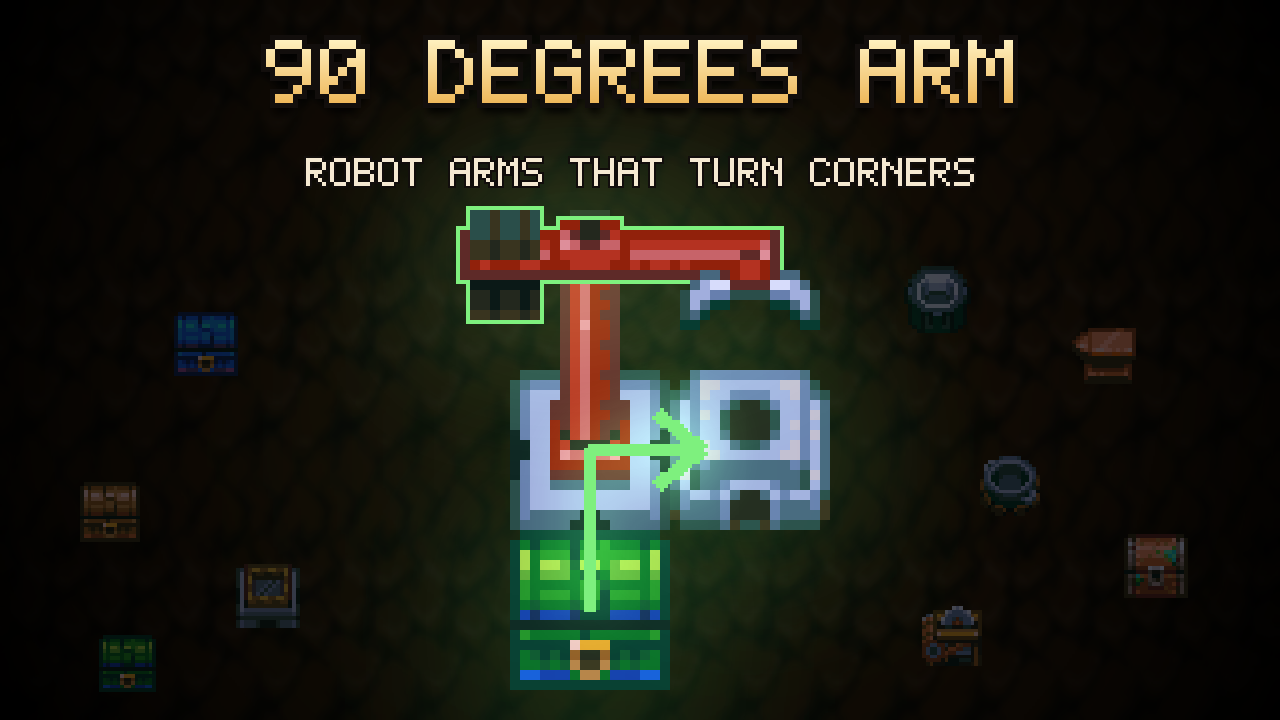
From mod.ioRobot arms can drop to the side instead of straight through. A button on the arm's own panel steps between 90, 180 and 270 degrees, and the quarter turn is animated with the game's own frames.
90 Degrees Arm lets a robot arm drop to the side instead of straight through.
The game's robot arm only ever moves an item across itself: it takes from one side and puts down on the opposite one. A chest and the machine it feeds therefore have to sit opposite each other, with the arm squeezed between them. This mod adds a button to the arm's own panel that bends it a quarter turn either way.
How to use it
Interact with a placed robot arm to open its filter panel. A third button sits beside the pipette and the eraser:
- Straight arrow — 180° — across the arm, the game's own behaviour. The default.
- Arrow bending right — 90° — the tile to the arm's right.
- Arrow bending left — 270° — the tile to the arm's left.
Each click steps to the next setting. Left and right are read from the arm, which at rest points at the tile it takes from: stand behind it, look the way it looks, and the icon shows where it puts things.
The setting is per arm, and an arm you have never touched keeps working exactly as it did before. Rotating an arm on placement still works the same way — the turn is measured from whichever side the arm takes from.
A bent arm also says so on its base: the power light on the side it drops turns green while the other three stay yellow, so a line of arms can be read at a glance without waiting for one to move.
Applies to the Robot Arm and the Robot Farm Arm.
The animation
No new art. The quarter turn is cut out of the half-turn clips the game already ships.
The arm sweeps a 270° arc in ten steps of 30°, with its four resting poses landing on steps 0, 3, 6 and 9. A quarter is three steps, so every quarter turn is already drawn inside one of those clips — it is a matter of entering one late, leaving it early, or both.
Left and up are the two ends of that arc rather than neighbours on it, so two of the eight corners would have had to travel the long way round. Those flip the arm instead: the game already draws its left pose by mirroring its right one, so a flipped arm reaches the frames the gap left out and the turn comes out a quarter like every other corner.
Multiplayer
The host owns the settings. Clients ask for an arm's setting when they first see it and are told about any change, so every player sees the same corner and the same animation.
Notes
The settings live beside the save rather than inside it, because the world format is a closed list of serialised component types that a mod cannot add to. Restoring a backup of the world does not restore the corners.
Coexists with QuickStackFilter, which adds its own button to the same panel.
Highlights
From source dataFootprint
Rated a light load on a server.
Last update
Its author last shipped an update 2 mo ago.
90 Degrees Arm on Nxeon
From our catalogue- One-click install
- Supported on Nxeon Core Keeper servers. We download it from mod.io, place it, and restart the server.
- Server side
- Required on the server
- Server load
- light
- Smallest plan we suggest
- Core Keeper — 2 GB (2 GB RAM). This follows our own load rating above, not a benchmark.
- Latest build
- 1.0.0, released 2026-09-02
Run 90 Degrees Arm on a Core Keeper server
Pick a server or deploy a new one above; it is installed in one click.
What kind of mod it is
From the catalogQuality of life & UI
Small conveniences, tweaks and interface improvements players notice straight away.
Runs on your server
From source side supportmod.io lists 90 Degrees Arm as required on the server. Check its mod.io page to see whether players need it too.
Compatibility
- Game
- Core Keeper
- Runs on
- Serverrequired on the server
Verified at the source
- ✓mod.ioOfficial listing, checked 2026-11-03Open ↗
- ✓AuthorThilun, as published on mod.io
- ✓LicenseNot published by the sourceFree















