
About Boss Health Bar
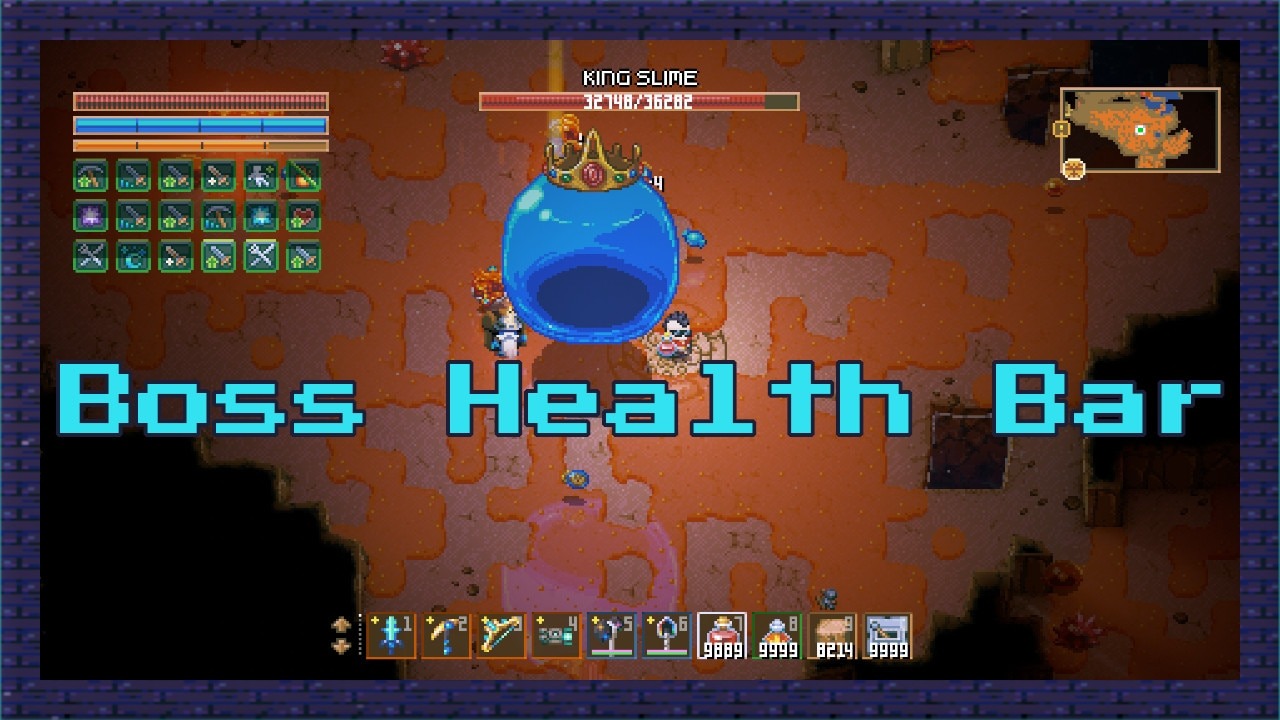
From mod.ioBoss Health Bar replaces the small boss health bar with a large one that shows the last boss you damaged.
Boss Health Bar replaces the small boss health bar with a large one that shows the last boss you damaged. It updates instantly, hides when you open a menu or move too far away, and works with every boss, even when they're immune or have multiple parts.
Works on Core Keeper 1.3+, multiplayer and dedicated servers. It only needs to be installed on the client.
This mod replaces the small boss health bar with a larger, clearer one at the top of the screen. When you damage a boss, the bar shows that boss's name and current health. If you switch targets, it updates to the last boss you hit, even when the boss is immune or you are hitting one of its parts.
The bar works with every boss in the game, including those with multiple parts or phases, and hides when you open a menu or move too far away. The original small bars on individual parts are left unchanged.
- Damage a boss and its large health bar appears at the top of your screen.
The bar shows the boss name and current health. - If you switch to another boss, the bar changes to the last one you hit.
- Works even when the boss is immune or you are hitting one of its parts.
- Opening a menu or moving too far away hides the bar automatically.
- Install on the client only.
- No commands or extra configuration needed.
Created by Parcew
Inspired by Astarot Aureate's idea
Special thanks to the Core Keeper modding community.
Discord: @parcew (preferred)
You can also leave a comment on the mod page.
Modding guide: https://modding.corekeepergame.com
My other mods: https://steamcommunity.com/workshop/filedetails/?id=3728796571
Support my work: https://ko-fi.com/parcew
Highlights
From source dataFootprint
Rated a light load on a server.
Last update
Its author last shipped an update 9d ago.
Boss Health Bar on Nxeon
From our catalogue- One-click install
- Supported on Nxeon Core Keeper servers. We download it from mod.io, place it, and restart the server.
- Server side
- Client-only: it runs in players’ own games, so it can’t be installed on a server
- Server load
- light
- Smallest plan we suggest
- Core Keeper — 2 GB (2 GB RAM). This follows our own load rating above, not a benchmark.
- Latest build
- v1.0.3, released 2026-10-26
Run Boss Health Bar on a Core Keeper server
Pick a server or deploy a new one above; it is installed in one click.
What kind of mod it is
From the catalogCosmetics, visuals & audio
Skins, textures, shaders, models and sound — how the game looks and sounds.
Client-side mod
From source side supportmod.io lists Boss Health Bar as not supported on servers. It runs in players’ own games, not on your server.
Compatibility
- Game
- Core Keeper
- Runs on
- Client only
Verified at the source
- ✓mod.ioOfficial listing, checked 2026-11-04Open ↗
- ✓AuthorSuperDoge1, as published on mod.io
- ✓LicenseNot published by the sourceFree