
About CK Hud
From mod.ioA simple mod that displays various stats.
Mod By: Flown_ Contributors: negue
A simple mod that displays various stats. The UI can be toggled with the F1 key (now rebindable!).
It works without any of the setup mentioned below, the setup is purely optional for people who want more customization.
Configuring your hud:
The hud can be configured by modifying the files located at Users\<user>\AppData\LocalLow\Pugstorm\Core Keeper\Steam\<number>\mods\CKHUD\.... Each file corresponds to a different setting, you will want to modify the value parameter within that file (the part that comes after "value":). Most of the settings are pretty self explanatory but if you need some clarification you can look at the Config settings section below.
Config settings:
- HudStart The uppermost y coordinate of the hud.
- Line Spacing The space between the lines of text.
- NumRows The total number of hud rows that you want to use.
- TextColor The color of your hud text in rgba 0-1 format.
- CompactMode If turned on makes the hud more compact.
- Layout The layout of your hud, specify which components (see components section below) goes on which rows as well as put multiple components on the same row. See components section below for more info on syntax.
Components:
Components are the individual pieces of information shown by the hud. They can be changed by modifying the value in the Layout section. You'll notice that the syntax for the layout section is not the most intuitive so I will explain how it works: The ; character separates different lines, between these you can put your components (see components list below). You can also have multiple components on the same line if you separate them with commas. Below is a list of all the components, their configuration options, and their functionality. Remember that these are case sensitive and wont work if you have any typos.
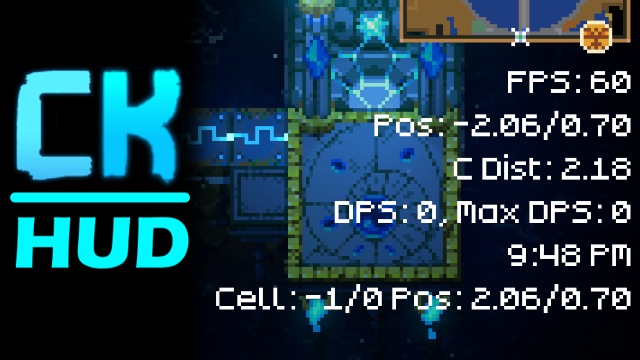
- FPS Your frames per second.
- RefreshRate The amount between updating the FPS number.
- FPSCap Your maximum fps, set by the game.
- Position Your position in the world.
- DecimalPlaces Determines how many decimal places to round the number to.
- CenterDistance Your distance from the center of the world (useful for finding structures and bosses).
- DecimalPlaces Determines how many decimal places to round the number to.
- DPS Your damage dealt per second.
- HoldTime The amount of time to hold the max DPS value (cannot be less than the smoothing coefficient).
- SmoothingCoefficient Controls the smoothness of the DPS meter.
- TimeFrame The amount of time to average your DPS from.
- MaxDPS The maximum DPS achieved, resetting after three seconds of zero DPS.
- RefreshRate The amount between updating the MaxDPS number.
- LocalComputerTime The current time as set by your computer.
- SpawnCell Displays the current spawning cell you are in as well as your position in that cell.
- DecimalPlaces Determines how many decimal places to round the number to.
Recent Updates:
(NEW) Spawn cells, more configs, and code rewrite:
- There is now a SpawnCell component for use when building farms.
- Configs have been added for most components, find them in the same place as usual.
- Thanks to CoreLib the toggle hud key is now rebindable.
- Many things were changed on the back end to make the mod easier to update!
(-) Max DPS and bugfixes:
- A lot of people were asking for a way to see your DPS after a fight so I decided to add a maximum DPS meter which resets after three seconds of your DPS being 0, hopefully that helps.
- It will be automatically enabled if you have the DPS component enabled.
- I also fixed some bugs and cleaned up code but that's not very interesting.
(-) DPS meter and custom colors:
- There is now a DPS component that you can add to your hud.
- It is enabled by default if you haven't installed the mod before but it can be manually enabled by adding DPS to your Components-Layout.json (See config info)
- Custom text colors are now possible.
- You can now set a custom color for your text, this is in rgba format and can be set by changing the TextColor configuration.
(-) Configuration support:
- The config files can be found at Users\<user>\AppData\LocalLow\Pugstorm\Core Keeper\Steam\<number>\mods\CKHUD\... (Windows)
- You can now configure what information you want displayed and where by editing Components-Layout.json.
- ; indicates a new line and , separates components that you want on the same line.
- Currently there are only 4 components to configure:
- FPS Your frames per second.
Highlights
From source dataGame versions
Built for Core Keeper 1.0.0.8.
Footprint
Rated a light load on a server.
Last update
Its author last shipped an update 2 yr ago.
CK Hud on Nxeon
From our catalogue- One-click install
- Supported on Nxeon Core Keeper servers. We download it from mod.io, place it, and restart the server.
- Server load
- light
- Smallest plan we suggest
- Core Keeper — 2 GB (2 GB RAM). This follows our own load rating above, not a benchmark.
- Latest build
- 1.3.0, released 2024-09-15
Run CK Hud on a Core Keeper server
Pick a server or deploy a new one above; it is installed in one click.
What kind of mod it is
From the catalogQuality of life & UI
Small conveniences, tweaks and interface improvements players notice straight away.
Compatibility
- Game
- Core Keeper
- Game versions
- 1.0.0.8
Verified at the source
- ✓mod.ioOfficial listing, checked 2026-10-31Open ↗
- ✓AuthorFlown_, as published on mod.io
- ✓LicenseNot published by the sourceFree