







About Core Automation Plus
From mod.ioCategory and item filters, selectable collection areas, batch output and 14 drill colors. English and Japanese UI.
Core Automation Plus 1.0 — English & Japanese UI / 日本語対応
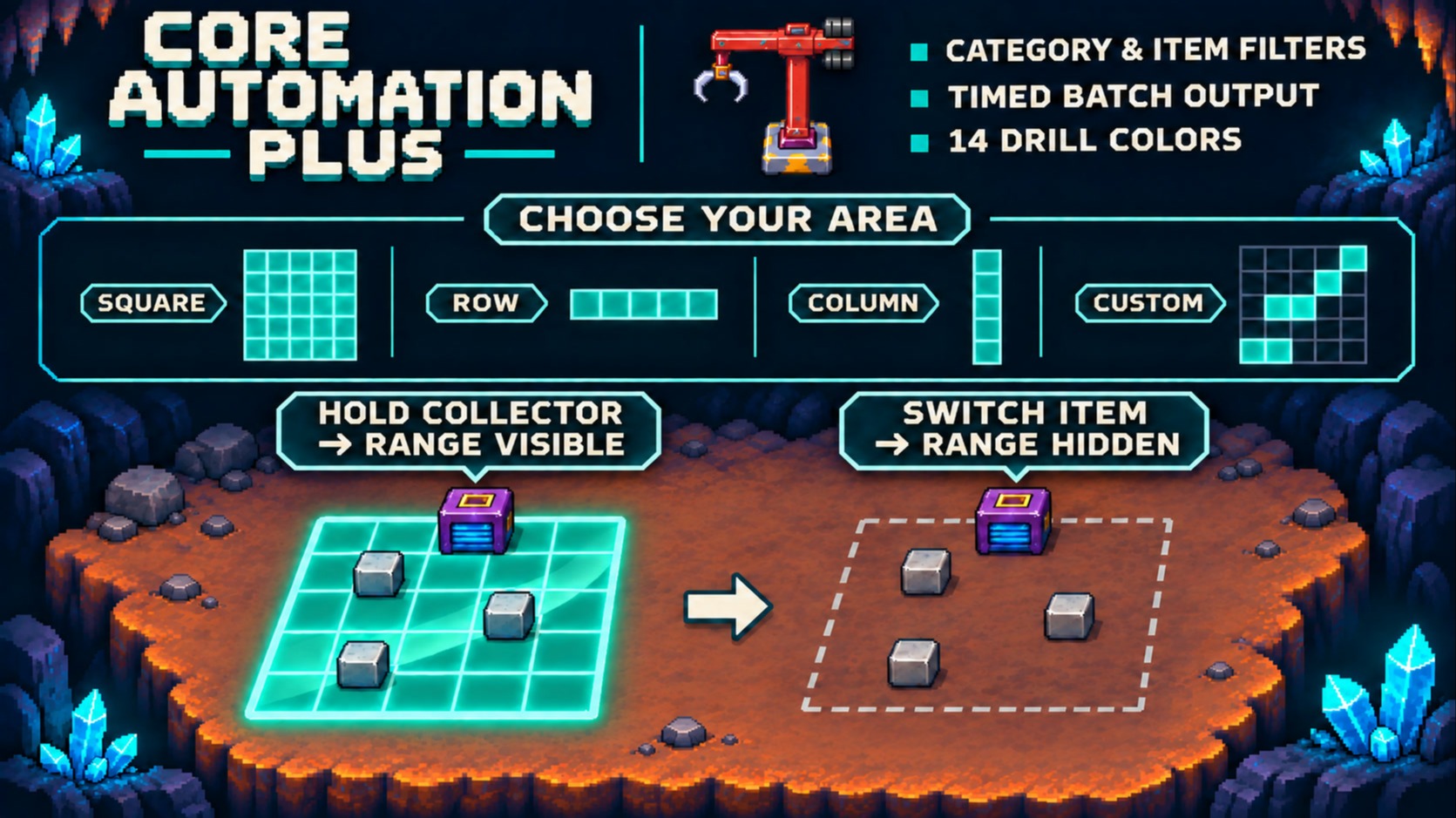
Hide scan effects by switching items. Choose what your machines collect, where they collect it, and when collectors send it out.
Features
- Scan effects on demand: hold a collector to show its range; switch items to hide it and silence the scanning loop. Collection continues, and item-transfer effects remain.
- Category filters: collect or exclude whole categories, or narrow them down with subcategories. Available for item collectors and standard robot arms.
- Three item slots: include specific item types alongside your categories, exclude unwanted types, or collect only those items. Picking an item for a filter does not move or consume it.
- Custom collection areas: choose squares up to 9×9, narrow strips, or your own selection of tiles within a forward 9×9 area. Gaps and disconnected shapes are supported. Item collectors only.
- Batch output: group stackable items and release them every 5, 10 or 30 seconds. Equipment and other non-stackable items pass through normally. Item collectors only.
- Drill colors: paint placed drills with the game's 14 brush colors. The blade keeps its original appearance; red restores the original casing.
No new machines to craft and no CoreLib dependency.
Quick start
Stand near the machine until it has the game's white interaction outline.
- C — Category filters. Select categories, choose collect or exclude, then press Apply.
- Tab — Three-slot item filter. Use the eyedropper, then select an item from your inventory. Changes save automatically. Uses your game's filter key if rebound.
- X — Collection area and batch output. Choose your settings, then press Apply.
C and X can be rebound under Settings → Controls → Mods. Closing either screen without applying discards those edits.
Want blocks plus one extra item? Select blocks in C, then add that item in Tab. Want only specific items? Leave categories off and fill the item slots. With both categories and item slots empty, every item type is allowed.
Filters match item type, not color, upgrade level or recipe variation. Items outside the filter stay where they are. Items already collected continue to be output.
Language support
Set the game to Japanese for Japanese mod labels. Other game languages use English mod labels. Item names follow the game's language.
Compatibility and current limitations
- Filters support the standard robot arm, not the agricultural arm. Range and batch settings apply only to item collectors.
- The host/server and every player need the same mod version. Final in-game multiplayer validation is still pending.
- If Master Filter is loaded, Core Automation Plus disables its own filter editing and leaves that mod's screen in place.
- DrillPaint is already included; do not install the standalone version alongside Core Automation Plus.
- If you used an earlier development build under a different name, disable it before installing this release. Its configuration files remain untouched and are not imported.
- Hold an item collector to see collection-area overlays. Custom areas currently use a stationary overlay; the moving scan sweep is available for preset areas.
- Final in-game checks for drill-color persistence and item counts across reloads and destruction are still pending. Performance improvements have not been measured.
Reporting an issue
Include game/mod versions, language, host or joining player, machine, reproduction steps, and a screenshot or short video.
Japanese / 日本語
Core Automation Plus 1.0 — 日本語対応 / English & Japanese UI
持ち替えでエフェクトON/OFF。何を拾うか、どこから拾うか、いつ排出するかも、工場に合わせて調整できます。
主な機能
- 持ち替えでエフェクトON/OFF: 回収機を持つと範囲表示、持ち替えると走査の光とループ音が消えます。回収は継続し、転送時の演出は残ります。
- カテゴリで選別: 種類をまとめて回収・除外できます。小分類での絞り込みも可能。アイテム回収機と通常ロボットアームに対応します。
- 個別アイテム3枠: カテゴリに特定の品を追加したり、不要な品を除外したり、指定品だけを回収したりできます。登録時に所持品を移動・消費しません。
- 自由な回収範囲: 最大9×9の正方形、細い直線、前方9×9内の自由なマス選択に対応。穴や飛び地のある形も作れます。アイテム回収機専用です。
- まとめ排出: 重なる品をまとめ、5・10・30秒ごとに排出します。防具など重ならない品は通常どおり通過します。アイテム回収機専用です。
- ドリル塗装: 設置したドリルを本体の全14色のブラシで塗装できます。刃の見た目はそのまま、赤で元の外装へ戻ります。
新しい装置の作成やCoreLibの導入は不要です。
使い方
装置に近づき、本体の白い操作枠が付いた状態で開いてください。
- C — カテゴリフィルター: カテゴリと回収/除外を選び、適用で保存します。
- Tab — 個別3枠: スポイトを押して、所持品から登録する品を選びます。変更は自動保存されます。本体のフィルターキーを変更している場合は、そのキーを使います。
- X — 回収範囲・まとめ排出: 設定を選び、適用で保存します。
CとXは設定 → 操作 → Modsで変更できます。この2画面では、適用せずに閉じると編集を破棄します。
「ブロックと、この品も拾いたい」なら、Cでブロックを選び、Tabでその品を追加。「指定品だけ」ならカテゴリをOFFにして個別枠へ登録。カテゴリも個別枠も空なら、すべての種類を回収します。
判定は品の種類単位です。色・強化度・料理の組み合わせは区別しません。対象外の品は元の場所に残り、すでに回収した品はそのまま排出されます。
言語
ゲームを日本語にすると、MODの追加メニューも日本語になります。日本語以外の設定では英語表示です。アイテム名は本体の表示言語に従います。
対応と現在の制限
- フィルターは通常ロボットアームに対応します。農業用アームは対象外です。範囲・まとめ排出はアイテム回収機専用です。
- ホスト/サーバーと参加者全員に同じ版が必要です。実マルチの最終動作確認は継続中です。
- Master Filterが読み込まれている場合、Core Automation Plus側のフィルター編集を停止し、そちらの画面を維持します。
- DrillPaintの機能は統合済みです。単独版との同時導入は避けてください。
- 旧名の開発版を使用していた場合は、旧版を無効化してから導入してください。以前の設定ファイルは変更せず、自動では引き継ぎません。
- 範囲表示は回収機を手に持っている間に表示します。カスタム範囲は静止表示で、動く走査演出は定型範囲に対応しています。
- ドリル色の保存、再読込・破壊時のアイテム数量などは実機での最終確認が残っています。負荷軽減の効果は未測定です。
Highlights
From source dataFootprint
Rated a light load on a server.
Last update
Its author last shipped an update 1d ago.
Core Automation Plus on Nxeon
From our catalogue- One-click install
- Supported on Nxeon Core Keeper servers. We download it from mod.io, place it, and restart the server.
- Server side
- Required on the server
- Server load
- light
- Smallest plan we suggest
- Core Keeper — 2 GB (2 GB RAM). This follows our own load rating above, not a benchmark.
- Latest build
- 1.0.0, released 2026-11-03
Run Core Automation Plus on a Core Keeper server
Pick a server or deploy a new one above; it is installed in one click.
What kind of mod it is
From the catalogQuality of life & UI
Small conveniences, tweaks and interface improvements players notice straight away.
Runs on your server
From source side supportmod.io lists Core Automation Plus as required on the server. Check its mod.io page to see whether players need it too.
Compatibility
- Game
- Core Keeper
- Runs on
- Serverrequired on the server
Verified at the source
- ✓mod.ioOfficial listing, checked 2026-11-04Open ↗
- ✓Authormaxwell_game, as published on mod.io
- ✓LicenseNot published by the sourceFree















