






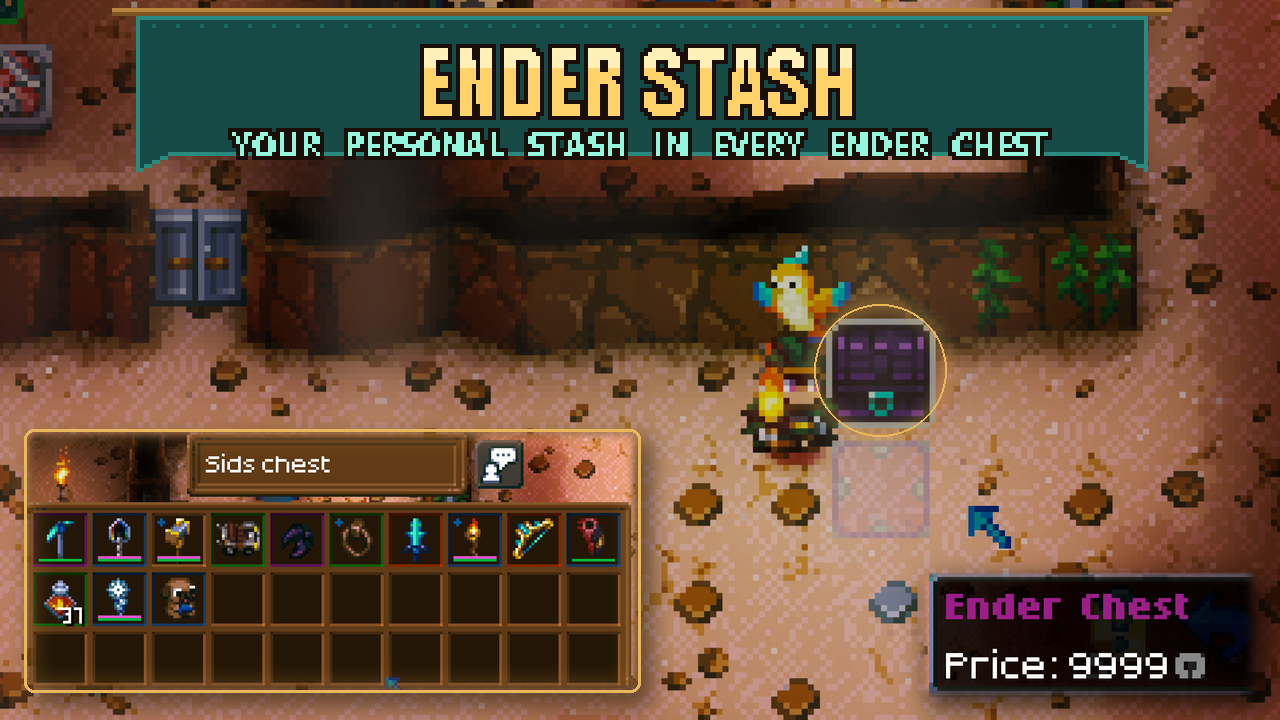

About Ender Stash
From mod.ioKeep a personal 40-slot stash you can open from any Ender Chest, across worlds. Your character owns the contents, so each player sees their own items and the stash stays safe when you die.
Keep a personal 40-slot stash you can open from any Ender Chest, across worlds. Your character owns the contents, so each player sees their own items and the stash stays safe when you die.
Getting started
1. Buy an Ender Chest from the Fishing Merchant for 9,999 ancient coins. He stocks one per restock, at the top of his list.
2. Place it and open it like a normal chest.
3. Place more Ender Chests wherever you need access. They all open that character's same stash.
Shift-click moves items between your inventory and stash. Sort sorts the stash. Quick stack adds matching items from your inventory, excluding your hotbar. Walking away or breaking the chest closes the window; breaking the chest leaves your stored items safe.
Requirements and limits
No settings or library dependencies. Install on the host and every client in multiplayer. Ordinary chests keep their normal behavior.
- *Empty your stash before removing the mod.** Removing it removes placed Ender Chests and can lose the items stored in its extra slots. Keep a save backup before changing mods that add inventory slots.
Upgrading from 1.x? Your items are kept, but the old purple button is gone. Buy an Ender Chest to reach them.
How it works (for modders)
- The object is a real modded object (ObjectAuthoring.objectName = "EnderStash_EnderChest",
ObjectID assigned by the game above 32767; saves store it by name). Its prefabs, sprites and name
text live in Bundles/EnderStash_*.assetbundle, built with the official Core Keeper Mod SDK by
Unity/build_bundle.py (see below). The logic prefab mirrors the vanilla ChestEntity minus the
inventory; the graphics prefab uses the vanilla Chest component, so the bundle has no script
references of its own and works inside Sid's Overhaul too. Price: sellValue 2000 x 5 x 0.9999 = 9999.
- StashLayout: 40 slots appended to the player prefab's ContainedObjectsBuffer
(API.Authoring.OnObjectTypeAdded, subscribed on the first Update so they always come after
Shared Loadout Gear & Vanity / Five Loadouts / vanity slots). The character save stores the whole buffer.
Death drops only slots 10..maxSize of InventoryBuffer[0], so the stash is safe.
- StashGrowSystem (server) grows older characters' buffers to include the stash and runs StashGuard.
- StashGuard keeps the stash in place when a mod that also appends player slots (Pouch Lite, Five
Loadouts...) is installed or removed, which shifts where the stash starts. The slot after the stash is a
marker (objectID None, variationUpdateCount = 0x45535448, variation = stash start) that the
character save keeps. On join, a postfix on SaveManager.GetCharacterDataFromSerialized moves the stash
inside the decoded character (before StartGameRPCSystem copies it, which would cut off slots past the
new length). Rejoining the world you were last in uses the world save's player instead (the world save
drops the marker but keeps the old slot count), so the guard remembers the stash items it saw and moves
them on the live player if they are still at the old position. Tested both directions (+10 / -10 slots,
both join paths): items, aux data and other slots unchanged.
- Player memory: the stash adds no component or buffer type to the player (it only appends elements to
ContainedObjectsBuffer, InternalBufferCapacity(1), so they live on the heap), so it does not count
toward the shared 16 KB chunk limit for the player archetype.
- EnderChestMerchantSystem (server) puts the Ender Chest at index 0 of the Fishing Merchant's
MerchantItemInfoBuffer (prefab and merchants already in saves; forces one restock when added).
- Patches: Chest.Use (an Ender Chest opens the chest window on
new InventoryHandler(player, world, start, 10, 40)), Chest.OnPlayerLeftChest (closes it),
InventoryHandler.Sort (sorts the stash via swaps), Create.QuickStack (quick stack into the
stash), InventoryUI.UpdateContainerSize (force a size refresh).
Rebuilding the asset bundle
Needs Unity 6000.0.59f2 with Linux Build Support (Mono), and https://github.com/Pugstorm/CoreKeeperModSDK
cloned to C:\Users\Sid\CoreKeeperModSDK. Then python Unity/build_bundle.py (add --art to
regenerate the art from the vanilla black chest). Art: Unity/Art, made by Unity/make_art.py.
Removing the mod drops the stash slots from future saves (items in it are lost) and removes placed
Ender Chests.
Source and full docs: https://github.com/Sthakur27/corekeeper-mods/tree/main/EnderStash
Highlights
From source dataFootprint
Rated a light load on a server.
Last update
Its author last shipped an update 3d ago.
Ender Stash on Nxeon
From our catalogue- One-click install
- Supported on Nxeon Core Keeper servers. We download it from mod.io, place it, and restart the server.
- Server side
- Required on the server
- Server load
- light
- Smallest plan we suggest
- Core Keeper — 2 GB (2 GB RAM). This follows our own load rating above, not a benchmark.
- Latest build
- 2.1.0, released 2026-10-31
Run Ender Stash on a Core Keeper server
Pick a server or deploy a new one above; it is installed in one click.
What kind of mod it is
From the catalogQuality of life & UI
Small conveniences, tweaks and interface improvements players notice straight away.
Runs on your server
From source side supportmod.io lists Ender Stash as required on the server. Check its mod.io page to see whether players need it too.
Compatibility
- Game
- Core Keeper
- Runs on
- Serverrequired on the server
Verified at the source
- ✓mod.ioOfficial listing, checked 2026-11-03Open ↗
- ✓Authorcoopdedoop, as published on mod.io
- ✓LicenseNot published by the sourceFree















