







About Item Spawner
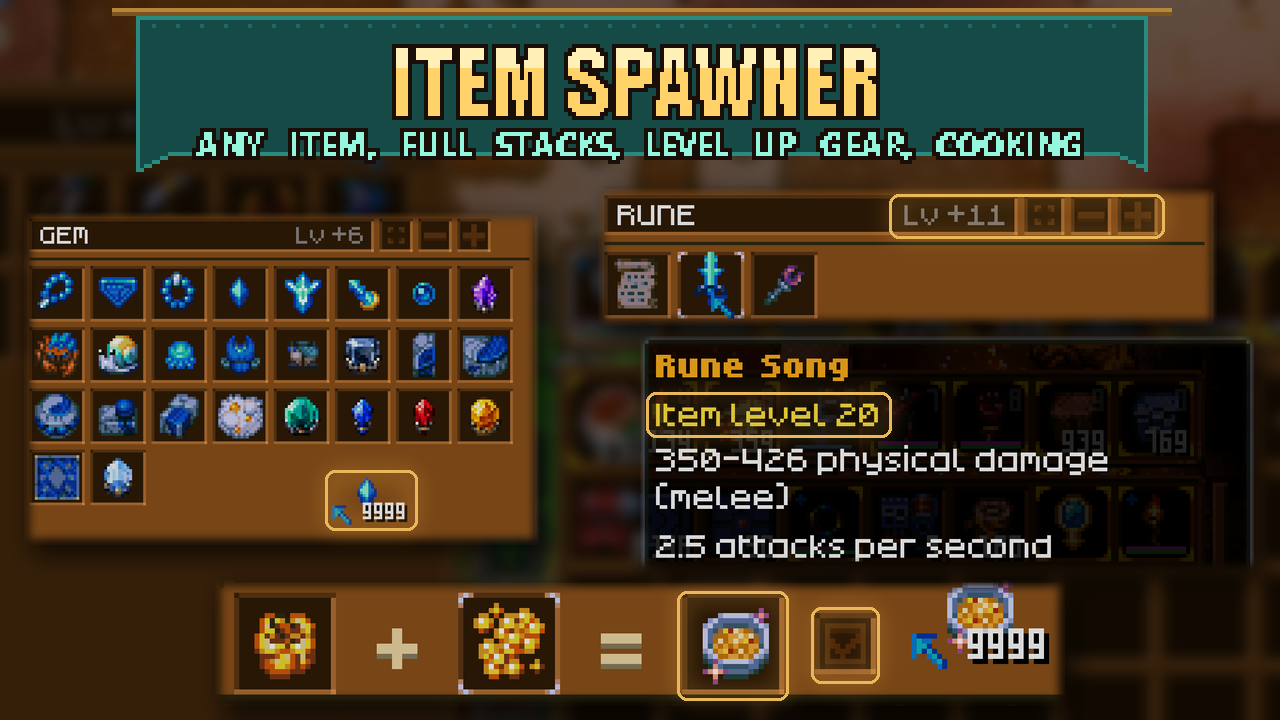
From mod.ioA searchable spawn browser for the host and admins. Press Z (rebind under Controls > Item Spawner) to open a grid of every item in the game, including items from other mods (Magic Mirror, Ender Chest, every Runic Storage tier).
A searchable spawn browser for the host and admins. Press Z (rebind under Controls > Item Spawner) to open a grid of every item in the game, including items from other mods (Magic Mirror, Ender Chest, every Runic Storage tier).
Controls
- Left-click an item: one on your cursor. Click again to add one more. Ctrl-left-click: a full stack on your cursor.
- Right-click: one straight into your bag. Ctrl- or Shift-right-click: a full stack into your bag.
- Shift-left-click: a full stack into your bag. Bag spawns drop at your feet if the bag is full.
- Category tabs on the left and the search box narrow the list. The grid/list button switches views.
- Level bonus (the two buttons next to grid/list, or the
[and]keys): adds levels on top of each gear piece's or tool's base level. "Lv base" means the normal level; "Lv +3" means three levels above it. Hold Shift to step by 5. It never goes below base, and an item stops at the game's max level instead of overshooting. Hover an item to see its stats at that level. - The trash can sits next to your bag as usual, so you can spawn something and bin it without closing the browser.
- Esc, Z or opening another inventory closes the browser.
Cooking
Press the cooking pot button (top right of the panel) to switch to cooking. The top row becomes [ A ] + [ B ] = [ dish ] with a Gourmet checkbox, and the grid below lists every cooking ingredient (golden versions are separate entries).
- Click an ingredient to fill the highlighted box. Filling the first box moves the highlight to the second. Click a box to choose which one the next ingredient fills; right-click a box to empty it.
- Once both boxes are filled, the dish appears on the right with its real name, colors and stats. Spawn it with the same clicks as any item: left-click to your cursor, right-click to your bag, Ctrl or Shift for a full stack.
- Gourmet adds the cooking talent's extra roll: one tier up, so a normal dish becomes Rare, and a dish with a golden flower or a legendary ingredient becomes Epic. Without it, a golden flower or legendary ingredient already makes the dish Rare.
- Every dish is one the cooking pot can actually make. Press the pot button again to go back to items.
Who can spawn
Only the host or an admin (or a creative-mode character). Other players can open the browser to look but cannot spawn.
Requirements
CoreLib, and Runic Storage (the browser uses its panel layout). Included in Sid's Overhaul. Only the player using it needs the mod; the server needs nothing extra.
Notes
If another mod also uses Z, rebind one of them under Controls.
Spawning uses the game's own create-item request (the one that hands out starter items). The admin check runs on the spawning player's game.
Highlights
From source dataFootprint
Rated a light load on a server.
Last update
Its author last shipped an update 2d ago.
Item Spawner on Nxeon
From our catalogue- One-click install
- Supported on Nxeon Core Keeper servers. We download it from mod.io, place it, and restart the server.
- Server side
- Client-only: it runs in players’ own games, so it can’t be installed on a server
- Server load
- light
- Smallest plan we suggest
- Core Keeper — 2 GB (2 GB RAM). This follows our own load rating above, not a benchmark.
- Latest build
- 1.1.1, released 2026-11-01
Recent builds
| Build | Released | Game versions | Loaders |
|---|---|---|---|
| 1.1.1 | 2026-11-01 | n/a | n/a |
| 1.1.0 | 2026-10-31 | n/a | n/a |
Run Item Spawner on a Core Keeper server
Pick a server or deploy a new one above; it is installed in one click.
What kind of mod it is
From the catalogQuality of life & UI
Small conveniences, tweaks and interface improvements players notice straight away.
Client-side mod
From source side supportmod.io lists Item Spawner as not supported on servers. It runs in players’ own games, not on your server.
Compatibility
- Game
- Core Keeper
- Runs on
- Client only
Verified at the source
- ✓mod.ioOfficial listing, checked 2026-11-03Open ↗
- ✓Authorcoopdedoop, as published on mod.io
- ✓LicenseNot published by the sourceFree















