







About Shared Loadout Gear and Vanity
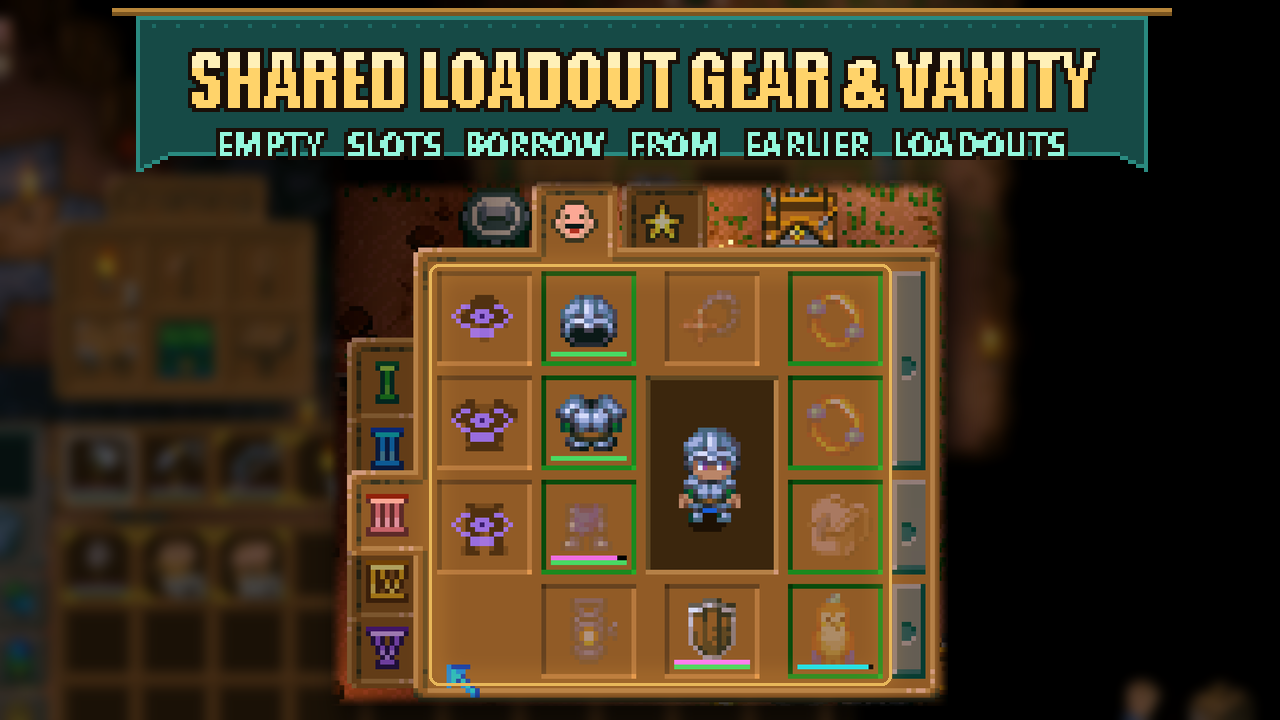
From mod.ioShare your best gear and your vanity outfit across loadouts without moving them back and forth. Empty equipment and vanity slots borrow the nearest earlier loadout's item automatically.
- Formerly called Loadout Fallback. Same mod, same settings, just a clearer name.
Share your best gear and your vanity outfit across loadouts without moving them back and forth. Empty equipment and vanity slots borrow the nearest earlier loadout's item automatically.
How to use it
Put your everyday gear in loadout 1, then add only the items you want to change in loadouts 2 and 3. For example, an empty helmet slot in loadout 3 uses loadout 2's helmet, or loadout 1's if both are empty.
- Borrowed items appear dimmed and show their real durability.
- Drag an item onto a dimmed slot to give that loadout its own item. Remove it to borrow again.
- To change or remove a borrowed item, go to the loadout that owns it.
- Armor, jewelry, off-hand, bag, lantern and pet follow this rule. Bag capacity and appearance update with your active gear.
With Five Loadouts, the same rule continues through loadouts 4 and 5.
A different outfit for each loadout
Three vanity slots beside your armor let you choose a cosmetic helmet, chest and pants for each loadout. Vanity furniture also edits your current outfit, which other players can see.
- Vanity fallback** (Mod Options, on by default) applies the same borrowing rule to vanity: an empty vanity slot shows the nearest earlier loadout's vanity piece, dimmed. Click a borrowed piece to hide it in this loadout instead; click again to borrow it back. Hiding a piece only affects that loadout. With the option off, empty vanity slots show the real armor and clicking one toggles hiding that piece. The option changes what you see, so other players see your outfits according to their own setting.
The in-window slot idea was inspired by Vanity Slots; this is a separate implementation. If that mod adds its slots first, this mod reuses them.
Requirements and limits
Requires CoreLib and Mod Options. Install on the host/server and all clients, then restart the game. Keep Loadout Plus disabled because this mod replaces its equipment behavior.
- *Use drag-and-drop or inventory shift-click for borrowed slots.** Right-clicking gear on the hotbar can replace the earlier loadout's original item instead of creating an override in your current loadout.
This mod adds equipment slots. Move items out of added slots before removing it or changing other mods that alter the player inventory layout.
Source and full docs: https://github.com/Sthakur27/corekeeper-mods/tree/main/LoadoutSharing
Highlights
From source dataFootprint
Rated a light load on a server.
Last update
Its author last shipped an update 3d ago.
Shared Loadout Gear and Vanity on Nxeon
From our catalogue- One-click install
- Supported on Nxeon Core Keeper servers. We download it from mod.io, place it, and restart the server.
- Server side
- Required on the server
- Server load
- light
- Smallest plan we suggest
- Core Keeper — 2 GB (2 GB RAM). This follows our own load rating above, not a benchmark.
- Latest build
- 2.4.1, released 2026-10-31
Recent builds
| Build | Released | Game versions | Loaders |
|---|---|---|---|
| 2.4.1 | 2026-10-31 | n/a | n/a |
| 2.3.0 | 2026-10-02 | n/a | n/a |
| 2.1.0 | 2026-09-25 | n/a | n/a |
Run Shared Loadout Gear and Vanity on a Core Keeper server
Pick a server or deploy a new one above; it is installed in one click.
What kind of mod it is
From the catalogQuality of life & UI
Small conveniences, tweaks and interface improvements players notice straight away.
Runs on your server
From source side supportmod.io lists Shared Loadout Gear and Vanity as required on the server. Check its mod.io page to see whether players need it too.
Compatibility
- Game
- Core Keeper
- Runs on
- Serverrequired on the server
Verified at the source
- ✓mod.ioOfficial listing, checked 2026-11-03Open ↗
- ✓Authorcoopdedoop, as published on mod.io
- ✓LicenseNot published by the sourceFree















