
About Loot Filter
From mod.ioTake control of your items: filter what you pick up or spawn exactly what you need with an easy-to-use item filter.
Loot Filter (Requires CoreLib)
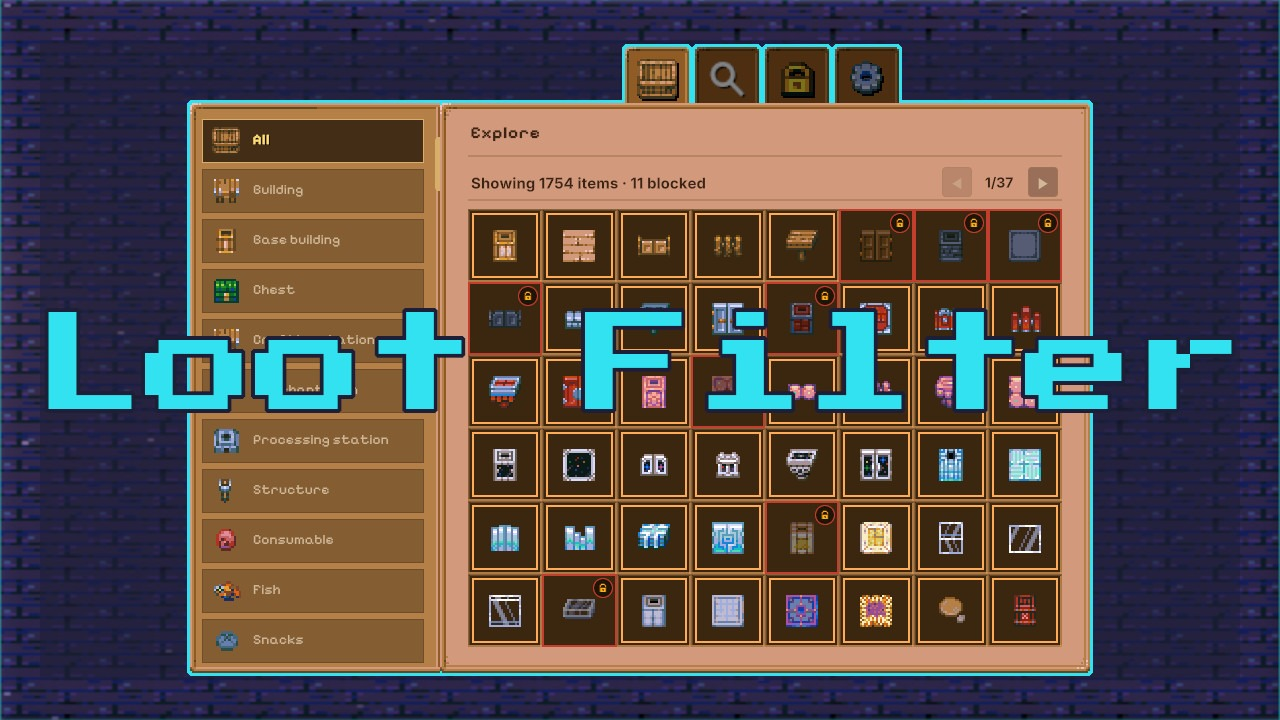
Loot Filter gives you complete control over your items. Browse a clean book interface, filter any item with a click, and spawn exactly what you need while keeping unwanted loot out of your inventory.
Works on Core Keeper 1.3+, local only.
FEATURES
Loot Filter gives you complete control over what you pick up while exploring. Open its clean book-style window, browse all vanilla items sorted by category, and block any object with a single click. Once blocked, that item will be ignored by your character, keeping your inventory free of unwanted seeds, blocks, and junk.
You can quickly find any item with the search bar, review your blocked list in a dedicated tab, or activate a “Block All” switch to reject everything at once. The “Filter Active” toggle lets you temporarily disable the filter without losing your list. You can also search for any item and spawn it directly by Alt+Clicking its slot. Open and close keys are configurable through CoreLib, and a /lootfilter chat command provides a reliable fallback. All settings are saved automatically.
HOTKEYS (Configurable in Settings → Controls → Mods)
- Shift+F (or your bound key) or the
/lootfilterchat command opens the Loot Filter window. - Shift+C (or your bound key) or Escape closes the window.
- Left Click on an item in the filter grid toggles blocking for that item.
- Middle Mouse Button on any item in your inventory instantly blocks or unblocks it without opening the filter.
- Alt+Left Click on an item (with the setting enabled) spawns 9999 stackable items or a single non‑stackable item.
HOW IT WORKS
- Open the Loot Filter window with Shift+F (or your bound key) or the /lootfilter command.
- Browse items by category and subcategory, or use the search bar to find a specific object.
- Left‑click any item in the grid to toggle blocking. Blocked items are no longer picked up.
- Middle‑click on an item in your inventory to block or unblock it instantly.
- Enable Alt+Click to spawn items directly: 9999 for stackable items, one for non‑stackable.
- Check the Blocked tab to review your current list and clear it anytime.
- All preferences are saved automatically between sessions.
CREDITS
Created by Parcew.
CoreLib Commands and Hotkeys thanks to Limoka.
Some images were thanks to Moorowl.
Special thanks to the Core Keeper modding community.
FEEDBACK & SUPPORT
Discord: @parcew (preferred)
You can also leave a comment on the mod page.
LINKS
Modding guide: https://modding.corekeepergame.com/
My other mods: https://mod.io/u/parcew/
Support my work: https://ko-fi.com/parcew
LICENSE
This mod is protected by the Parcew Mod License. Re-uploading, redistributing, or including this mod (or any of its files, assets, prefabs, or other original content) in other mods or packs without written permission is not allowed.
Full license: https://github.com/parcew/modding/blob/main/LICENSE.md
Permission requests: Discord parcew
This mod is not affiliated with or endorsed by Pugstorm.
Highlights
From source dataFootprint
Rated a light load on a server.
Last update
Its author last shipped an update 42d ago.
Loot Filter on Nxeon
From our catalogue- One-click install
- Supported on Nxeon Core Keeper servers. We download it from mod.io, place it, and restart the server.
- Server side
- Required on the server
- Server load
- light
- Smallest plan we suggest
- Core Keeper — 2 GB (2 GB RAM). This follows our own load rating above, not a benchmark.
- Latest build
- 1.0.1, released 2026-09-22
Run Loot Filter on a Core Keeper server
Pick a server or deploy a new one above; it is installed in one click.
What kind of mod it is
From the catalogWeapons, items & crafting
New weapons, gear, items and the recipes to make them.
Runs on your server
From source side supportmod.io lists Loot Filter as required on the server. Check its mod.io page to see whether players need it too.
Compatibility
- Game
- Core Keeper
- Runs on
- Serverrequired on the server
Verified at the source
- ✓mod.ioOfficial listing, checked 2026-10-20Open ↗
- ✓AuthorParcew, as published on mod.io
- ✓LicenseNot published by the sourceFree