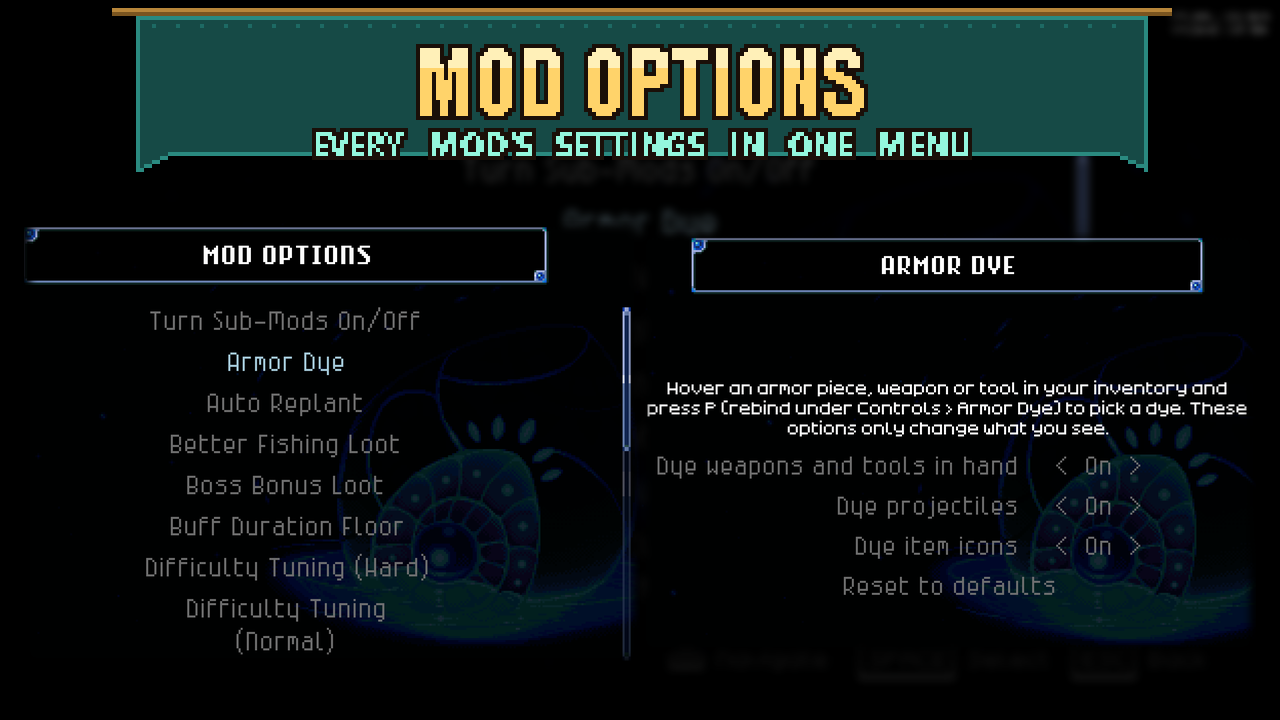

About Mod Options
From mod.ioChange supported mod settings in one place, without leaving Core Keeper or editing configuration files. Use your mouse, keyboard or controller.
Change supported mod settings in one place, without leaving Core Keeper or editing configuration files. Use your mouse, keyboard or controller.
Mods with their own Mod Options pages appear alongside compatible settings discovered from other installed mods. Discovery is limited to supported client-side CoreLib settings; not every mod or option will appear.
Get started
1. Subscribe to CoreLib and Mod Options, then restart Core Keeper.
2. Open Settings > Mod Options from the main menu or pause menu.
3. Choose a mod, then adjust its options. Settings save automatically.
Click the left or right side of a value, or use left/right navigation. On pages that offer Reset to defaults, select it twice to confirm. Automatically discovered settings do not have a bulk reset.
Requirements and compatibility
Requires CoreLib. Keep it updated for automatic discovery support. For multiplayer, install this library where your chosen mods require it, including the host/server and clients when required. Automatically discovered options change local client settings; they do not synchronize server settings.
Built into Sid's Overhaul. The standalone mods use this separate library. It can coexist with Mod Settings Menu, which has its own button.
Third-party settings
Compatible third-party mods appear directly in the main Mod Options list. Names and labels are made readable, and the original mod's help text appears beneath each setting. Reopen Mod Options to find settings initialized after the menu was opened. Opening the menu does not change saved values.
The original mod decides when a change takes effect. Options explicitly marked for restart show Restart required; some mods also cache settings, so restart if a change is not visible immediately. Your edits go back to that mod's existing configuration.
- *Placement Plus has been checked with six supported settings. Mods that use their own storage format, such as Health Bars and Roofing Gadget Plus**, are not discovered. Server/admin controls, keybindings and free-text settings are also outside this feature's scope.
For modders
Automatic discovery scope
Discovery supports existing, described client-scoped CoreLib entries: booleans, bounded integers/floats, and bool/int/float/string acceptable-value lists. Integer controls move by one; float controls move by one twentieth of the declared range. Descriptions retain the original mod's help text. Only settings marked as needing a restart show Restart required; ordinary options have no status prefix. The original mod decides when changes take effect, so restart if an option is cached by that mod.
Edits use the original config entry, preserving its save behavior and change events. Discovery itself never creates config files, binds keys, reloads files, sanitizes saved values, or saves anything. There is no bulk reset for discovered settings. CoreLib preserves bound and orphaned values when saving; its normal save process may reformat comments and ordering.
The initial version deliberately excludes:
- Mods that already have an authored Mod Options page, including other configs owned by that mod.
- Server/admin/view-only settings; this feature does not implement multiplayer config synchronization.
- Free text, enums, keybinds, unbounded numbers, custom types, undocumented entries, and entries with custom metadata tags whose visibility/editability semantics are unknown.
- CoreLib's own configuration, common internal/debug/credential/security/ID-binding names, and files with automatic saving disabled. Name filtering is conservative, not a guarantee that every described option is appropriate for every player.
- Ambiguous duplicate live file instances, noncanonical paths, files outside
<loaded manifest name>/..., and unsupported custom formats such as JSON.
Requires a CoreLib version with ConfigFile.AllConfigFilesReadOnly, ConfigScope, and acceptable-value metadata. No disk search or reflection into mod internals is used. Installed Placement Plus's six settings were validated; Health Bars and Roofing Gadget Plus use custom JSON and are outside this scope.
Registering a settings page
</code>csharp<br>using ModOptions;</p> <p>private static Setting<string> _speed;</p> <p>public void Init()<br>{<br> SettingsPages.Create(this, "My Mod")<br> .Hint("What this mod does.")<br> .Choice(out _speed, "Speed", new[] { "1x", "2x", "3x" }, "1x")<br> .Build();<br> _speed.OnChanged += token => Apply(token);<br>}<br><code>
Controls: Toggle (bool), Choice (string list), Stepper (int range), and Slider (float range with a step). Read Setting<T>.Value or subscribe to .OnChanged.
SettingsPages.Create(mod, title, keyPrefix) supports several pages in one config file. Pages sort alphabetically; .PinToTop() places a page first. CoreLib saves values in <mod name>/config.cfg. The interface uses the game's menu navigation and scrolling.
Validation
python ModOptions/Tests/run.py --csc <path/to/csc.dll> compiles and runs regression checks against the installed CoreLib configuration source and extracts the installed Placement Plus Bind declarations as an integration fixture. Override --corelib and --placement for different install locations. Tests use an in-memory filesystem and do not access player configs. Outputs go to ignored build/modoptions-tests.
Highlights
From source dataFootprint
Rated a light load on a server.
Last update
Its author last shipped an update 3d ago.
Mod Options on Nxeon
From our catalogue- One-click install
- Supported on Nxeon Core Keeper servers. We download it from mod.io, place it, and restart the server.
- Server side
- Required on the server
- Server load
- light
- Smallest plan we suggest
- Core Keeper — 2 GB (2 GB RAM). This follows our own load rating above, not a benchmark.
- Latest build
- 1.2.2, released 2026-10-31
Recent builds
| Build | Released | Game versions | Loaders |
|---|---|---|---|
| 1.2.2 | 2026-10-31 | n/a | n/a |
| 1.0.0 | 2026-10-04 | n/a | n/a |
Run Mod Options on a Core Keeper server
Pick a server or deploy a new one above; it is installed in one click.
What kind of mod it is
From the catalogLibraries & compatibility
Foundations and fixes other mods build on. Usually installed because something else needs it.
Runs on your server
From source side supportmod.io lists Mod Options as required on the server. Check its mod.io page to see whether players need it too.
Compatibility
- Game
- Core Keeper
- Runs on
- Serverrequired on the server
Verified at the source
- ✓mod.ioOfficial listing, checked 2026-11-03Open ↗
- ✓Authorcoopdedoop, as published on mod.io
- ✓LicenseNot published by the sourceFree