
About More Equipment Sets
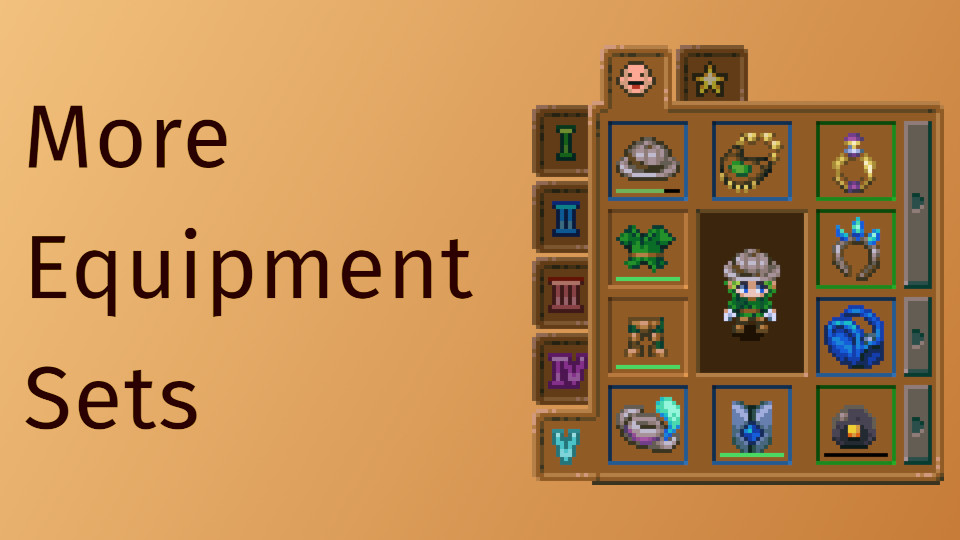
From mod.ioAdds 2 additional equipment preset tabs.
Grants a total of 5 equipment sets.
Q & A
What happens to my items if the mod is uninstalled?
The items are persisted as part of your save, meaning with or without the mod installed they will still exist. However, since they are only accessible with the mod installed, it is best to unequip those items before removing the mod.
If the mod was removed unintentionally, re-installing it should make those same items visible again.
Compatibility
This mod may conflict with other mods that extend or expand the player inventory size. All items belonging to a character, whether equipped or in their inventory, exist within a single list of items. This mod functions by extending that list. Using other mods that also extend that list may cause items to move from the inventory to the equipment or vice versa when loaded from the character save data.
Known Quirk
If you have equipment set 4 or 5 selected when exiting the game, your gear set will be changed to set 3. This is done intentionally to protect your save if the mod is removed.
In future versions I will hopefully add a feature to set it back to your chosen gear set on load.
This behavior is necessary as the base game makes no attempt to verify the existence of an equipment tab before rendering it, which will cause a crash-to-desktop when loading the affected save(s) if no such tab exists. If, through some series of unfortunate events, your game managed to save on one of those tabs and the mod got removed, the crash-to-desktop on the affected save(s) can be fixed by re-adding the mod, then changing the selected tab to one of the first 3 before uninstalling again.
TODO
- Auto-load previously selected tab if the game was exited with a mod equipment tab selected.
- Allow keyboard shortcuts to be assigned to the extra equipment tabs.
- Move item buffer to a safer location to avoid potential conflicts with other mods.
Highlights
From source dataGame versions
Supports 6 Core Keeper versions, the newest being 1.1.2.
Footprint
Rated a light load on a server.
Last update
Its author last shipped an update 15 mo ago.
More Equipment Sets on Nxeon
From our catalogue- One-click install
- Supported on Nxeon Core Keeper servers. We download it from mod.io, place it, and restart the server.
- Server side
- Required on the server
- Server load
- light
- Smallest plan we suggest
- Core Keeper — 2 GB (2 GB RAM). This follows our own load rating above, not a benchmark.
- Latest build
- 1.0.0, released 2025-08-22
Run More Equipment Sets on a Core Keeper server
Pick a server or deploy a new one above; it is installed in one click.
What kind of mod it is
From the catalogQuality of life & UI
Small conveniences, tweaks and interface improvements players notice straight away.
Runs on your server
From source side supportmod.io lists More Equipment Sets as required on the server. Check its mod.io page to see whether players need it too.
Compatibility
- Game
- Core Keeper
- Runs on
- Serverrequired on the server
- Game versions
- 1.1.2 and 5 earlier
Verified at the source
- ✓mod.ioOfficial listing, checked 2026-11-05Open ↗
- ✓AuthorFXCPDS, as published on mod.io
- ✓LicenseNot published by the sourceFree