







About Pet Editor
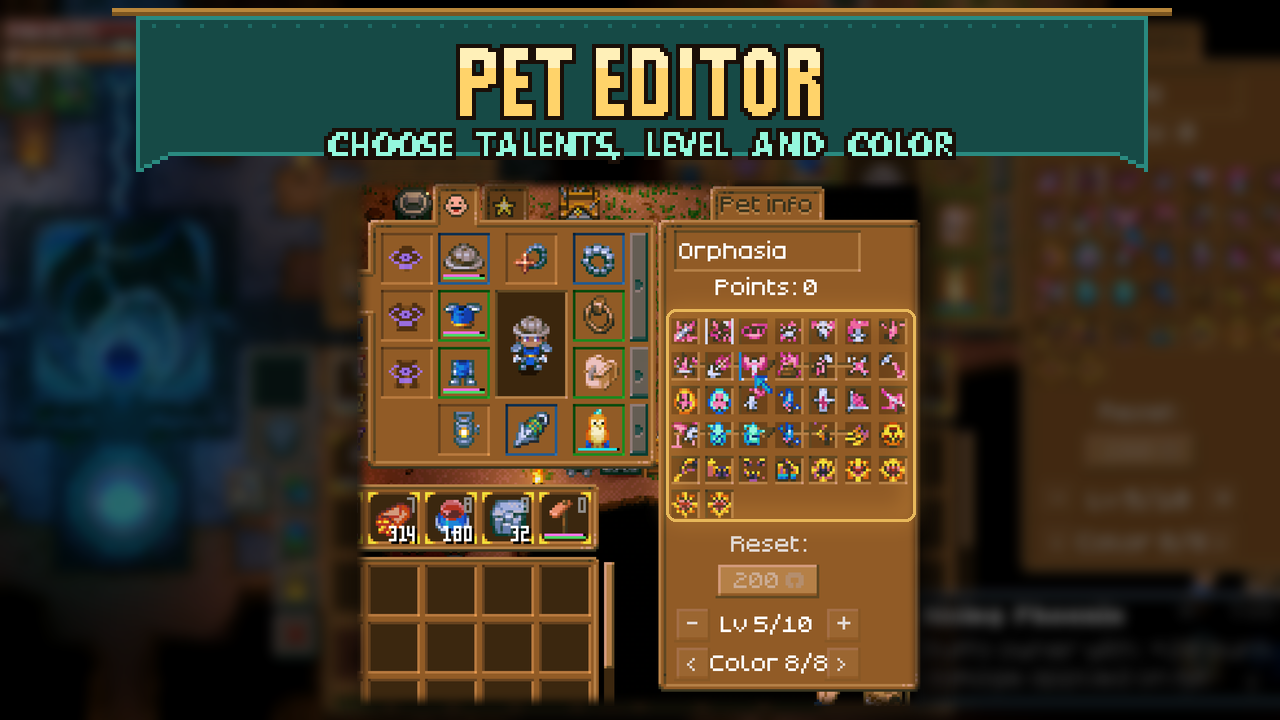
From mod.ioChoose your equipped pet’s level, color and talents directly in its familiar talent window.
Choose your equipped pet’s level, color and talents directly in its familiar talent window.
How to use
Equip a pet, then open its talent window.
- Change level: use the minus and plus buttons under the reset button.
- Change color: use the left and right buttons to cycle through that pet's available colors.
- Replace a talent: right-click a talent slot, then left-click a talent in the selection grid. Hover to read its description; right-click to close the grid.
- Refund a talent: Shift + left-click a filled talent slot to clear its spent points for free.
Spending points still works as usual. The total follows the game's own point formula, including the pet talent points setting in Skill XP & Talent Points. Lowering a pet's level resets allocated points if the pet would otherwise have too many.
Chat alternatives
/pet level <1-10>/pet talent <slot 1-9> <talent name or id>/pet color <n>/pet unpoint <slot 1-9>
Commands and buttons edit your own equipped pet. No separate Mod Options page is needed.
Requirements
Requires CoreLib on the host/server and every client. No Mod Options dependency. Changes affect the pet itself and are saved with it.
Written from scratch against Core Keeper's own pet systems; not based on another pet mod. Also included in Sid's Overhaul; use one version of this feature.
Highlights
From source dataFootprint
Rated a light load on a server.
Last update
Its author last shipped an update 3d ago.
Pet Editor on Nxeon
From our catalogue- One-click install
- Supported on Nxeon Core Keeper servers. We download it from mod.io, place it, and restart the server.
- Server side
- Required on the server
- Server load
- light
- Smallest plan we suggest
- Core Keeper — 2 GB (2 GB RAM). This follows our own load rating above, not a benchmark.
- Latest build
- 1.0.1, released 2026-10-31
Recent builds
| Build | Released | Game versions | Loaders |
|---|---|---|---|
| 1.0.1 | 2026-10-31 | n/a | n/a |
| 1.0.0 | 2026-10-02 | n/a | n/a |
Run Pet Editor on a Core Keeper server
Pick a server or deploy a new one above; it is installed in one click.
What kind of mod it is
From the catalogQuality of life & UI
Small conveniences, tweaks and interface improvements players notice straight away.
Runs on your server
From source side supportmod.io lists Pet Editor as required on the server. Check its mod.io page to see whether players need it too.
Compatibility
- Game
- Core Keeper
- Runs on
- Serverrequired on the server
Verified at the source
- ✓mod.ioOfficial listing, checked 2026-11-04Open ↗
- ✓Authorcoopdedoop, as published on mod.io
- ✓LicenseNot published by the sourceFree















